Showing posts with label Tailoring. Show all posts

Friday, February 2, 2024

Manage 2000 News Ideas

Manage 2000 NEWS.ARTICLES provide a wrapper for ERP generated news content, publishing ERP news on an RSS feed making it accessible from any RSS enabled client.  This might be the Manage 2000 web function NewsReader, or a web browser RSS plug-in, or some other client newsreader software outside of Manage 2000.

Many news content providers already exist within Manage 2000. MSO is one out of 8 news source types available in NEWS.ARTICLES. The MSO new source type publishes the results of Manage 2000 Software Objects.  There are about 1000 standard MSOs, about 1/2 of which are suitable for publishing as news articles (not dependent on PWS).  And if you don't see what you are looking for, creating specific new tailored MSOs can be quickly accomplished using MSO.BUILD.

News About a Customer:

There are lots of standard MSOs creating content about customers and sales.  You can easily configure a newsfeed focused on what has just happened in a customer's account and another feed focused on what is expected to happen shortly.  You can copy any of these standard MSOs to a tailored version to adjust date ranges, time spans, and other options.

Try creating a Customer Recent Events newsfeed with news articles based on some of these MSOs: 508S, 509S, 512S, 513S, 514S.  And a Customer Forecast News with news articles based on some of these MSOs: 510S, 515S, 1272S, 1278S.

In NEWS.ARTICLES select MSO as the Source and enter the MSO Id and then accept all the defaults.

Add your articles to a newsfeed and then inspect in the NewsReader.

When you have something you like then use the previous post 'Virtual NUGM 2023 Tailoring Manage 2000 Web Portals' to guide you through adding your displays to LOOK.AR.

News About Today's Business Activity:

If SOP.CONSTANTS Sales Data Monitoring and AR.CONSTANTS AR Data Monitoring are enabled then MCD_DATA is updated with monitoring information about Sales Orders and Shipments and Invoicing and Cash Receipts as these transactions are entered into Manage 2000. 

MCD_DATA can be used as a News Source in NEWS.ARTICLES to present live information about SOP/AR activity.  You can present bottom line totals or Top Ten lists of customers or parts or sales reps, which continuously update as transactions are entered into the ERP system.

News From The Shipping/Receiving Docks:

Create an E type MSO which lists the RCVNG.RPTS for today in reverse chronological order  sampling the last hour or so.  Then wrap your tailored MSO in a NEWS.ARTICLE.

News From The Production Floor :

If you track live activity on your production floor using an MES system then check to see if it is capable of publishing REST services providing detailed status of work in progress.  If so you can configure a REST.SERVICE in Manage 2000 to consume the MES REST service.  And yes, there is a REST news source type allowing you to publish the MES information inside of Manage 2000, say, on the Work Order Status portal.

News About System Administration Tasks:

Another of the 8 news source types is MONITOR.  You can publish MONITOR.OPTIONS of ADI, BATCH.MASTER, CASE, ECA Agents, MASTER.AGENT processes and more. The original MONITOR.INTERFACE was PWS based, consuming a PWS user license while providing a user display. NEWS.ARICLES publishing MONITOR.OPTIONS are displayed in a web browser drastically lowering the license cost of using MONITOR.OPTIONS and making them available on a variety of devices.

News From Power BI:

If your company uses Power BI to build Visualizations you can publish these as news articles making them available to Manage 2000 users within the ERP system.

In Summary:

Manage 2000 RSS News is a low cost way of sharing ERP news events in real time. You can leave newsfeeds for private consumption by users in NewsReader, or make the newsfeed appear on portal pages, or hang a smart TV in a public area and set its URL to a specific NewsFeedId to create an Airport style monitor of shared information keeping everybody on the same page.

Tuesday, October 31, 2023

Virtual NUGM 2023 Tailoring Manage 2000 Web Portals

 NovoRoi Systems is in the middle of a month of virtual NUGM with sessions each Tuesday and Thursday from 2:00 to 3:00 pm central time.  This week is a bi-week so everyone can attend to Month End and finish their Halloween costumes.

I've done my two sessions with my co-host Linda McHenry.  The first on October 10 was on major development topics in recent service packs to Manage 2000 release 8.1.  The second on October 24 was on tailoring Manage 2000 Web Portals.

Here are a few slides about adding custom web functions to web portals menus:

Portal Menus Are Just Menus


Portal Menu Roots Are In DEFINE.PORTAL.LINKS


LJM.CM.INQS Is Now Part of CustomerPortal


The Secret to Passing the Portal Key


Adding news articles to web portal news panels:

Create a Feed in NEWS.FEEDS and Attach Articles

Create Your Own Articles in NEWS.ARTICLES

Attach the Feed to the Portal in DEFINE.PORTAL.VIEW

LOOK.AR Now Displays Feed 000018


And enabling MSO access in web functions:

Enabling MSOs Globally in Web Functions

LOOK.AR Now Has an Attachment Icon Menu

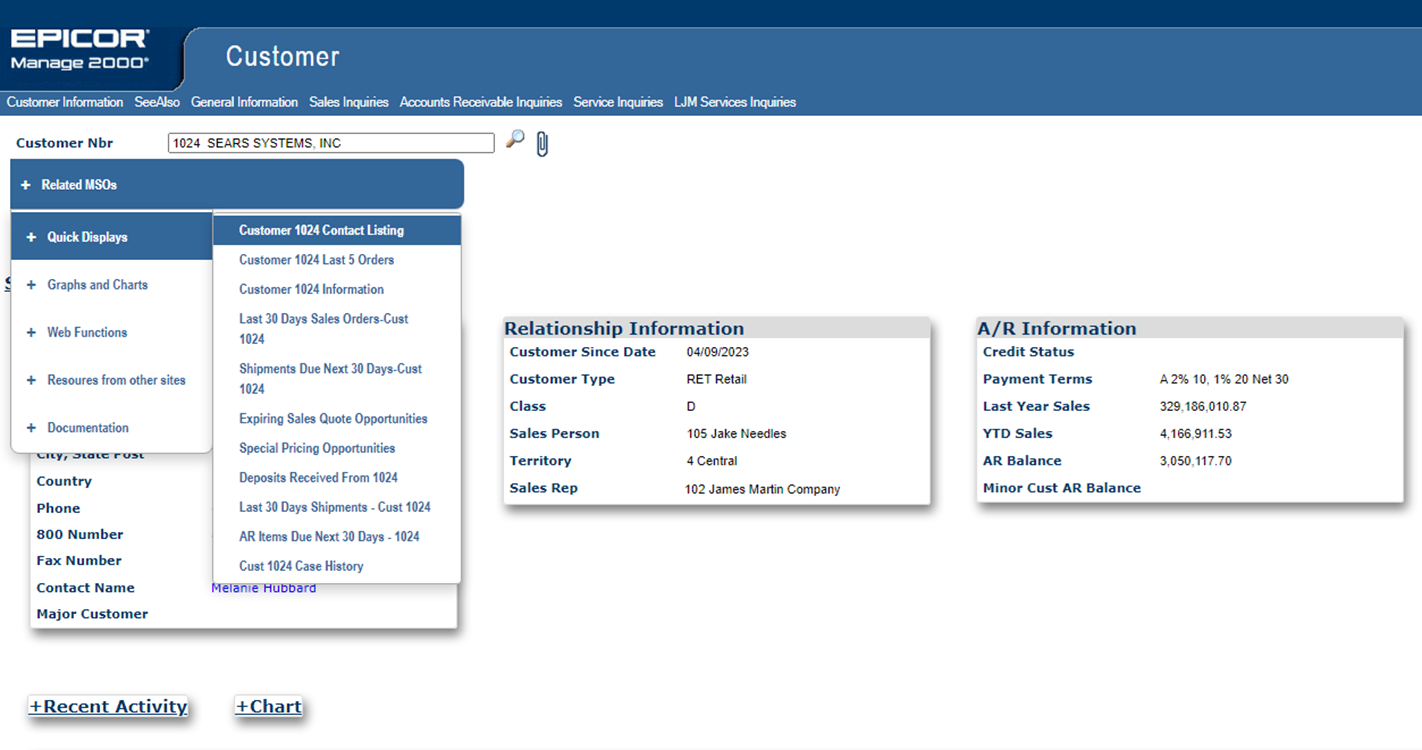
Quick Display Example

Navigation Shortcuts under ‘Web Functions’


Tuesday, August 1, 2023

Extending the browser based capabilities of Manage 2000

Manage 2000 8.1 contains 317 browser based functions compared to about 2200 PWS based functions.

A few of the browser based functions are abstract in that they can emulate a class of PWS based functions:

  • ReportBuildRpt, for instance, accepts a module and report name and then emulates that specific REPORT.BUILD report.  
  • BatchProcess accepts a PWS function name and then emulates MT420, presenting the screen as a web page and submitting the request to DJS or MASTER.AGENT.

Over half of PWS functions are MT420 functions such as, MRP.CALC.PN or SHOP.LOAD.SUM.WK or SALES.BY.ITEM. These types of batch functions can easily be published as web functions by creating the appropriate FN.BUILD record.

Given a PWS function name, BatchProcess will use the PWS SCREEN.BUILD definition referenced in the paragraph to generate a web page to gather user input. After prompting the user for input BatchProcess will submit the completed MT420 request to DJS or MASTER.AGENT.

By creating a record in FN.BUILD you are creating a web type pseudo-function, pre-configuring BatchProcess to run a specific MT420 function.  You just need to create a web type function pointing to /MT/BatchProcess/BatchProcess.aspx passing in a parameter named FunctionName with a value like SHOP.LOAD.SUM.WK, and directing it to always run in a batch queue like a Master Agent AdHoc queue.


BatchProcess will not support any possible MT420 request. In particular there is no provision for handling screen output like EOT Viewer inquiries. However, by sending the output to the spooler with an LPTR request, it will be available to the browser user in the MyPrintJobs web page.


Once the FN.BUILD record is created your web function can be added to any menu through MENU.BUILD.  You can add it to PWS menus, or just as easily to the web portal menu system.

Friday, May 6, 2022

Bearer Token Authorizations and JPATH Expressions

 Yeah, apples and oranges.  And I am not going to relate the two either.  They are just the flotsam and jetsam floating about in my mind from recent development.

Bearer token authorization comes out of the OAuth 2.0 standard, but has taken on a life of its own and become a commonly used authorization mechanism for REST services.

In the Rocket UniData UniBasic Extensions Version 8.2.2 you can find details on the Authorization setting required in setRequestHeader.  There is a whole intro page about OAuth 2.0 and U2.  

Short version:

setRequestHeader(HTTPRequest.Handle,"Authorization", "Bearer ":BEARER.TOKEN)

setRequestHeader(HTTPRequest.Handle,"Authorization", "DIRECT ":HMAC.TOKEN)

And these have to be done after the Request object is created.  There is no option in setHTTPDefault to specify the authorization type ahead of time. 

So in the REST.SERVICES table you just need to start the Auth Token prompt with "Bearer " or "DIRECT " and then the token, and REST.SERVICE will setRequestHeader and your REST.SERVICE request will be off to the races.


JSONPath or JPATH is for JSON what XPATH is for XML; a standard for declaratively specifying pieces of a JSON string to be returned.  I stumbled into the need for such a thing while working on the REST provider for NEWS.ARTICLES.  If you want to provide the capability to an article author to layout an HTML div and specify replacements from a REST service then you need some standard declarative expression to say "put THAT piece from the REST service results HERE!". And it would be nice to make the replacement expressions familiar and consistent with some larger standard.


The REST.NEWS news provider subroutine simply calls out to JPATH to extract out the pertinent data.

 *
2110* Replace dictionary references with values
 *     
     VAR.CNT = COUNT(LINE, "&")/2
     FOR VAR.IDX = 1 TO VAR.CNT
        VAR.IDX = VAR.IDX ;* Audits!
        VAR.NAME = FIELD(LINE, "&", 2, 1)
        TARGET.NAME = VAR.NAME
        TARGET.VALUE =  JPATH(udoRESTData, TARGET.NAME )


JPATH is not yet a W3C standard.  There is an IETF working group developing a standards-track JSONPath specification based on work by Stefan Goessnerwhich.  So while not set in stone there is general consensus on what a JPATH expression ought to look like and how it ought to function.

There are no JPATH features in the Rocket UDO functionality currently. However, the primitives are there for building a JPATH function.  And that is what I have started. It is available as a patch to Manage 2000 8.1 sp5.  And I would lead with "not complete yet".  But it provides the basic functionality which allows expressions in NEWS.ARTICLES like "&$.Customers[1].OutputEmailAddresses.SaleseQuoteEmail&" and since "$" is optional and array slice filter defaults we can write more concisely &Customers.OutputEmailAddresses.SalesQuoteEmail&.  

Why "not complete yet"?  Well it will do basic array slicing expressions, but a lot of work remains to implement all the possible filter expression and array slices within array slices and so forth.  


Friday, October 1, 2021

Custom Formatter Subroutines for Rendering RESTful Service JSON Results as Text or HTML

 There is an intriguing property in MSO.BUILD on the REST.MSO parameter screen named CustomFormatter:


When this property is blank the rendering of the JSON results from the REST endpoint is handled by a subroutine named FORMAT.JSON which, at release 8.1sp5, you will find in SUB.MFG.RPT.BP.

FORMAT.JSON does a blind format, not knowing anything about the JSON string it is formatting. It just goes through the string displaying property names and property values somewhat like a property inspector in an IDE might do.  You can use the IncludeFilter or the ExcludeFilter to eliminate unwanted properties.  But you do not have any control over the text or html rendering.


By writing your own custom formatter subroutine you get complete control over the rendering process.

In this example I have copied FORMAT.JSON to FORMAT.JSON.101 and modified it to be smarter about the JSON string that REST.SERVICES 101 returns.

I know that REST.SERVICES 101 returns a top level object with 4 properties, 3 of which are simple values and a 4th property named 'forecast' is of type array.  Forecast is, in fact, an array of objects each with 3 simple properties about a future day.  I can store the forecast properties instead of outputting them down the page, and then when the current conditions rendering is complete and the forecast properties have been parsed,  I can output the daily forecast properties across the page with a new row for each day.


REST.MSO pulls JSON data from any RESTful provider endpoint defined in REST.SERVICES. CustomFormatter subroutines let you present this data to users in a more readable format than the autoformatter.


Sunday, September 12, 2021

Manage 2000 REST Consumer API

My latest development adventure has been expanding on text messaging REST services to create a generalized API for Manage 2000 to act as a REST API consumer.

To this end 8.1 sp5 will have a new function named REST.SERVICES which allows naming and configuring access to  REST providers.


The REST.MSO subroutine provides MSO access to REST.SERVICES endpoints.


These services can then be used in MSO.BUILD to display information from REST API provider endpoints in any Manage 2000 function.


This MSO can now be called up in PWS from the CUSTOMERS function:


Or, alternatively, from the CustomerPortal web function:

Perhaps you have an internal system that can be configured to supply a REST provider.  Let's say an MES system which lets you publish real time work order activity. You could display that in the work order status portal by configuring a REST.SERVICES item to access the provider and then publish internally as an MSO or news article.


One can envision REST API providers and consumers becoming a critical architecture for accelerating information up and down the supply chain: 

"... APIs can make certain that carriers, shippers and 3PLs have access to the same real-time data through the entire lifecycle of a shipment, providing true visibility across the supply chain...One of the greatest benefits of using API technology in a 3PL business is that APIs are capable of transmitting data back and forth across the supply chain in milliseconds, making real-time supply chain management a reality."

- Rempel, Eric | REDWOOD LOGISTICS. "Supply Chain Integration: How API-Led Connectivity Is Transforming the Logistics Industry" 3PL Magazine, 7 Jan 2019  


Whatever the source, REST.SERVICES, MSO.BUILD, and NEWS.ARTICLES allow you to build a loosely coupled integration of information from disparate sources into displays within Manage 2000.

Related topics coming soon: 

  • Custom formatter subroutines for rendering JSON responses
  • NEWS.ARTICLES templated support for REST providers
  • Tools subroutine REST.SERVICE for application specific development of REST provider service based features


Tuesday, June 1, 2021

Javascript Injection in Manage 2000 Web Functions Q&A


What is it?

WEB.CONSTANTS and FN.BUILD have prompts for Custom Javascript.

The scripts stored in WEB.CONSTANTS and FN.BUILD are downloaded to any Manage 2000 web site accessing that Manage 2000 account, during IIS application initialization. 

The scripts in WEB.CONSTANTS are injected into every web page. 


FN.BUILD script entries are only injected into web pages of that particular function.


In order to ensure that all other resources are loaded, scripts should be enclosed in a jQuery document ready call:

<script>
$j(document).ready(function(){...}
</script>


What is its upgrade path expense profile?

Since the scripts are stored in Manage 2000 files on the Unidata server, any custom scripts automatically migrate to new service packs and survive web server replacements.  It is possible some adjustment to script logic may be required due to changes in the mark-up or code-behind of web functions, but for the most part the scripts float along with other configuration items stored in any Manage 2000 User type account like ACME.MAIN.

In what release did it become available?

Custom Javascript Injection was first introduced in Manage 2000 release 8.1 sp1.

How can it be used?

Manage 2000 web functions include access to jQuery.js and Prototype.js.  In desktop view jQueryUI is also available, and in mobile view jQueryMobile is available.  There are also many Manage 2000 javascript functions available from the roiGlobal.js library.  Therefor brief scripts can accomplish significant adjustments to the Manage 2000 web functions.

For instance, 8.1sp4 introduced many collapsible panels which improve navigation on mobile devices. However, they quickly become annoying on desktop devices with large screens. A standard solution is coming in 8.1sp5 which will add the overlooked state memory to the panels so they remain in the state last set by the user. For those on 8.1sp4 a simple solution to this annoyance can be made through Custom Javascript Injection:

<script>
$j(document).ready(function(){
$j('.accordion-expand-all a').trigger( "click" );});
</script>

Add this to WEB.CONSTANTS and restart the IIS application accessing the account and EVERY page with collapsible panels will begin with all of the panels expanded.

This becomes a very powerful way to make adjustments to Manage 2000 web functions without introducing custom components on the web server. 


Tuesday, June 25, 2013

RSS Feed Readers for Firefox and Chrome

I've been going through some cross browser testing and came to the issue of newsfeed readers. Historically we have been focused on IE, Outlook 2007+, and SharePoint.  But now that the Manage 2000 web site is supporting other browsers, I started wondering about the news feed reader choices that work well with Firefox and Chrome.

What I found was a plethora of website based news aggegators.  These do not work well for Manage 2000 purposes.  We would like to read rss feeds coming out of Manage 2000 on our intranet without providing access from some Internet hosted rss feed reading site.

These animals do exist.  I poked around with searches like "local RSS reader".

For Firefox users there has been a suitable and popular reader available as an extension for a long time called 'Sage':


For Chrome users I found a couple of extensions that work hand in hand.  'Slick RSS Feed Finder' alerts you to the available feeds on a page and lets you subscribe to them. And 'Slick RSS' lets you actually read and manage your feeds:


Tuesday, August 28, 2012

Extending web portals by publishing REPORT.BUILD functions as web functions


Use FN.BUILD to create a web function that runs a specific REPORT.BUILD report from the web

Start FN.BUILD.

Create a new item with a name that matches the REPORT.BUILD report function name without space or periods and with only the first letter of each word captialized; so an entry to run RCVNG.RPTS.BY.DATE would be called RcvngRptsByDate.

Set the Type to W to specify a web function.

The module should match the module where the REPORT.BUILD report function exists.

Enter a suitable description. Shorter descriptions are nicer on mobile devices.

End out of the first screen.

Enter an extended description.


The additional parameters prompt will bring up a new screen with web function specific prompts.

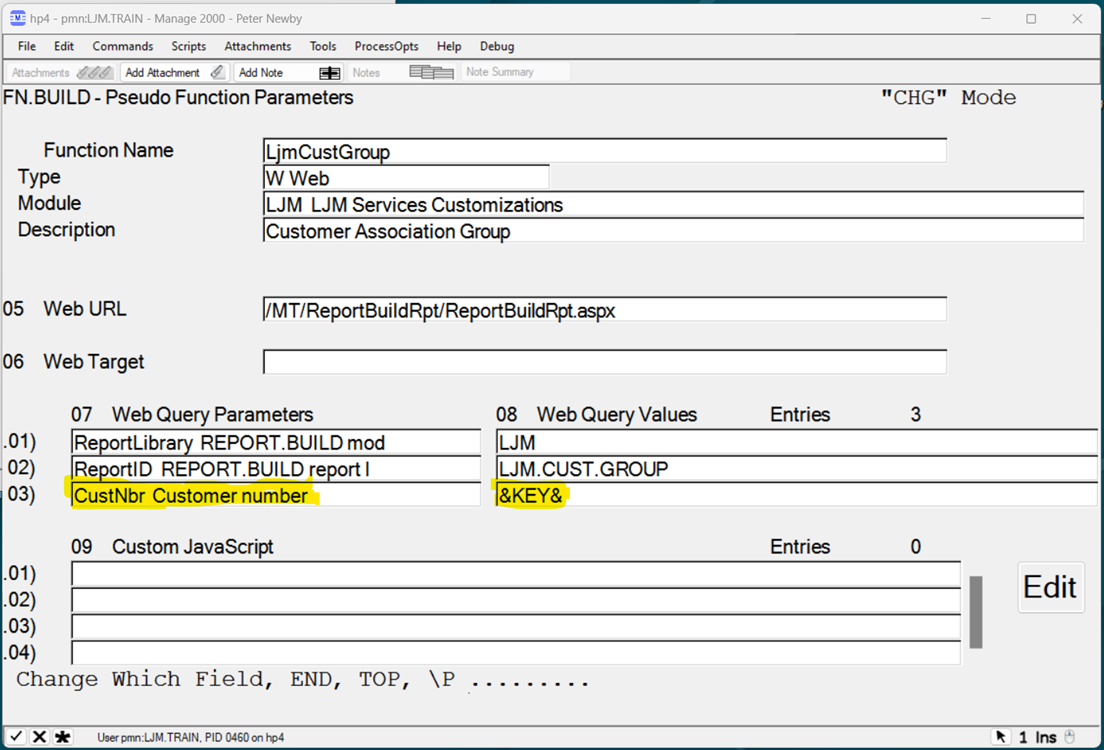
For Web URL enter the Url to the REPORT.BUILD report interpreter /mt/ReportBuildRpt/ReportBuildRpt.aspx

Add a Web Query Parameter to specifiy the library (module) that the report resides in.
Use ReportLibary for the parameter. Use your module for the value.

Add A Web Query Parameter to specify the REPORT Id that should be used to generate the web page. Use ReportID for the paramter. Use the actual REPORT.BUILD report id (The PWS report name) for the value.

End out of FN.BUILD.

Test your web version of the report by typing in the upper and lower case version of the report name at a Menu or from ECL.

This web function may now be added to a web or PWS menu in MENU.BUILD


Note: In Release 8.1 this has been automated into the REPORT.BUILD function. Setting the Create Web Also flag to Y will create the corresponding FN.BUILD record for you.

Friday, July 13, 2012

Enabling Attachments in Web Portal Functions


Manage 2000 web portal  functions may be used to view and/or upload attachments. Web portal attachments are viewable from PWS and vice versa.

To enable viewing and downloading link type attachments from Manage 2000 web portals, add web preference 17 Enable Attachments and set the value to 'Y'. This may be done globally in WEB.CONSTANTS, or by ROLE in CNT.SYSTEM.REFS, or individually in CONTACTS. It may be necessary to logoff the web site and log back on to refresh your web preference settings. After entering a key in a portal, any objects attached to the portal base file and current key (that the user has security to access) will be added to a local menu named attachments.

To enable uploading attachments from Manage 2000 web portals add web preference 16 Attachment Storage UNC and set its value to a fully qualified UNC location or a UNC location relative to web site virtual directory root. After entering a key in a portal the user may click on the paperclip icon in the upper right corner of the portal which will navigate to the upload attachment page. Any objects uploaded will be attached to the current portal base file and current key.

Attachment Storage specifications starting with "\\" will be treated as UNC format. Specification starting with a letter followed by ":\" will be treated as a local disk drive location. Other formats will be treated as directories relative to the web site application root directory, "Documents\Attachments", for instance, specifies a directory in the websites "Documents" directory named "Attachments".

The suggested storage format is a UNC to a network resource that is available to the AppPool Identity on all Manage 2000 site hosting web servers, that is backed up regularly, and that is available to PWS users. Attachments from PWS users should be moved to the UNC Attachments Storage location and linked from that location in PWS using \O.I and specifying the file location using \\server\... rather than just attaching something from a location localized to the users PC.

Tuesday, May 22, 2012

How to setup AR KPI dashboard displays

Manage 2000 has included an AR Monitoring System since release 6.5.  Monitoring must be turned on in SOP.CONSTANTS and AR.CONSTANTS.


This results in real time updates in the MCD_DATA file tracking SO and AR activity.  The original interface in 6.5 for this information was found on the SYS.MONITOR menu.  But with release 7.3 these KPI counters can  be much more elegantly presented as a news feed into MS Outlook 2007 or 2010.


MSO's 1290 -1300 provide a variety of standard dashboard widgets. You can, of course, copy one of these and change time fences, graph types, and so forth for a particular result.


To get them to OUTLOOK simply wrap them in a NEWS.ARTICLE and attach to a NEWS.FEED. By specifying a news source of MSO and the MSO.ID to use as the source for the article almost all of the required setup will default in.


To find the feed run a Manage 2000 web function and then use IE9 Feed Discovery from the Tools menu. Then just copy and paste the required URL into the Outlook Add RSS Feed wizard.


Here is an ARCHIVER package of example AR news articles and a feed:
DASH.PMN AR Dashboard RSS example

  1. Click to download it to your PC
  2. From PWS use FILE.PASS to upload it into the PROJECT_LIBRARY
  3. From PWS use the ARCHIVER function bring up record DASH.PMN and use the Extraction screen 4 to put the example feed into the NEWS_FEED and NEWS_ARTICLE files.