Showing posts with label Software Deployment. Show all posts

Thursday, December 22, 2022

Testing and Documenting Manage 2000 REST Services using Postman

Manage 2000 release 8.0 provided 15 poorly documented REST services.

Release 8.1 sp5, the current field release, provides 18 poorly document REST services.

Release 8.1 sp6 (projected release Q2 2023) will provide 50 well documented REST services.

Postman has become an invaluable development tool for both testing and documenting the Manage 2000  REST Services.

The results of Manage 2000 development using Postman can be found at: Manage 2000 REST Services

The Manage 2000 REST Services collection may be imported into Postman and used for your own testing and debugging.

Multiple environments may be setup for running examples against MANAGE-2000, xxx.MAIN, xxx.TRAIN, xxx.DEV...

Service root URL and Auth Tokens may be defined in one place in the environment and then used on all services.

The resulting documentation provides not only parameter specifications but also examples with results, so developers can clearly see the content and format of the data being passed in and the results being returned.  

The results of using Postman speak for themselves.  It is clearly a huge contributor to the usability and quality of today's and tomorrow's REST APIs.

Saturday, May 1, 2021

ARCHIVER UNINSTALL and REPLACE


Archiver packs together components of a function or a group of functions into a single file for storage or transport. It is also used to explode the package into its constituent items and put them away in an account. A package may be built in a development account and extracted in a live account or vice-versa.

For custom code development purposes this is like a Multi-Value version of WinZip transporting a collection of software in one go. It makes progressive development easy to redeploy no matter how large or complex the collection of software components grows.

There has always been an UNINSTALL method for removing the existing functionality before EXTRACTING and INSTALLING upgraded functionality, but it was not very accessible or possibly well known.  It also takes multiple steps to cleanly backup, uninstall, extract and install new versions.

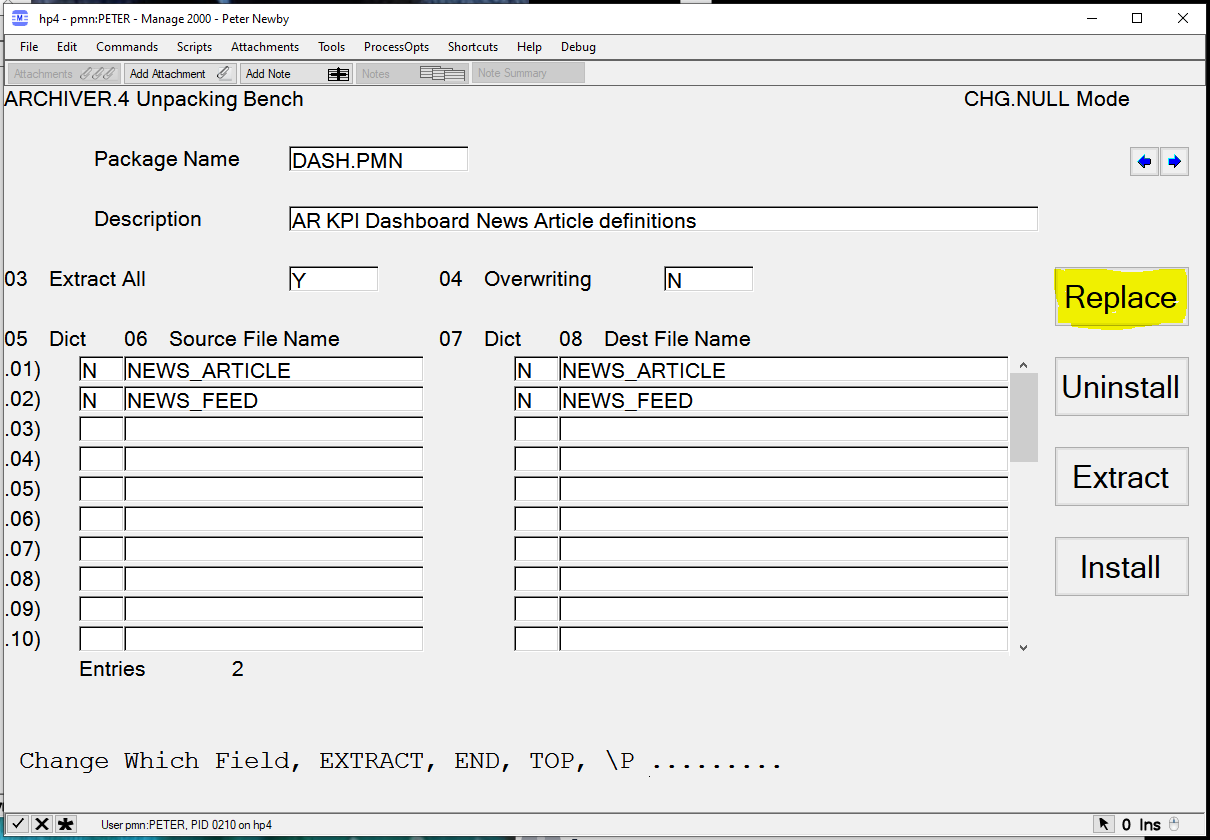
New to ARCHIVER in Manage 2000 8.1sp5 is the REPLACE option on the ARCHIVER Extraction screen.


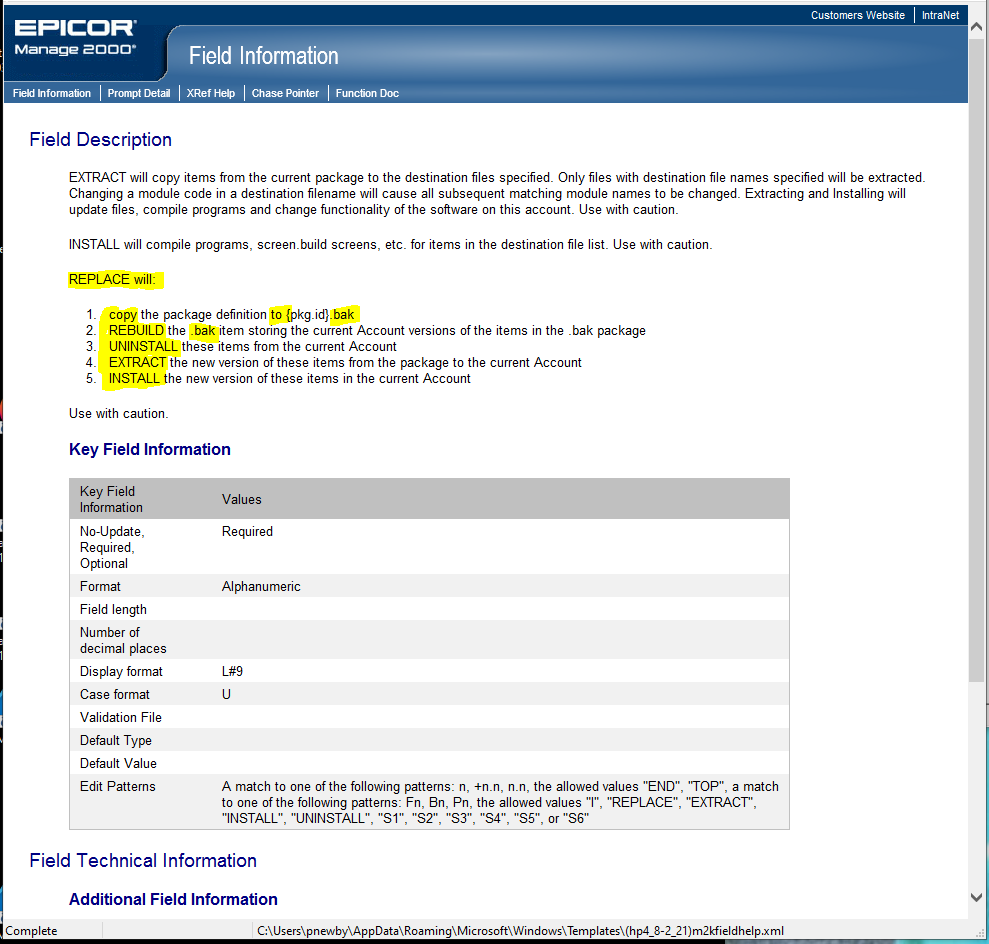
REPLACE automates the steps necessary to backup and replace existing functionality with replacement functionality stored in the ARCHVIER package:

  1. creates a new PROJECT_LIBRARY record with Item ID {FILE.KEY}.bak. 
  2. REBUILD {FILE.KEY}.bak package filling its contents with the current file items from the current account. 
  3. UNINSTALL {FILE.KEY} removing all the identified file items from the current account. 
  4. EXTRACT {FILE.KEY} copying all the package contents to the current account. 
  5. The user is then prompted to INSTALL the package in the current account resulting in compile and screen building operations 

This feature was suggested by Mike Daniels and our thanks go out to him for helping to make Manage 2000 a better product.

Tuesday, August 28, 2012

Extending web portals by publishing REPORT.BUILD functions as web functions


Use FN.BUILD to create a web function that runs a specific REPORT.BUILD report from the web

Start FN.BUILD.

Create a new item with a name that matches the REPORT.BUILD report function name without space or periods and with only the first letter of each word captialized; so an entry to run RCVNG.RPTS.BY.DATE would be called RcvngRptsByDate.

Set the Type to W to specify a web function.

The module should match the module where the REPORT.BUILD report function exists.

Enter a suitable description. Shorter descriptions are nicer on mobile devices.

End out of the first screen.

Enter an extended description.


The additional parameters prompt will bring up a new screen with web function specific prompts.

For Web URL enter the Url to the REPORT.BUILD report interpreter /mt/ReportBuildRpt/ReportBuildRpt.aspx

Add a Web Query Parameter to specifiy the library (module) that the report resides in.
Use ReportLibary for the parameter. Use your module for the value.

Add A Web Query Parameter to specify the REPORT Id that should be used to generate the web page. Use ReportID for the paramter. Use the actual REPORT.BUILD report id (The PWS report name) for the value.

End out of FN.BUILD.

Test your web version of the report by typing in the upper and lower case version of the report name at a Menu or from ECL.

This web function may now be added to a web or PWS menu in MENU.BUILD


Note: In Release 8.1 this has been automated into the REPORT.BUILD function. Setting the Create Web Also flag to Y will create the corresponding FN.BUILD record for you.