Showing posts with label Web. Show all posts

Tuesday, October 31, 2023

Virtual NUGM 2023 Tailoring Manage 2000 Web Portals

 NovoRoi Systems is in the middle of a month of virtual NUGM with sessions each Tuesday and Thursday from 2:00 to 3:00 pm central time.  This week is a bi-week so everyone can attend to Month End and finish their Halloween costumes.

I've done my two sessions with my co-host Linda McHenry.  The first on October 10 was on major development topics in recent service packs to Manage 2000 release 8.1.  The second on October 24 was on tailoring Manage 2000 Web Portals.

Here are a few slides about adding custom web functions to web portals menus:

Portal Menus Are Just Menus


Portal Menu Roots Are In DEFINE.PORTAL.LINKS


LJM.CM.INQS Is Now Part of CustomerPortal


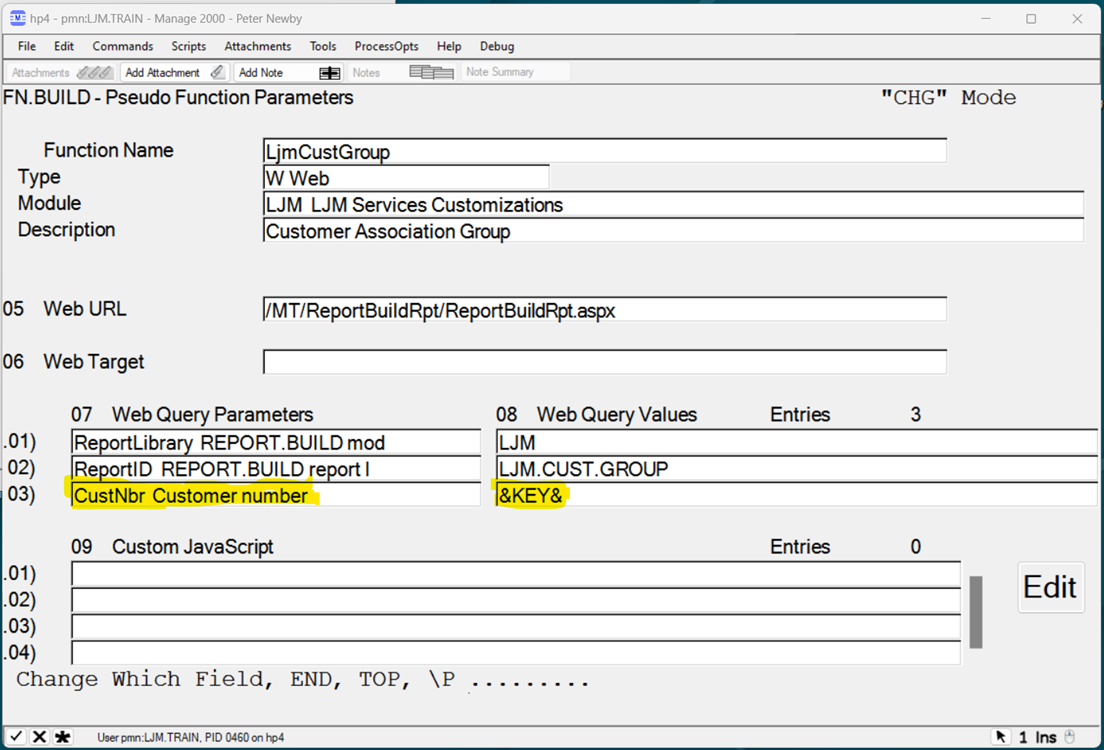
The Secret to Passing the Portal Key


Adding news articles to web portal news panels:

Create a Feed in NEWS.FEEDS and Attach Articles

Create Your Own Articles in NEWS.ARTICLES

Attach the Feed to the Portal in DEFINE.PORTAL.VIEW

LOOK.AR Now Displays Feed 000018


And enabling MSO access in web functions:

Enabling MSOs Globally in Web Functions

LOOK.AR Now Has an Attachment Icon Menu

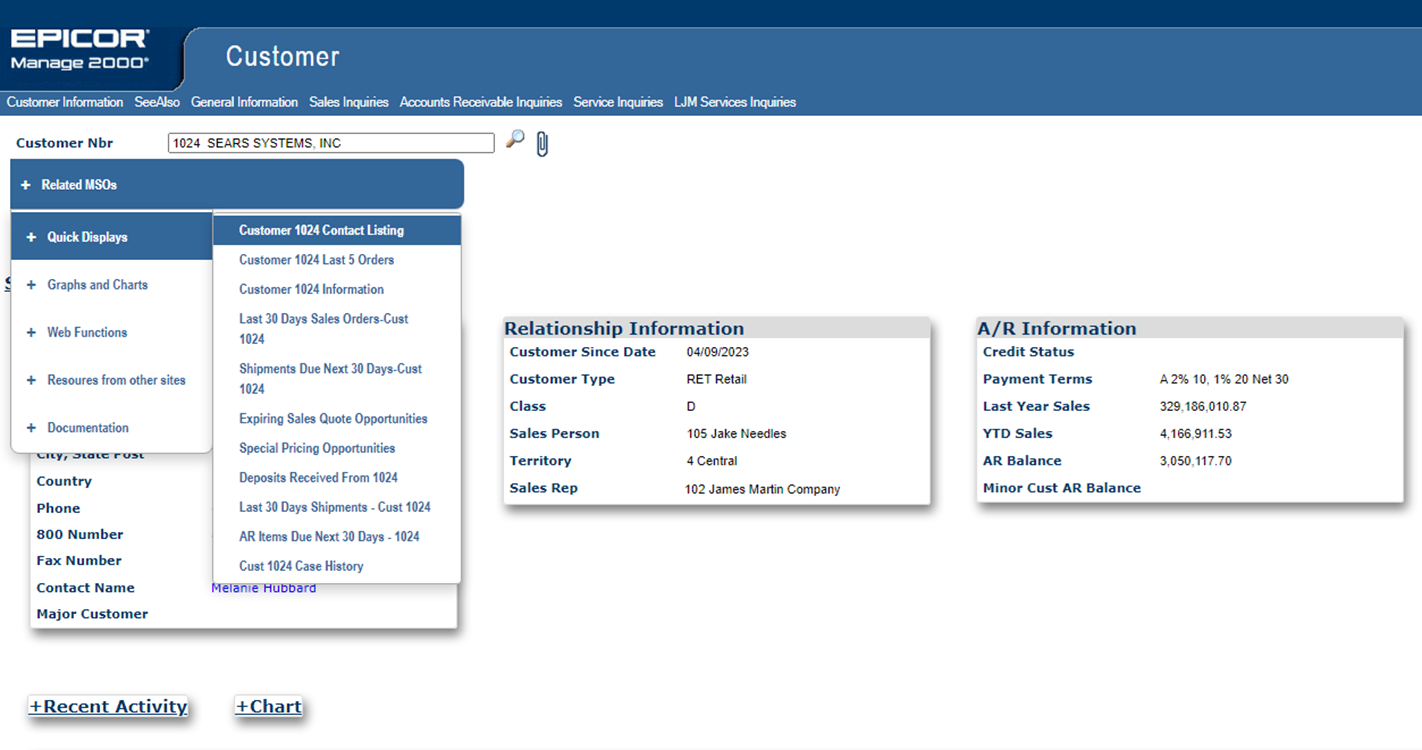
Quick Display Example

Navigation Shortcuts under ‘Web Functions’


Tuesday, August 1, 2023

Extending the browser based capabilities of Manage 2000

Manage 2000 8.1 contains 317 browser based functions compared to about 2200 PWS based functions.

A few of the browser based functions are abstract in that they can emulate a class of PWS based functions:

  • ReportBuildRpt, for instance, accepts a module and report name and then emulates that specific REPORT.BUILD report.  
  • BatchProcess accepts a PWS function name and then emulates MT420, presenting the screen as a web page and submitting the request to DJS or MASTER.AGENT.

Over half of PWS functions are MT420 functions such as, MRP.CALC.PN or SHOP.LOAD.SUM.WK or SALES.BY.ITEM. These types of batch functions can easily be published as web functions by creating the appropriate FN.BUILD record.

Given a PWS function name, BatchProcess will use the PWS SCREEN.BUILD definition referenced in the paragraph to generate a web page to gather user input. After prompting the user for input BatchProcess will submit the completed MT420 request to DJS or MASTER.AGENT.

By creating a record in FN.BUILD you are creating a web type pseudo-function, pre-configuring BatchProcess to run a specific MT420 function.  You just need to create a web type function pointing to /MT/BatchProcess/BatchProcess.aspx passing in a parameter named FunctionName with a value like SHOP.LOAD.SUM.WK, and directing it to always run in a batch queue like a Master Agent AdHoc queue.


BatchProcess will not support any possible MT420 request. In particular there is no provision for handling screen output like EOT Viewer inquiries. However, by sending the output to the spooler with an LPTR request, it will be available to the browser user in the MyPrintJobs web page.


Once the FN.BUILD record is created your web function can be added to any menu through MENU.BUILD.  You can add it to PWS menus, or just as easily to the web portal menu system.

Monday, March 19, 2018

Another Cool Administrator Feature

This one courtesy of the Rocket development staff.

With Manage 2000 release 8.1 service pack 2 the webserver connector moves up to Rocket Web DE 5.3.0 Javascheduler.  This makes the service pack roll-up from service pack 1 a little bit more involved but not only results in a faster connection but a really cool administrator portal.

Going back through the administrator guide I got to wondering about this apiserver thing that I keep running into.  Is it a development API?  Is it a user interface?

Turns out it is both:

Admin API server - The new Admin API web server hosts a Web API and a web-based user interface, which you can use to control configuration and monitoring functions of the Java Scheduler. Enhanced monitoring and logging API improves tracing and supportability, accessible via a an HTTP-based API and UI. Prior to v5.3.0, these administrative functions were performed through an Eclipse-based interface and anchored into the U2 Web Designer. Now, you can easily update configuration, monitoring, and security preferences in Web DE via an open API and new web-based user interface.


Rocket Web DE 5.3.0 includes a fully functional mobile ready REST based user interface to the Javascheduler  console for administrators.  This is much more convenient than the snap-in to the Web DE eclipse environment.  Definitely worth investing in setting up and securing.


Page 15 for Windows, page 20 for UNIX.

Friday, January 26, 2018

Manage 2000 Web Technology - The Big Picture

The Manage 2000 ERP application includes a website for accessing information from web browsers. What is the significance of this? How does it provide value to the people and businesses that run Manage 2000?

  • Communication
    • Inside your organization and outside your organization
    • Desktop, Tablet, and Smart Phone
    • Reusable, brand-able, easy to use, graphic rich, web technology
    • Seamless access to web portals for internal PWS users
    • Customer Portal for communicating with customers and sales reps
    • Vendor Portal for communicating with vendors
    • Attachment, PDF, and Note sharing.
    • RSS Feeds for integrating with Microsoft Outlook , SharePoint and Lotus Notes and other RSS capable applications
    • Web Services for integrating with Microsoft Office Products via VSTO (Visual Studio Tools For Office)
      • Build Manage 2000 aware Excel Spreadsheets
        • search , validate ids, import data, export data
      • Build Word Documents with action panes integrating Manage 2000 functionality
        • Think credit letters with address block and aging built live from Manage 2000
    • JSON REST Services and CORS support for integrating Manage 2000 intelligence into other web based applications.

What is Manage 2000 Web Technology all about?

Communication. The ability to get ERP information in front of people’s eyes in the applications that they use regularly, on the devices they have available, in an affordable manner.

Tuesday, January 21, 2014

Cross Origin Resource Sharing

In release 7.3 we added a REST service endpoint named /MT/JSONServices to provide all sorts of asynchronous services to javascript functions running in browsers. These services can validate items, return TM tables, and in the latest releases even run UniBasic subroutines.

One BIG limitation with RESTful services has been the "Same Origin Policy" which was put in place for legitmate security concerns, but prevents sharing these really nice dynamic services across domains. How nice would it be to use Manage 2000 REST services to validate items in your third-party or self-rolled shopping cart application or CRM application or ...?

The W3C answer to this constraint is known as CORS (Cross Origin Resource Sharing) and has been supported in Chrome and Firefox for many releases, but has just recently gained full support in IE 10+.

You can implement CORS support through IIS custom headers, but I thought it would be nice to have a list of CORS approved sites in WEB.CONSTANTS where it can be more easily maintained by Manage 2000 account.  So Manage 2000 release 8.0 has a new screen in WEB.CONSTANTS for just this purpose and the /MT/JSONServices project has been updated to respond to CORS requests based on this list.


You will find example code on the JSONServicesTester page which you can run from the Development menu in the 8.0 release:


Monday, January 6, 2014

Manage 2000 Web Update from Frostbite Falls MN

Yes, it is MINUS -19F degrees today in balmy Minneapolis, with an expected HIGH of MINUS -15F degrees. Our EVPN authentication system decided it did not like my password this morning so I have some time to catch you up on Manage 2000 8.0 web development.

The 8.0 Beta is in progress and we have received and cashed-in our first treasure.  Beta startup drifted into the holidays and end of year, but I expect to be working on many more bug clean-up items over the next month or two in preparration for the GA cut.

In the mean time I am filling in my time with work on ASP.NET Health Monitoring.

The ASP.NET Health Monitoring system was developed by Microsoft and built into the ASP.NET 2.0 framework. By default it just pushes unhandled exceptions into the web servers event log.  But with a few web.config modifications you can coax it into sending emails to an administration email address with exceptions, heartbeat status reports, and custom health monitoring events.

I am putting together some doc on it for the WEB.ADMIN.COURSE and the SYS.WEB.HOWTOs menu. And I will leave my web.config settings from testing commented out in the release so that administrators can just uncomment sections, replace a couple of parameters, and experiement with this nice monitoring system.

There is another popular monitor for unhandled exceptions named ELMAH.  I played with this guy a little bit too. He can be added to existing web sites easily and does a nice job of presenting unhandled exceptions to the administrator through RSS feeds or a web interface.  But ELMAH does not seem to offer any custom extensibility options to instrument the Manage 2000 web site.

So I am sticking with ASP.NET Health Monidoring and adding a custom Manage 2000 Health Monitoring event in release 8.0 that can poll the Unidata box and let the administrator know if Redback goes down.

Tuesday, November 19, 2013

Browser Identification Insanity

As if programming for IE and Chrome and Safari and Firefox was not challenging enough; a few months back Windows Update brought a change into our development web server that convinced the .Net framework that Chrome, Safari, and other non-IE and non-Firefox browsers, were down level browsers. 

This led me to create the new function ShowClientInfo which displays information about the current browser.


The Version Information, Capabilities Detail, and Screen Information sections show how ASP.NET is treating the client browser.  This is not based upon realtime information from the browser but is looked up from tables in C:\Windows\Microsoft.NET\Framework\v4.0.30319\Config\Browsers based on ASP.NET's parsing of the User Agent string which does come 'live' from the browser, as does the Accept Types and top user language setting.


The CSS Device Type Detection section shows the results of the m2kMobile.css media queries and is only available on mobile devices (when the m2kMobile.css is rendered).  This is useful for verifying which RWD CSS rules are being applied.


The Javascript Diagnostics are based on the qunit.js javascript unit test framework and provide visibility of which versions of libraries are loaded, as well as, unit tests of key Manage 2000 web client javavscript operations along with some performance timings.  These diagnostics can provide a level of confidence in the javascript capabilities and performance of new or unique client hardware, as well as, confirmation of proper javascript library configuration.

So it is a bit of a smorg-as-borg, but hopefully will tell you everything you need to know about what the Manage 2000 8.0 web site thinks about that device you hold in your hand... or wherever.

Wednesday, September 25, 2013

Multi Level Grids

Infragistics is sunsetting the UltraWebxxx series of webcontrols in their ASP.NET suite of controls.  The last version that supports their classic controls is 2011.  So Manage 2000 is going to need some new patterns.

I've been playing around with GridView and DetailsView controls and experimenting with templated columns containing child views.  Here is one possible pattern for Manage 2000 multi-level grid displays:


It is not an exact replacement and certainly not the only possible option with Microsoft webcontrols.  But I rather like the vertical display of the current single valued record with the multi-valued children to the right.  This emphasizes the relationship and my eyes don't get quite so buggy trying to follow two different sets of columns over the same vertical space.

Tuesday, March 12, 2013

Manage 2000 Control Extenders Explained

M2kDataBinderControlExtender:

Originally this was an alternative to placing single valued fields in FormView containers.  The VS2005-2008 MS databinding changes mandated that a table be bound to a FormView and that textboxes and such in that FormView could then be bound to a field in that table. There are a bunch of things I find objectionable here.

Anyway, I stole the code for this extender from Rick Strahl at WestWind (Hawaii, poor chap), a great source for .Net intelligent thought http://www.west-wind.com/weblog/.  The databinder moves fields into and out of datasets from web controls.

Visual Studio 2003 only did one way binding using the ‘eval’ method, and we had to write code to move data back. VS 2005/8 added the ‘bind’ method to move data from web controls back into datasets.

I prefered the method name ‘Fill’ to describe moving fields into the dataset.  The name was always used in DataAdapters to mean moving the fields into the dataset from the datasource.  So I chose to use the DBCE.Fill expression to request the databinder to fill up the dataset with field values from web controls.

While working on the m2kScrolledSetControlExtender I enhanced this extender to bind fields from dataset to columns in a JSON array stored in a hidden field (Bind To Client).    The scrolledset then moves fields between a hidden field and textboxes inside the browser using javascript. The hiddenfield acts like FILE.ITEM(1) providing working storage at the browser end.   Together these extenders manage the transmission from datasets to scrolledsets and back.

Since then, based on application work by the development team, I have been adding additional support in the data binder for other situations like an easy way to bind SA MV sets to multi-line textboxes and just lately support for RadioButtonLists.

The Microsoft databinding patterns can still be used and, in fact, for grid displays and other sorts of table level binding I expect we will continue to use ObjectDataSource controls.

M2kScrolledSetControlExtender:

My original goal for the scrolled set extender was to create a way to have scrolled set processing in web pages that matched the keyboarding and development efficiencies of SUB.MT500 and SCROLL.MAINT. Yeah, not quite there yet :)

In one sense the scrolled set extender stands in for SCREEN.BUILD C4.  It provides a design time place for the developer to specify scrolled set behavior.  It also serves to emit the required javascript for instantiating a javascript object with the operational mechanics implementing the scrolled set experience.  The definition for the javascript object and all of its methods actual exists in roiGlobal.js.  The scrolledset extender just needs to create an object of that class in the browser world and initialize it with parameters supplied by the application developer.

One of the principal design decisions was to leverage all the data entry power of the roiTextBox, and to loosely package an arbitrary number of entry fields in a table that would contain the set entry controls and display cells. I wrote up a how to with more details on creating scrolled sets named WEB.SCROLLED.SET and added it to the SYS.WEB.HOWTOS menu.

M2kMetaDataControlExtender:

This extender is basically a re-write of the EditParams features that we originally built into roiTextBox and the metadata data access component. It provides PMT like definitions that developers can use to describe the behavior they want and then the Tools layer can take care of the implementation.


When Microsoft broke the component design surface into a separate tab in Visual Studio 2005/2008 they COMPLETELY isolated WebControl design time from Data Access Component design time.  This meant that the roiTextBox had no way of talking to the typed datasets or the metadata component.  So the whole metadata world and the databinding got shoe-horned into “WebControls” (which the control extenders are) so they can sit in the same designer and interact with webcontrols.

Friday, January 25, 2013

Manage 2000 Version 8.0

The major version has officially rolled in the development environment.  Manage 2000 8.0 here we come. Whoo Hooo!!!

The development team decided a couple of months ago that with all the mobile web changes plus other un-celebrated technology changes that the 7.x branch should end with 7.3 and the upcoming release should begin the 8.x dynasty.  Look for it towards year-end of 2013.

So now that changing the numbering is done, it is time to change some more of the machinery as well.  I am currently hip deep in ASP.NET 4.5, HTML 5, and VS 2012, trying to solve too many equations with way too many unknowns.

The VS 2012 IDE has a lot to be said for it.  It feels faster, and seems to get confused less often by our sub-project pattern web architecture. The solution explorer drill down into project classes, the highlighting of the current variable in neighboring code, the javascript highlighting during edits are all wonderful developer productivity improvements.  There is a project level option to run a code analyzer at compile time that functions much  like the Manage 2000 BX Audits to provide developers with coding standards compliance feedback.

We are going to have to make a few mass changes to vbproj files and  a few references in aspx and ascx files.  Infragistics references will have to target ASP.NET 4 instead of 3.5. But it doesn't seem like the Visual Studio Tools Team broke anything critical to Manage 2000 this time around.  Whew!

There is an interesting convergence of client side technology happening as Manage 2000 web tools provide lots of client side javascript and JSON validation and editing features which run into some of the unobtrusive validation being supplied with VS 2012 and ASP.NET 4.5 with the inclusion of jquery.  And as we proceed down the HTML 5 path we are both running into the validation constraints being coded natively into browsers as they process HTML 5 markup.  So it seems I will be spending some time trying to smooth over some redundant repetition of validation on the client end.

Thursday, October 11, 2012

How to develop web functions with Visual Studio

There are a number of different sub-topics here:

  1. Creating a developer sandbox on your desktop
  2. Loading the Manage 2000 DAC components and WebControls into Visual Studio
  3. Configuring Visual Studio to 'see' the Manage 2000 web function wizards
  4. Where to find out more about Manage 2000 Web Technology and how to use it
You can find answers on all of these topics in Manage 2000 7.3 sp3 on the SYS.WEB.HOWTOS menu:
  1. SYS.DEV.SETUP describes how to set up your PC for Manage 2000 web function development.
  2. WEB.VS.TOOLBOX.SETUP describes how to add Manage 2000 Web Components and Controls into your installation of Visual Studio.
  3. WEB.VS.WIZARDS.SETUP describes how to configure Visual Studio to 'see' the M2k wizards.
And in the related courseware section you will find links to INTRO.WEB.COURSE and ADV.WEB.COURSE which are chock-full of web function development minutia.

But if you want to get somewhere quickly check out the new wizards for generating Visual Studio projects for HyperQueries, Mobile Web, and BTO Posting type functions.  These wizards allow you to describe your function in terms of Unidata file names and dictionaries, or in terms of Manage 2000 Business Transactions and then generate for you a working prototype with controls configured and named in useful ways and in some cases with extensive amounts of code-behind already plumbed out.

There are a couple of webex videos available under the Manage 2000 Web Presentations link above on the right.  For Visual Studio Manage 2000 web function development knowledge check out Mastering ASP.NET 3.5 and VisualStudio2008 for Manage2000 Parts I and II.

Monday, September 17, 2012

Setting Up Mobile Access to Manage 2000 7.3 sp3

Manage 2000 7.3 sp3 mobile features are designed to run in webkit browsers such as Mobile Chrome or Mobile Safari.  These are the built-in browsers for IPhones and many Android phones. The next major version of Manage 2000, currently under development, supports many other mobile device browsers.

To configure mobile users on Manage 2000 7.3 sp3:

Use CNT.SYSTEM.REFS to assign mobile preferences for a web user role
For example on the SYSUSER role assign MobileUser as the menu for system users
  1. Start CNT.SYSTEM.REFS
  2. Call up record SYSUSER
  3. Add a Preference Code of 25 Mobile Menu
  4. Set the value to MobileUser
  5. Add a Preference Code of 22 Mobile Stylesheet
  6. Set the value to mobile.css
  7. Add a Preference Code of 26 Mobile Items Per Page
  8. Set the value to 5
You may assign preference codes 22, and 26 in WEB.CONSTANTS Default Web Preference settings instead of on each role in CNT.SYSTEM.REFS since they are likely to be constant for all roles.

Use CNT.SYSTEM.REFS record CM to assign preferences for customers accessing Manage 2000 via an externally facing portal. The MobileCustomer menu can be used as the mobile menu.
Use CNT.SYSTEM.REFS record SLSREP to assign preferences for sales representatitves accessing Manage 2000 via an externally facing portal. The MobileSalesRep menu can be used as the mobile menu.
Use CNT.SYSTEM.REFS record DEVELOPER to assign preferences for developers or administrators. The MobileAdmin menu can be used as the mobile menu.
Mobile devices are automatically detected. If the user has a mobile menu assigned and is accessing the site from a recognized mobile device then the user will be directed to a mobile login and from there to the M2000Mobile navigation app. The FullSite web function may be used to re-enter the site in non-mobile mode. Logging off the website and logging back in will place the mobile user back in mobile mode.
The a fore mentioned menus have been supplied as examples and starting points for configuring mobile access to Manage 2000 7.3 sp3.  The mobile navigation options may be modified in MENU.BUILD by changing the menu items. REPORT.BUILD web function definitions may be used (See WEB.REPORT.BUILD for information on setting up FN.BUILD entries to run REPORT.BUILD reports from the web). Web functions built using the roiHyperQueryControl will also be optimized for mobile automatically, this includes about 65 standard Manage 2000 web functions.

While the desktop portal system is not yet available from this mobile navigation you can recover some of the portal feature by setting the Use Last Key As Default preference to Y. This will default in the last key used as users select different web functions from the mobile menu emulating the key integration you get from portals.
There are about 220 Web functions that have not yet been optimized for mobile use in Manage 2000 7.3 sp3.  They may be used, but will likely prove inconvenient for the user.  The next major release of Manage 2000, currently under development, has all web functions and portals optimized for mobile.

Tuesday, August 28, 2012

Extending web portals by publishing REPORT.BUILD functions as web functions


Use FN.BUILD to create a web function that runs a specific REPORT.BUILD report from the web

Start FN.BUILD.

Create a new item with a name that matches the REPORT.BUILD report function name without space or periods and with only the first letter of each word captialized; so an entry to run RCVNG.RPTS.BY.DATE would be called RcvngRptsByDate.

Set the Type to W to specify a web function.

The module should match the module where the REPORT.BUILD report function exists.

Enter a suitable description. Shorter descriptions are nicer on mobile devices.

End out of the first screen.

Enter an extended description.


The additional parameters prompt will bring up a new screen with web function specific prompts.

For Web URL enter the Url to the REPORT.BUILD report interpreter /mt/ReportBuildRpt/ReportBuildRpt.aspx

Add a Web Query Parameter to specifiy the library (module) that the report resides in.
Use ReportLibary for the parameter. Use your module for the value.

Add A Web Query Parameter to specify the REPORT Id that should be used to generate the web page. Use ReportID for the paramter. Use the actual REPORT.BUILD report id (The PWS report name) for the value.

End out of FN.BUILD.

Test your web version of the report by typing in the upper and lower case version of the report name at a Menu or from ECL.

This web function may now be added to a web or PWS menu in MENU.BUILD


Note: In Release 8.1 this has been automated into the REPORT.BUILD function. Setting the Create Web Also flag to Y will create the corresponding FN.BUILD record for you.

Friday, July 13, 2012

Enabling Attachments in Web Portal Functions


Manage 2000 web portal  functions may be used to view and/or upload attachments. Web portal attachments are viewable from PWS and vice versa.

To enable viewing and downloading link type attachments from Manage 2000 web portals, add web preference 17 Enable Attachments and set the value to 'Y'. This may be done globally in WEB.CONSTANTS, or by ROLE in CNT.SYSTEM.REFS, or individually in CONTACTS. It may be necessary to logoff the web site and log back on to refresh your web preference settings. After entering a key in a portal, any objects attached to the portal base file and current key (that the user has security to access) will be added to a local menu named attachments.

To enable uploading attachments from Manage 2000 web portals add web preference 16 Attachment Storage UNC and set its value to a fully qualified UNC location or a UNC location relative to web site virtual directory root. After entering a key in a portal the user may click on the paperclip icon in the upper right corner of the portal which will navigate to the upload attachment page. Any objects uploaded will be attached to the current portal base file and current key.

Attachment Storage specifications starting with "\\" will be treated as UNC format. Specification starting with a letter followed by ":\" will be treated as a local disk drive location. Other formats will be treated as directories relative to the web site application root directory, "Documents\Attachments", for instance, specifies a directory in the websites "Documents" directory named "Attachments".

The suggested storage format is a UNC to a network resource that is available to the AppPool Identity on all Manage 2000 site hosting web servers, that is backed up regularly, and that is available to PWS users. Attachments from PWS users should be moved to the UNC Attachments Storage location and linked from that location in PWS using \O.I and specifying the file location using \\server\... rather than just attaching something from a location localized to the users PC.

Tuesday, May 22, 2012

How to setup AR KPI dashboard displays

Manage 2000 has included an AR Monitoring System since release 6.5.  Monitoring must be turned on in SOP.CONSTANTS and AR.CONSTANTS.


This results in real time updates in the MCD_DATA file tracking SO and AR activity.  The original interface in 6.5 for this information was found on the SYS.MONITOR menu.  But with release 7.3 these KPI counters can  be much more elegantly presented as a news feed into MS Outlook 2007 or 2010.


MSO's 1290 -1300 provide a variety of standard dashboard widgets. You can, of course, copy one of these and change time fences, graph types, and so forth for a particular result.


To get them to OUTLOOK simply wrap them in a NEWS.ARTICLE and attach to a NEWS.FEED. By specifying a news source of MSO and the MSO.ID to use as the source for the article almost all of the required setup will default in.


To find the feed run a Manage 2000 web function and then use IE9 Feed Discovery from the Tools menu. Then just copy and paste the required URL into the Outlook Add RSS Feed wizard.


Here is an ARCHIVER package of example AR news articles and a feed:
DASH.PMN AR Dashboard RSS example

  1. Click to download it to your PC
  2. From PWS use FILE.PASS to upload it into the PROJECT_LIBRARY
  3. From PWS use the ARCHIVER function bring up record DASH.PMN and use the Extraction screen 4 to put the example feed into the NEWS_FEED and NEWS_ARTICLE files.

Tuesday, February 7, 2012

Web Performance Exception Reporting

One of the diabolical aspects of n-tier pooled connection processing used in web functions is the degree of difficulty there is trouble-shooting performance issues. The reality of many users sharing the same Unidata session as they make calls across responders make it difficult to untangle who's process is burning up bandwidth and forcing others to queue behind them.
In 7.3 sp3 we added a tune-able performance exception trace based on the RPC History tracing infrastructure used for development debugging.
You can set a performance benchmark in WEB.CONSTANTS defining how long an RPC call must last before being considered a performance exception and also how long to retain the RPC trace information for review.
Later, after activity across the responders, run WEB.PERFORMANCE.EXCPT to see RPC calls that exceeded the defined performance target. The report attempts to display 'important' parameters about what the responder was requested to do.

Since the performance exception logging is built on the RPC History trace tools you can use DEBUG.NET to dig deeper into the 'problem' calls and even re-run them from PWS for debugging and profiling purposes.