Showing posts with label Integration. Show all posts

Friday, December 8, 2023

Automating REST Authorization Calls

REST services provided by 3PL partners generally require a two-step process to use their service.  First a call must be made with secret credentials to obtain an authorization token.  Then the auth token is submitted with subsequent requests.

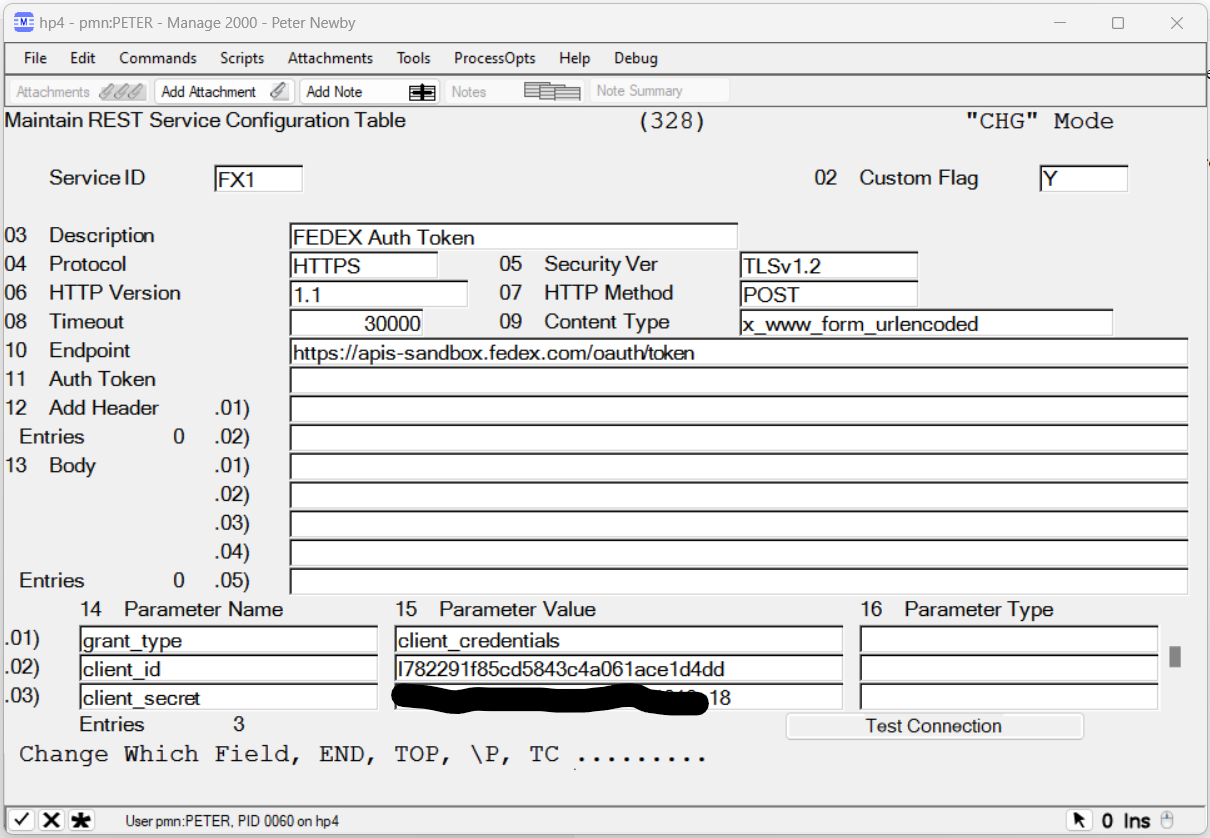
In Manage 2000 REST.SERVICES we can create one REST.SERVICES record to obtain the auth token and then reference it in another REST.SERVICES record:


GetAuthToken accepts JPATH expression parameters to identify the token and the expiration span. It then caches the token for the expiration span and uses the cached version until it expires before going back to the REST service to get a fresh token.

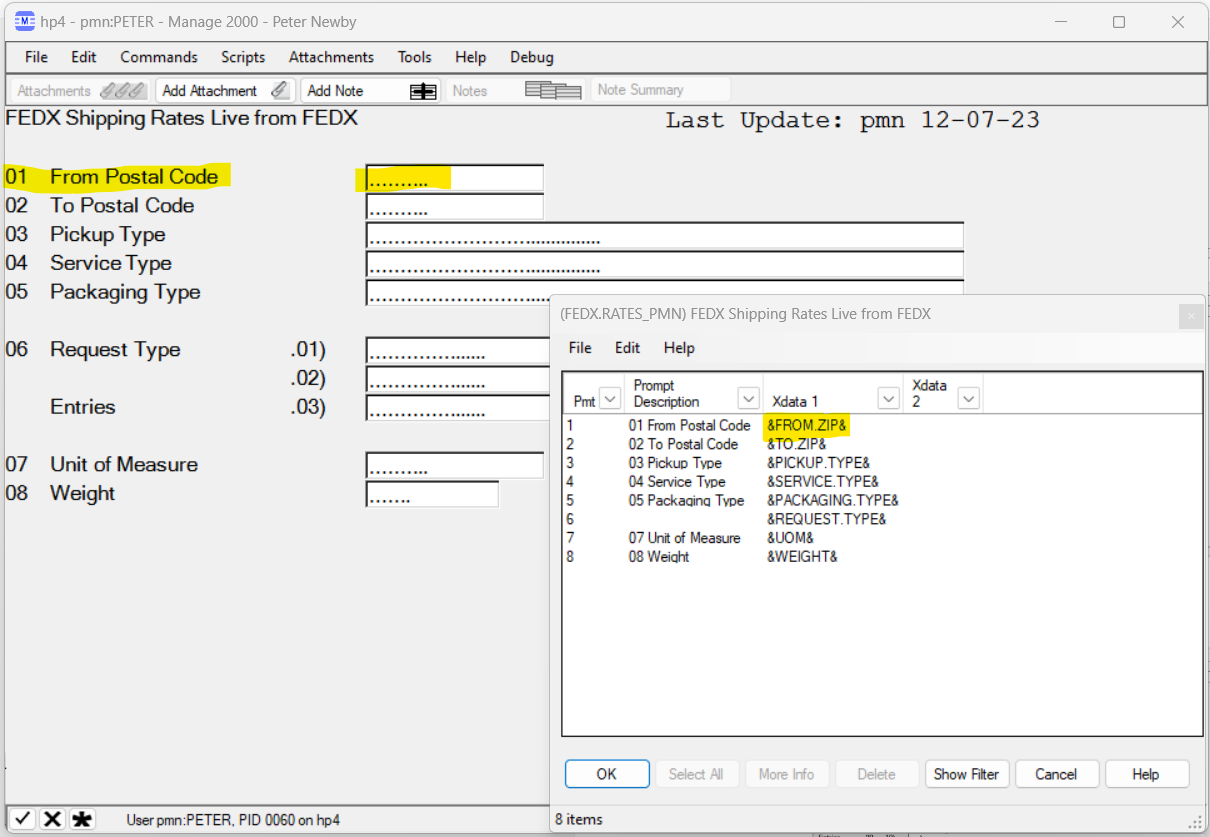
Services like the FEDEX Rates service accept a great many parameters.  These can be specified in the REST.SERVICES record:

A SCREEN.BUILD screen built with matching X_DATA_1 names makes it easy to map the inputs into the RS.COM area for calling the 3PL REST API for information.


The program needs to:

  • Call SUB.MT500 to run the screen
  • Overlay the variables from the screen to the REST common
  • Call REST.SERVICE
  • Parse the result with JPATH
  • Present the results to user, perhaps in the PWS Viewer using SUB.TEXT.OUTPUT.
And the result is a Manage 2000 look and feel function that gets live information from the 3PL REST service:


Wednesday, December 1, 2021

Application Specific Development of REST Provider Service Based Features

Adding information displays for users in Manage 2000 from REST providers is all well and good, but how can we use the Manage 2000 REST.SERVICES connections to do other more interesting and specific things?

What if the RESTful service lets us POST information back to the provider system?  

What if we want to develop integrations with FEDEX and UPS RESTful service APIs which supply not only tracking services, but Rates, Time in Transit, Dangerous Goods, Global Trade Documents and more?

Back in March I wrote about manually coding REST HTTP Post method calls in UniBasic. But it is not necessary to drop down to this level. REST.MSO and REST.NEWS rely on a new Tools subroutine named  REST.SERVICE to carry out the actual conversation with the REST provider system. 

Application code can declare the parameters for the REST exchange and then delegate the implementation to REST.SERVICE:

     $INCLUDE COM.RS FROM COPY.TOOLS.BP
     $INCLUDE TM_328 FROM TOOLS.LAYOUTS
     ...
     READ TM_328.REC FROM TM, '328*':SERVICE.ID
     ...
     RS.Endpoint               = TM_328.Endpoint
     RS.Protocol               = TM_328.Protocol
     RS.Security_Version       = TM_328.Security_Ver
     RS.HTTP_Version           = TM_328.Http_Version
     RS.Auth_Token             = TM_328.Auth_Token
     RS.Method                 = TM_328.Method
     RS.Content_Type           = TM_328.Content_Type
     RS.Parameter_Names        = TM_328.Parameter_Names
     RS.Parameter_Values       = TM_328.Param_Values
     RS.Parameter_Types        = TM_328.Param_Types
     RS.Body                   = TM_328.Body
     RS.Timeout                = TM_328.Timeout
 *
     CALL REST.SERVICE
     IF RS.Status # "" THEN CALL SCREEN.MSG("RS.Status - ":RS.Status<1,1>:" ] ":RS.Status<1,2>:";VT;#M260618")
     IF RS.Headers # "" THEN CALL SCREEN.MSG("RS.Headers - ":RS.Headers:";VT;#M260619")
     IF RS.Data # "" THEN
        SWAP @AM WITH @VM IN RS.Data        
        RS.Data = CONVERT(FILTER.CHARS, "", RS.Data)
        CALL SCREEN.MSG("RS.Data - ":RS.Data:";VT;#M260620")
     END 
     IF RS.Error # "" THEN  CALL SCREEN.MSG("RS.Error - ":RS.Error:";VT;#M260621")
     RETURN

Parameters may be loaded from the REST.SERVICES table as in this example or created on the fly, or some combination of the two. You might, for instance, want to post a bunch of FORM variables based on a work order or sales order into some RESTful provider endpoint defined in REST.SERVICES, and perhaps receive back some confirmation number or message.

REST services may accept inputs on the querystring or as part of the URL route path when using an HTTP GET method, or the service may accept inputs as form variables or as JSON or XML strings in the HTML Body element when using an HTTP POST method.  The REST.SERVICE subroutine supports all of these approaches to REST parameter passing.

Parameters are placed in the appropriate property in a named common block, then your program executes CALL REST.SERVICE, and then interrogates the result values which are also stored as properties in the common block. If the call is successful then RS.Data will contain the resulting JSON string.  All of the UniBasic Extensions' HTTP plumbing is taken care of by REST.SERVICE.

As always tools subroutine documentation is available from HELP:


     HELP REST.SERVICE
Monday, November 1, 2021

Templated Rendering of REST Provider's JSON Responses in Manage 2000

REST.MSO CustomFormatter subroutines are great for Unibasic programmers who don't mind familiarizing themselves with UDO JSON parsing and building text and HTML displays.

But what can you do without getting into programming?

There is another REST JSON formatter named REST.NEWS. Its purpose is to support writing NEWS.ARTICLES with content from REST providers.  It works similarly to the MCD_DATA.NEWS AR/SO dashboard code behind subroutine in that it lets you layout a template in the news article body with &var& type replacement variables. 


Use the new News Source REST in place of CUSTOM to save yourself some typing.

REST.NEWS will run the REST service specified and then look for expressions in the body like &propertyname& and replace them with the corresponding value from the web service JSON response. It will also check for expressions matching variables sent to the web service like CITY in this example.

So we can hit the same REST provider as our previous MSO and see the results laid out nicely, all without doing any actual programming:


There is an important distinction between MSOs and NEWS.ARTICLES in their scope.

At release 8.1 sp5 MSOs can be configured to be available in any PWS or web function throughout Manage 2000. 

The scope of news articles is a little different:

In terms of Manage 2000 functions, you only see them in NewsReader and the News panels of the 16 or so web functions in the ROIPortals directory. 

However, news articles are NOT limited to viewing in Manage 2000 functions. Manage 2000 news feeds can be viewed from any RSS client. This includes Outlook, Sharepoint, Lotus, the built-in IE newsreader, browser add-ons like Sage for FireFox and SlickRSS for Chrome, standalone readers like RSSOwl, and others.

There is also an interesting reciprocity between the two: MSOs can be used as the source for NEWS.ARTICLES, and since Newsreader is a Manage 2000 function an MSO can wrapper a display of articles in Newsreader.

In this sense the news article scope is actually wider than the MSO scope.  One could even use the auto-start feature of MSOs to fire off a Newsreader display based upon the user entering any particular PWS function or prompt.


Sunday, September 12, 2021

Manage 2000 REST Consumer API

My latest development adventure has been expanding on text messaging REST services to create a generalized API for Manage 2000 to act as a REST API consumer.

To this end 8.1 sp5 will have a new function named REST.SERVICES which allows naming and configuring access to  REST providers.


The REST.MSO subroutine provides MSO access to REST.SERVICES endpoints.


These services can then be used in MSO.BUILD to display information from REST API provider endpoints in any Manage 2000 function.


This MSO can now be called up in PWS from the CUSTOMERS function:


Or, alternatively, from the CustomerPortal web function:

Perhaps you have an internal system that can be configured to supply a REST provider.  Let's say an MES system which lets you publish real time work order activity. You could display that in the work order status portal by configuring a REST.SERVICES item to access the provider and then publish internally as an MSO or news article.


One can envision REST API providers and consumers becoming a critical architecture for accelerating information up and down the supply chain: 

"... APIs can make certain that carriers, shippers and 3PLs have access to the same real-time data through the entire lifecycle of a shipment, providing true visibility across the supply chain...One of the greatest benefits of using API technology in a 3PL business is that APIs are capable of transmitting data back and forth across the supply chain in milliseconds, making real-time supply chain management a reality."

- Rempel, Eric | REDWOOD LOGISTICS. "Supply Chain Integration: How API-Led Connectivity Is Transforming the Logistics Industry" 3PL Magazine, 7 Jan 2019  


Whatever the source, REST.SERVICES, MSO.BUILD, and NEWS.ARTICLES allow you to build a loosely coupled integration of information from disparate sources into displays within Manage 2000.

Related topics coming soon: 

  • Custom formatter subroutines for rendering JSON responses
  • NEWS.ARTICLES templated support for REST providers
  • Tools subroutine REST.SERVICE for application specific development of REST provider service based features


Tuesday, May 7, 2019

Power Query Access to Manage 2000 Data

Power Query is a common import tool used by both Power BI and Excel 2016+.

From either Power BI or Excel, Get Data dialogs allow you to import data from many different sources.  Among the options is Web. Get Data Web automatically detects JSON formatted results from REST endpoints and starts a Power Query editor session.

From the Power Query editor session a click on the Convert To Table button starts building the M language script which will transform the JSON data package into tables suitable for driving Power BI or Excel.  From there clicking on column expand icons and selecting columns continues to build the transform script.

To see the full script select the Advanced Editor.

This script will automatically be applied anytime the data is refreshed from the source.

Data relations and formats can be refined in Power BI Desktop.

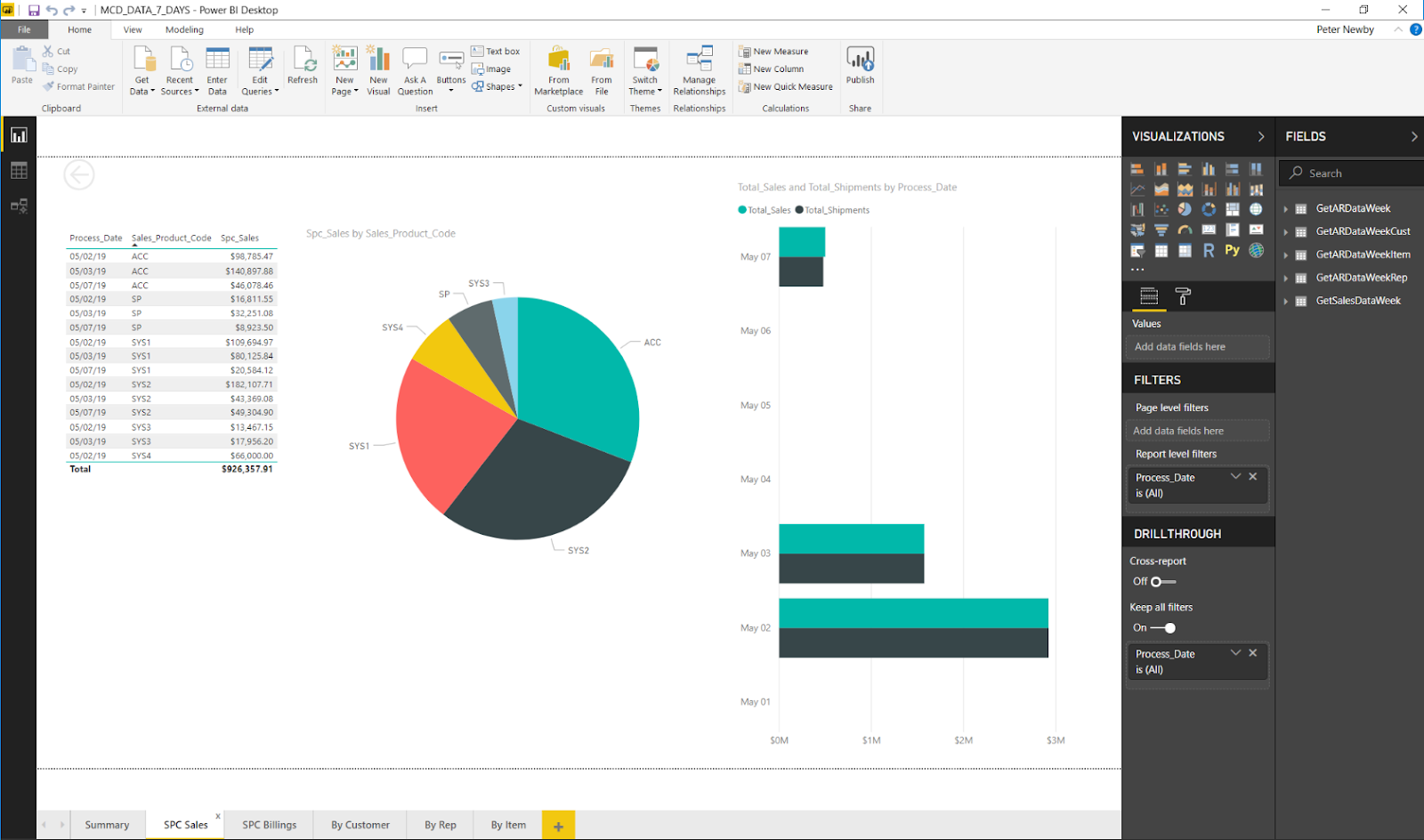
Report visualization can then be assembled by simple drag and drop selection.

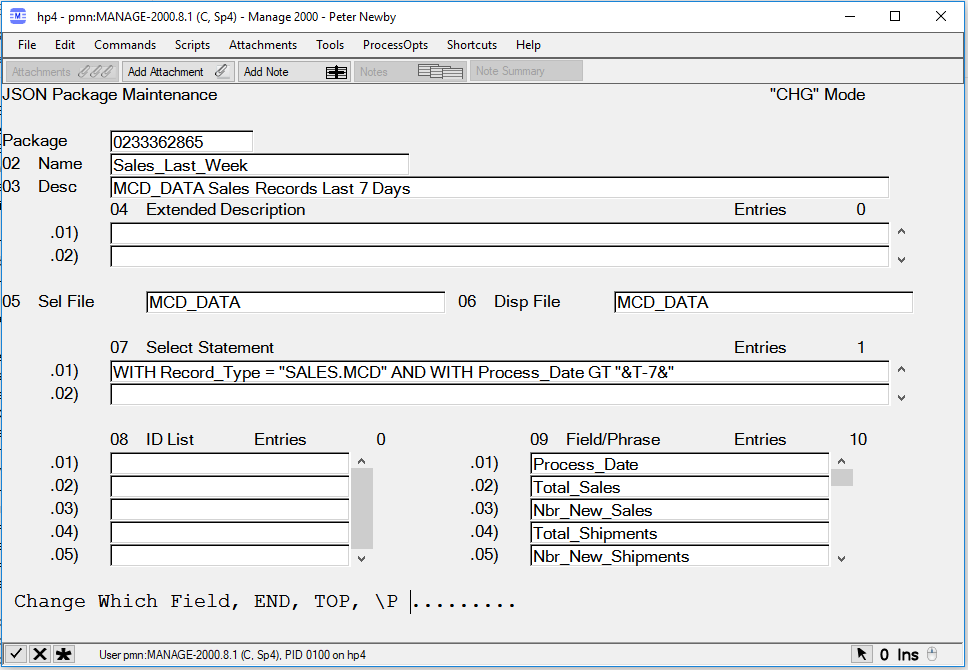
In order to plug Power Query directly into Manage 2000 a new JSON Service named GetData and a new PWS function named JSON.PACKAGE.MAINT have been added to release 8.1. JSON.PACKAGE.MAINT defines named selections of data. The specification for the selection is in the form a UniQuery SELECT statement with &var& replacement variables using the MSO replacement engine.  So relative time frames can be defined like 'Process_Date GE "&T-7&"'.

The JSON packages can be picked up at the /MT/JSONServices endpoint using the GetData service.

So if you are looking for a way to directly plug Manage 2000 data into Power BI or Excel check out the new JSON packages. (dev patch 40126 for 8.1 sp2 and 8.1 sp3)

Monday, April 22, 2019

Embedding Power BI Reports in Manage 2000 News Feeds


Power BI provides shareable visualizations mashed up from multiple data sources.  The data might come from Excel or SQL or ODBC.  For instance Manage 2000 data might be synced through Novo Motion Outbound to SQL server. From there Power BI might refresh reports and dashboards.

Users can consume the report through the Power BI interface.  But it is also very easy to embed Power BI reports in Manage 2000 news articles for display in the Manage 2000 function NewsReader or other RSS feed readers.

From the Power BI Service browser interface:
Select a report
Select File
Select Embed


Copy the iframe content
Paste it into a STATIC article Summary (HTML) prompt

(Recent updates to Power BI have made this a little more round about;
 After copying the iframe snippet into the Summary (HTML) prompt -
   copy the link to the app.powerbi.com website from the Secure embed code dialog to the clipboard
   use the Edit button on the right to bring the Summary (HTML) text up in the editor
   select the string inside the quotes on the right side of the "src" attribute
   paste in the app.powerbi.com url string
   save the contents back to the Summary (HTML) prompt - 8/19/2019)

(Even more recent updates corrected this hiccup.)

Copy the link to the app.powerbi.com website
Paste it into the Drill Back Document prompt
(Clicking on the news article link will send the user to the drill back URL, in this case the report in the Power BI Service. If related detail such as the original Manage 2000 data is available from another URL use that instead.)

Attach the article to a news feed and view from the Newsreader function:


Selecting a row in the airport table refocuses the map to display that specific information. The interactive features of the report remain active when viewed in a Manage 2000 newsfeed.


Friday, September 8, 2017

Using Excel as a Client Front End to Manage 2000

This is a bit of a follow-up to a previous post I wrote  about VSTO and Manage 2000  ERPBusinessObjectService. Visual Studio Tools for Office (VSTO) provides a development framework for coding behaviors into classes of Excel spreadsheets.  You can deploy them with one-click installs and users can save them as templates for creating smart spreadsheets.

Connecting VSTO code with Manage 2000 can be very easy with the ERPBusinessObjectService. A little bit of code in C# or VB.Net can read and post datasets of Manage 2000 business objects. However you may run into a lot of plumbing work moving values from business object dataset tables to the spreadsheet cells and back.  Excel ListObjects can greatly simplify this coding chore. ListObjects define mappings and databind values between columns in the worksheet and row data of columns in the business object data tables:


With this little bit of code you can synchronize the spreadsheet column cell values with a corresponding table in the business object dataset, and use the webservice to read the dataset from or post the dataset back to Manage 2000, turning Excel into a client UI for Manage 2000.

Wednesday, February 5, 2014

Programming Manage 2000 Access Into Excel

I was looking for a way to demonstrate Manage 2000 Data Access Components and web services outside of Manage 2000 web functions. I found VSTO, that is Visual Studio Tools for Office.

VSTO provides templates for creating Office projects like Excel WorkBooks and custom Ribbon Tabs.

You get to write .Net code to add behavior to the Excel workbook. It starts getting interesting to me when you add a web service reference to /MT/ERPBusinessObjectService/ERPBusinessObjectService.asmx.

With this combination you can create Manage 2000 awareness in Excel workbooks. This might take the form of item validation:


Or maybe Cross Referencing:


Or even reading and writing business objects:


You do have to be mindful of release levels.  Visual Studio 2008 cannot work on Office 2010 projects. Visual Studio 2012 has trouble with ASP.NET 4.5 assemblies unless you download the latest AddIn that makes it compatible with both Office 2010 and Office 2013.


Tuesday, January 21, 2014

Cross Origin Resource Sharing

In release 7.3 we added a REST service endpoint named /MT/JSONServices to provide all sorts of asynchronous services to javascript functions running in browsers. These services can validate items, return TM tables, and in the latest releases even run UniBasic subroutines.

One BIG limitation with RESTful services has been the "Same Origin Policy" which was put in place for legitmate security concerns, but prevents sharing these really nice dynamic services across domains. How nice would it be to use Manage 2000 REST services to validate items in your third-party or self-rolled shopping cart application or CRM application or ...?

The W3C answer to this constraint is known as CORS (Cross Origin Resource Sharing) and has been supported in Chrome and Firefox for many releases, but has just recently gained full support in IE 10+.

You can implement CORS support through IIS custom headers, but I thought it would be nice to have a list of CORS approved sites in WEB.CONSTANTS where it can be more easily maintained by Manage 2000 account.  So Manage 2000 release 8.0 has a new screen in WEB.CONSTANTS for just this purpose and the /MT/JSONServices project has been updated to respond to CORS requests based on this list.


You will find example code on the JSONServicesTester page which you can run from the Development menu in the 8.0 release:


Tuesday, June 25, 2013

RSS Feed Readers for Firefox and Chrome

I've been going through some cross browser testing and came to the issue of newsfeed readers. Historically we have been focused on IE, Outlook 2007+, and SharePoint.  But now that the Manage 2000 web site is supporting other browsers, I started wondering about the news feed reader choices that work well with Firefox and Chrome.

What I found was a plethora of website based news aggegators.  These do not work well for Manage 2000 purposes.  We would like to read rss feeds coming out of Manage 2000 on our intranet without providing access from some Internet hosted rss feed reading site.

These animals do exist.  I poked around with searches like "local RSS reader".

For Firefox users there has been a suitable and popular reader available as an extension for a long time called 'Sage':


For Chrome users I found a couple of extensions that work hand in hand.  'Slick RSS Feed Finder' alerts you to the available feeds on a page and lets you subscribe to them. And 'Slick RSS' lets you actually read and manage your feeds:


Friday, July 13, 2012

Enabling Attachments in Web Portal Functions


Manage 2000 web portal  functions may be used to view and/or upload attachments. Web portal attachments are viewable from PWS and vice versa.

To enable viewing and downloading link type attachments from Manage 2000 web portals, add web preference 17 Enable Attachments and set the value to 'Y'. This may be done globally in WEB.CONSTANTS, or by ROLE in CNT.SYSTEM.REFS, or individually in CONTACTS. It may be necessary to logoff the web site and log back on to refresh your web preference settings. After entering a key in a portal, any objects attached to the portal base file and current key (that the user has security to access) will be added to a local menu named attachments.

To enable uploading attachments from Manage 2000 web portals add web preference 16 Attachment Storage UNC and set its value to a fully qualified UNC location or a UNC location relative to web site virtual directory root. After entering a key in a portal the user may click on the paperclip icon in the upper right corner of the portal which will navigate to the upload attachment page. Any objects uploaded will be attached to the current portal base file and current key.

Attachment Storage specifications starting with "\\" will be treated as UNC format. Specification starting with a letter followed by ":\" will be treated as a local disk drive location. Other formats will be treated as directories relative to the web site application root directory, "Documents\Attachments", for instance, specifies a directory in the websites "Documents" directory named "Attachments".

The suggested storage format is a UNC to a network resource that is available to the AppPool Identity on all Manage 2000 site hosting web servers, that is backed up regularly, and that is available to PWS users. Attachments from PWS users should be moved to the UNC Attachments Storage location and linked from that location in PWS using \O.I and specifying the file location using \\server\... rather than just attaching something from a location localized to the users PC.

Tuesday, May 22, 2012

How to setup AR KPI dashboard displays

Manage 2000 has included an AR Monitoring System since release 6.5.  Monitoring must be turned on in SOP.CONSTANTS and AR.CONSTANTS.


This results in real time updates in the MCD_DATA file tracking SO and AR activity.  The original interface in 6.5 for this information was found on the SYS.MONITOR menu.  But with release 7.3 these KPI counters can  be much more elegantly presented as a news feed into MS Outlook 2007 or 2010.


MSO's 1290 -1300 provide a variety of standard dashboard widgets. You can, of course, copy one of these and change time fences, graph types, and so forth for a particular result.


To get them to OUTLOOK simply wrap them in a NEWS.ARTICLE and attach to a NEWS.FEED. By specifying a news source of MSO and the MSO.ID to use as the source for the article almost all of the required setup will default in.


To find the feed run a Manage 2000 web function and then use IE9 Feed Discovery from the Tools menu. Then just copy and paste the required URL into the Outlook Add RSS Feed wizard.


Here is an ARCHIVER package of example AR news articles and a feed:
DASH.PMN AR Dashboard RSS example

  1. Click to download it to your PC
  2. From PWS use FILE.PASS to upload it into the PROJECT_LIBRARY
  3. From PWS use the ARCHIVER function bring up record DASH.PMN and use the Extraction screen 4 to put the example feed into the NEWS_FEED and NEWS_ARTICLE files.

Tuesday, September 21, 2010

REST Web Services from UniBasic

In the midst of working up some labs for Perspectives I started thinking about REST web service access from UniBasic. The lab I happened to be working-up is on SOAP based RPC web service usage, for which we have a number of working examples and implemented projects.

But in creating services for Manage 2000 internal consumption I have all but abandoned SOAP RPC in favor of the far more elegant JSON REST model. I am usually working in ASP.NET and IE DOM client land, thankfully with the prototype.js library. So the question of the day was what would REST JSON access look like from UniBasic and what are the central issues in using it?

Well in addition to all the SOAPRequest support added with the UniBasic Extensions are a couple of simple little commands for retrieving the content from a URL. Now URLs often return HTML intended for human consumption and are not very easy to parse. The JSON REST model however returns very nice orderly string serializations.

With something as simple as:

CREATE.REQUEST.RTN.CODE = createRequest(URL:"?":QS,HTTP.METHOD,HTTP.REQUEST.HANDLE)
SUBMIT.REQUEST.RTN.CODE = submitRequest(HTTP.REQUEST.HANDLE,'','',HTTP.RESPONSE.HEADERS,HTTP.RESPONSE.DATA,HTTP.RESPONSE.STATUS)

you can get orderly responses like:

HTTP.RESPONSE.DATA = {'oValItem':{'FileName':'CM', 'TableNbr':'', 'ItemId':'1024
', 'NewItemId':'1024', 'Valid':'True', 'Display':'Sears Systems, Incorporated',
'ErrorFlag':'False', 'ErrorMsg':''}}

UniData does not yet include a JSON DOM to match the XML DOM of the UniBasic Extensions, but the parsing difficulties of JSON serializations are relatively minor. And if you need to directly access JSON REST services in the middle of UniBasic code this seems like nice direct approach.

The real stumbling blocks aren't coding difficulties, but security of your application server if you open up the HTTP or HTTPS ports for UniBasic to "see" services on the Internet. One answer to this is to go through a proxy server. This also points out one of the benefits of the architecture of Manage 2000 with its ASP.NET arm which may be used in a similar manner to delegate interaction with the messy world away from your closely guarded business database into a DMZ area.

Saturday, January 31, 2009

Release 7.3 Project Progress

Despite broken ankles and bouts of pneumonia Doug and I finally have the Manage 2000 web functions building under VS2008.  There remains a little tweaking to do on the installations routines.  But at last I feel like I can concentrate on new feature development.

I have started down the development list and finished my first significant web tools enhancement for 7.3, the integration of ECA's and the news feed system.  ECA's provide rich html scripting from all sorts of system events.  News feeds provide standard pluggable integration to Sharepoint and other web platforms.  Putting the two together really extends  the news source capabilities to 'broadcast' all sorts of automated news articles as the ERP systems churns through its machinations. 

Next up is Last Key integration between PWS sessions and web functions.  This will, in all likely hood, be the largest project I undertake for the 7.3 release (not counting the VS2008 ASP.NET 3.5 infrastructure upgrade).

I am still in the early stages of design, but have identified a whole raft of issues that were not obvious to me during my initial rough cut do-ability considerations.  I didn't realize how much of the fun part of working on Manage 2000 are these design conundrums that must be puzzled and teased out.

Tuesday, October 10, 2006

ERPBusinessObjectService - M2k SOA

Entry for October 09, 2006

Manage 2000 7.2 sp0 is "in the can". Most of the preparations for Perspectives have been finished. And now the development team is settling into a pleasant lull after the long hard summer. There remain the perennial small projects to occupy us until the beta sites start feeding us the work which will make 7.2 "sea-worthy".

I am happy with amount of "cool stuff" which made it into 7.2. And yet, in each major project, I can see another level to climb up to.

The ERPBusinessObjectService, in particular, has some very important new features. Unfortunately there is no session planned for it as Perspectives. But maybe I can sneak in some attention to it.

There is the beginnings of legitmate interest in web services among clients, and 7.2 ERPBusinessObjectService provides new useful methods:

* ValidateRecordKey - for validating parts and customers without having to export and refresh Manage 2000 file contents to SQL tables
* CallUdtSub - for running UniBasic subroutines across SOAP. A Unibasic programmer can write a routine and a web developer can instantly make use of it.
* UniQuerySelect, GetKeysFromCookie, and GetItemsAsXML provide the foundation for running UniQuery processes returning XML content.