Showing posts with label Custom Code. Show all posts

Friday, December 8, 2023

Automating REST Authorization Calls

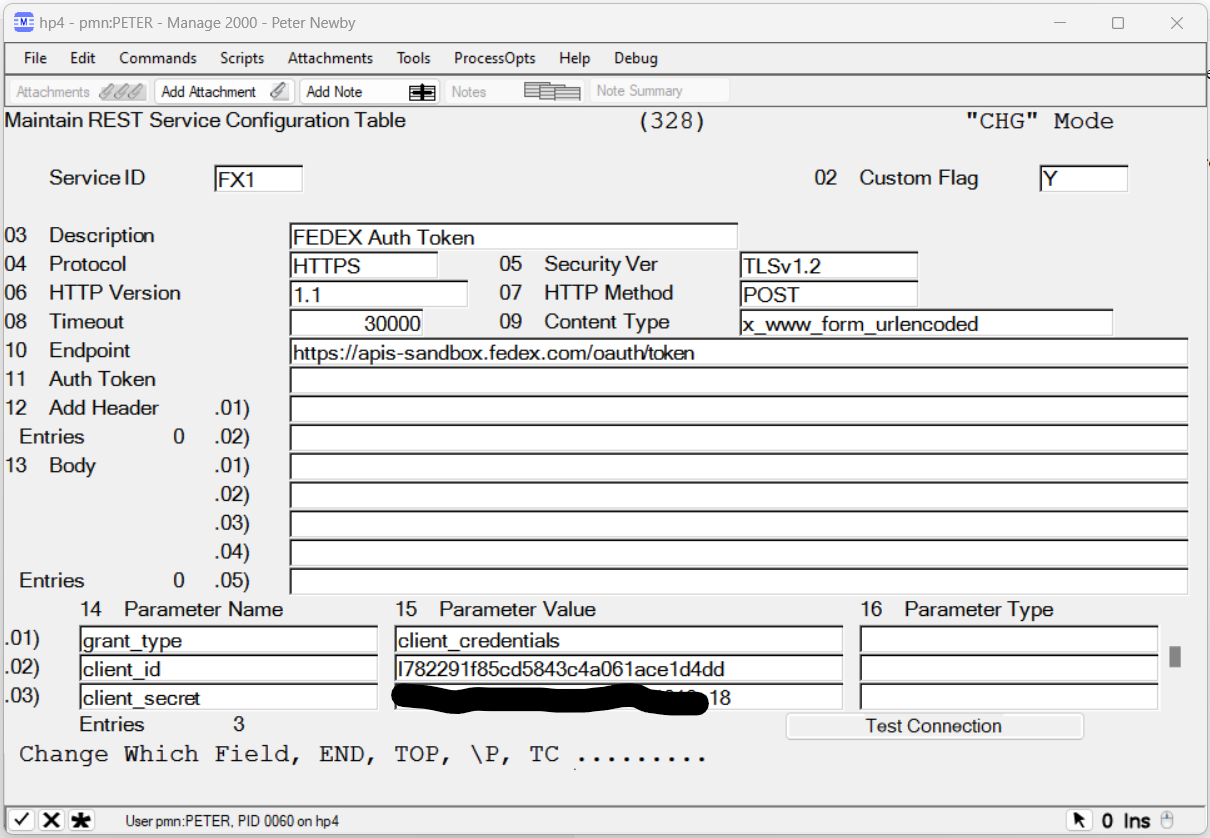
REST services provided by 3PL partners generally require a two-step process to use their service.  First a call must be made with secret credentials to obtain an authorization token.  Then the auth token is submitted with subsequent requests.

In Manage 2000 REST.SERVICES we can create one REST.SERVICES record to obtain the auth token and then reference it in another REST.SERVICES record:


GetAuthToken accepts JPATH expression parameters to identify the token and the expiration span. It then caches the token for the expiration span and uses the cached version until it expires before going back to the REST service to get a fresh token.

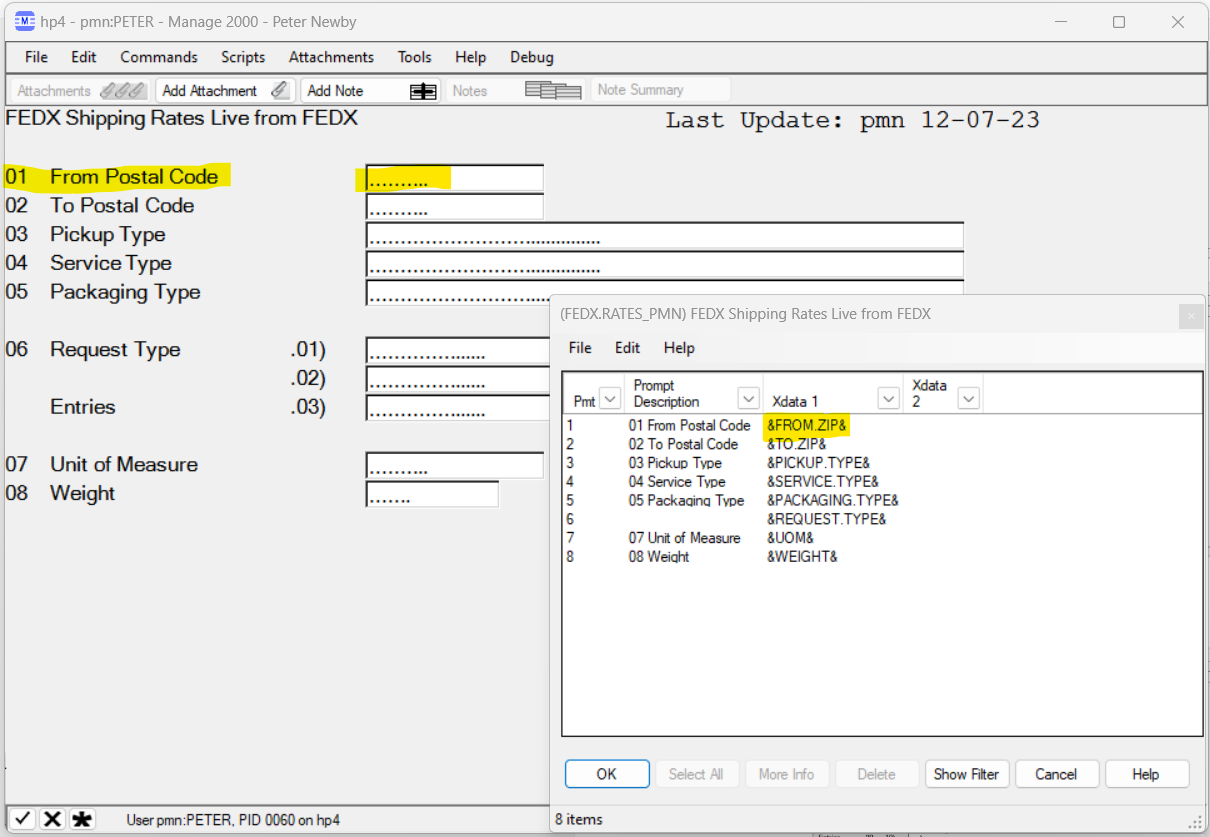
Services like the FEDEX Rates service accept a great many parameters.  These can be specified in the REST.SERVICES record:

A SCREEN.BUILD screen built with matching X_DATA_1 names makes it easy to map the inputs into the RS.COM area for calling the 3PL REST API for information.


The program needs to:

  • Call SUB.MT500 to run the screen
  • Overlay the variables from the screen to the REST common
  • Call REST.SERVICE
  • Parse the result with JPATH
  • Present the results to user, perhaps in the PWS Viewer using SUB.TEXT.OUTPUT.
And the result is a Manage 2000 look and feel function that gets live information from the 3PL REST service:


Tuesday, June 1, 2021

Javascript Injection in Manage 2000 Web Functions Q&A


What is it?

WEB.CONSTANTS and FN.BUILD have prompts for Custom Javascript.

The scripts stored in WEB.CONSTANTS and FN.BUILD are downloaded to any Manage 2000 web site accessing that Manage 2000 account, during IIS application initialization. 

The scripts in WEB.CONSTANTS are injected into every web page. 


FN.BUILD script entries are only injected into web pages of that particular function.


In order to ensure that all other resources are loaded, scripts should be enclosed in a jQuery document ready call:

<script>
$j(document).ready(function(){...}
</script>


What is its upgrade path expense profile?

Since the scripts are stored in Manage 2000 files on the Unidata server, any custom scripts automatically migrate to new service packs and survive web server replacements.  It is possible some adjustment to script logic may be required due to changes in the mark-up or code-behind of web functions, but for the most part the scripts float along with other configuration items stored in any Manage 2000 User type account like ACME.MAIN.

In what release did it become available?

Custom Javascript Injection was first introduced in Manage 2000 release 8.1 sp1.

How can it be used?

Manage 2000 web functions include access to jQuery.js and Prototype.js.  In desktop view jQueryUI is also available, and in mobile view jQueryMobile is available.  There are also many Manage 2000 javascript functions available from the roiGlobal.js library.  Therefor brief scripts can accomplish significant adjustments to the Manage 2000 web functions.

For instance, 8.1sp4 introduced many collapsible panels which improve navigation on mobile devices. However, they quickly become annoying on desktop devices with large screens. A standard solution is coming in 8.1sp5 which will add the overlooked state memory to the panels so they remain in the state last set by the user. For those on 8.1sp4 a simple solution to this annoyance can be made through Custom Javascript Injection:

<script>
$j(document).ready(function(){
$j('.accordion-expand-all a').trigger( "click" );});
</script>

Add this to WEB.CONSTANTS and restart the IIS application accessing the account and EVERY page with collapsible panels will begin with all of the panels expanded.

This becomes a very powerful way to make adjustments to Manage 2000 web functions without introducing custom components on the web server. 


Saturday, May 1, 2021

ARCHIVER UNINSTALL and REPLACE


Archiver packs together components of a function or a group of functions into a single file for storage or transport. It is also used to explode the package into its constituent items and put them away in an account. A package may be built in a development account and extracted in a live account or vice-versa.

For custom code development purposes this is like a Multi-Value version of WinZip transporting a collection of software in one go. It makes progressive development easy to redeploy no matter how large or complex the collection of software components grows.

There has always been an UNINSTALL method for removing the existing functionality before EXTRACTING and INSTALLING upgraded functionality, but it was not very accessible or possibly well known.  It also takes multiple steps to cleanly backup, uninstall, extract and install new versions.

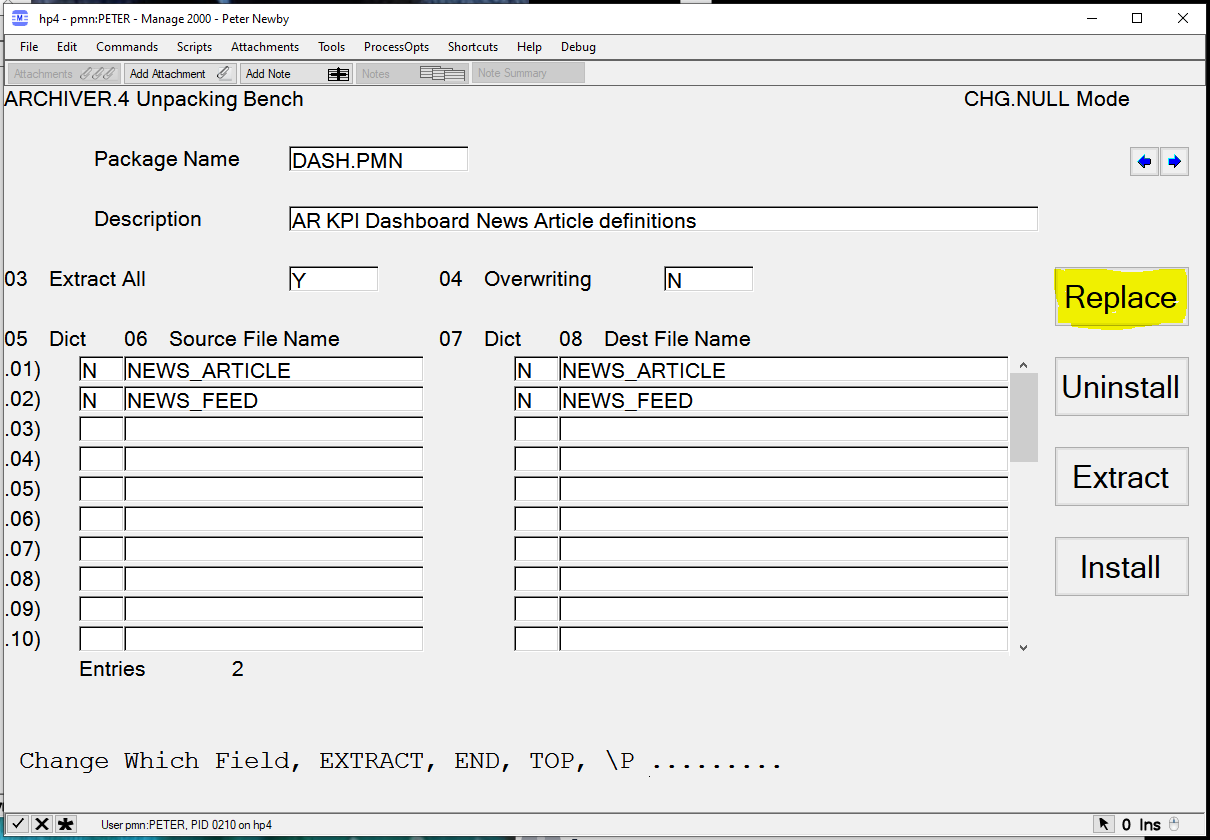
New to ARCHIVER in Manage 2000 8.1sp5 is the REPLACE option on the ARCHIVER Extraction screen.


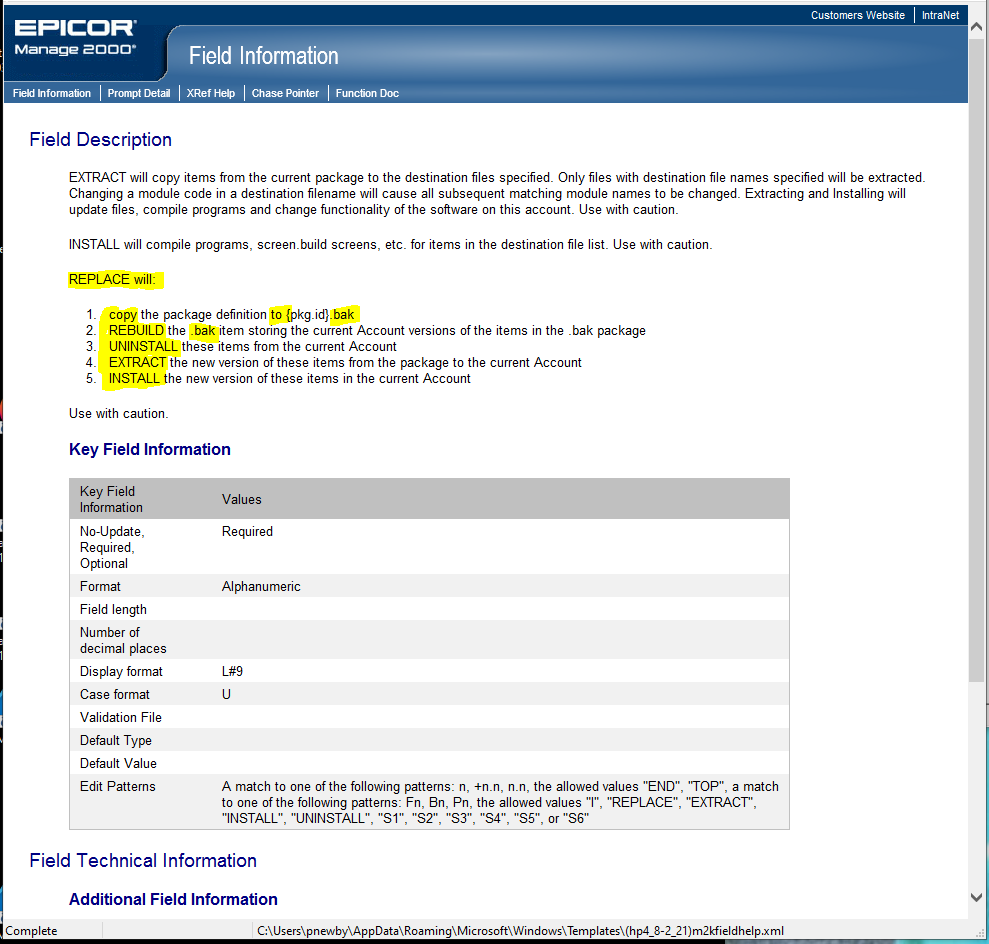
REPLACE automates the steps necessary to backup and replace existing functionality with replacement functionality stored in the ARCHVIER package:

  1. creates a new PROJECT_LIBRARY record with Item ID {FILE.KEY}.bak. 
  2. REBUILD {FILE.KEY}.bak package filling its contents with the current file items from the current account. 
  3. UNINSTALL {FILE.KEY} removing all the identified file items from the current account. 
  4. EXTRACT {FILE.KEY} copying all the package contents to the current account. 
  5. The user is then prompted to INSTALL the package in the current account resulting in compile and screen building operations 

This feature was suggested by Mike Daniels and our thanks go out to him for helping to make Manage 2000 a better product.

Thursday, November 7, 2013

Selecting From PC Most Recently Used Files

Taking the last two posts to a final conclusion, can we show the user the most recent PC files they have been working with in most recent order instead of showing their My Documents files in alphabetical order?

The answer is yes; using another CSIDL constant that represents the Recent Files directory, CSIDL_RECENT.

 * 
250* Pick a MRU file 
*
ANSWER = ''
GOSUB SelectFromMRU ;* Cross Reference using PCDirectoryInformation MRU
IF ANSWER # '' THEN
MSO.USER.VARS = '"':DirectoryPath:'\':ANSWER:'"'
CALL SUB.EXECUTE.MSO('2324C', '', '', '')
GO 250; *Let user choose another until none selected
END
*
RETURN
*
SelectFromMRU:* Cross Reference from PC File System MRU
*
DirectoryPath = SHGetFolderPath(CSIDL_RECENT)
Mask = '*.*'
ANSWER = ''
*
* Ask PC for Directory listing
*
HiddenFiles = False;SystemFiles = False;DoCheckSum = False;Recursive = False     
DIR.TEXT = PCDirectoryInformation(DirectoryPath,Mask,HiddenFiles,SystemFiles,DoCheckSum,Recursive)
*
* Format directory listing as OPTION list for OPEN.LIST.BOX
*
OPTION.TEXT = '';OPTION.RETURN.VALUES = ''; OPTION.SORT.KEYS = ''
DIR.ENTRIES.CNT = DCOUNT(DIR.TEXT<1>,@VM)
FOR DIR.IDX = 1 TO DIR.ENTRIES.CNT
DIR.ENTRY = DIR.TEXT<1>
DIR.ENTRY.END = DIR.ENTRY[1]
IF DIR.ENTRY.END # ":" AND DIR.ENTRY.END # "\" AND DIR.ENTRY.END # "/" THEN 
FILE.NAME = GetPCFileName(DIR.ENTRY)
IF FILE.NAME[1,1] # '~' THEN ;* Ignore Temp Files from currently open Office docs
DISPLAY.FILE.NAME = FILE.NAME[1, INDEX(FILE.NAME, ".lnk", 1)-1]
SWAP "~" WITH "_" IN DISPLAY.FILE.NAME
FILE.DATE.STAMP = DIR.TEXT<3>
FILE.TIME.STAMP = DIR.TEXT<4>
IF NOT(NUM(FILE.DATE.STAMP)) THEN FILE.DATE.STAMP = 0
IF NOT(NUM(FILE.TIME.STAMP)) THEN FILE.TIME.STAMP = 0
SORT.KEY = FILE.DATE.STAMP * 86400 + FILE.TIME.STAMP
LOCATE SORT.KEY IN OPTION.SORT.KEYS<1> BY "DR" SETTING POS ELSE
END
INS SORT.KEY BEFORE OPTION.SORT.KEYS
FILE.DATE.STAMP = OCONV(FILE.DATE.STAMP,"D2-")
FILE.TIME.STAMP = OCONV(FILE.TIME.STAMP, "MT")
BYTE.CNT = OCONV(DIR.TEXT<5>, "MD0,")
INS DISPLAY.FILE.NAME:"~":FILE.DATE.STAMP "L#8":"~":FILE.TIME.STAMP "L#8":"~":BYTE.CNT "L#15" BEFORE OPTION.TEXT<pos>
INS FILE.NAME BEFORE OPTION.RETURN.VALUES<pos>
END
END
NEXT
IF OPTION.RETURN.VALUES = '' THEN RETURN;* No Files Found
*  
* Setup call to OPEN.LIST.BOX
*
PROMPT.FOR.ANSWER = 1;DELETE.ALLOWED = 0;MULTI.SELECT = 0;FORCE.SELECT = 1;AUTOSELECT = 1;INFO.BUTTON = 0
INFO.SUB.NAME = '';INFO.SUB.KEYS = '';ADD.TEXT = '';BOTTOM.TITLE = ""
TOP.TITLE = DirectoryPath:" File Listing":@AM:"File Name~Date~Time~Size":@AM:"~Modified~Modified~"
NBR.COLS = DCOUNT(OPTION.TEXT<1>,'~')
CALL OPEN.LIST.BOX(OPTION.TEXT, OPTION.RETURN.VALUES, MULTI.SELECT, FORCE.SELECT, AUTOSELECT,  INFO.BUTTON, TOP.TITLE, BOTTOM.TITLE,  NBR.COLS, PROMPT.FOR.ANSWER, ANSWER, DELETE.ALLOWED, INFO.SUB.NAME, INFO.SUB.KEYS, ADD.TEXT)
IF ANSWER # '' THEN 
* Remove ok/delete flag from answer 
ANSWER = ANSWER<1> 
END
*
RETURN

You can find all the available CSIDL constants defined for SHGetFolderPath in the COPY.TOOLS.BP item PWS.CODES, which is where functions such as SHGetFolderPath and PCDirectoryInformation are declared.

To make them available in your code just include the copy item after the STANDARD.COMMON.VARIABLES declaration at the top of your code:

* Release Information
* MANAGE-2000 - PMN - Release 8.0
* PMN.TEST - TESTING MSO SUBROUTINE API
* Written                                                pmn 11-01-13
*#* COPY COPY.TOOLS.BP STANDARD.VARIABLES.1 (REPLACING PGM.NAME BY PMN.EXECUTE.MSO, FN.NAME BY PMN.TEST, IO.OPEN.OPTS BY TERM.DATA) ;*#* Copied Source Follows (11-01-13)
$INCLUDE STANDARD.COMMON.VARIABLES FROM COPY.TOOLS.BP
$INCLUDE STANDARD.COMMON.APP.PROGRAMS FROM COPY.TOOLS.BP
$INCLUDE STANDARD.VARIABLES.END FROM COPY.TOOLS.BP
PGM.NAME='PMN.EXECUTE.MSO'; FN.NAME ='PMN.TEST'
CALL IO.OPEN('TERM.DATA',PASSWORDS)
*#*
*
* Other Variables
*
$INCLUDE TrueFalse FROM COPY.TOOLS.BP
$INCLUDE PWS.CODES FROM COPY.TOOLS.BP

Wednesday, November 6, 2013

Cross Referencing PC File Directory

In the last post I casually suggested putting the selected filename in the Last Keys store for the IO.SCRATCH file.  This begs the question "How do I let the user select a file from their PC while in PWS?"

The answer to this question is the PCDirectoryInformation function which can access a directory listing and OPEN.LIST.BOX which can present the user with a CROSS.REF-like listbox.

*
200* Pick a file from a pc directory and run it
*
DirectoryPath = SHGetFolderPath(CSIDL_PERSONAL)
Mask = '*.*'
ANSWER = '' 
GOSUB CrossRefPCDir ;* Cross Reference using PCDirectoryInformation
IF ANSWER # '' THEN
MSO.USER.VARS = '"':DirectoryPath:'\':ANSWER:'"'
CALL SUB.EXECUTE.MSO('2324C', '', '', '')
GO 200; *Let user choose another until none selected
END
*
RETURN
*
CrossRefPCDir:* Cross Reference from PC File System
*
* Ask PC for Directory listing
*
HiddenFiles = False;SystemFiles = False;DoCheckSum = False;Recursive = False
DIR.TEXT = PCDirectoryInformation(DirectoryPath,Mask,HiddenFiles,SystemFiles,DoCheckSum,Recursive)
*
* Format directory listing as OPTION list for OPEN.LIST.BOX
*
OPTION.IDX = 0;OPTION.TEXT = '';OPTION.RETURN.VALUES = ''
DIR.ENTRIES.CNT = DCOUNT(DIR.TEXT<1>,@VM)
FOR DIR.IDX = 1 TO DIR.ENTRIES.CNT
DIR.ENTRY = DIR.TEXT<1,DIR.IDX>
DIR.ENTRY.END = DIR.ENTRY[1]
IF DIR.ENTRY.END # ":" AND DIR.ENTRY.END # "\" AND DIR.ENTRY.END # "/" THEN 
FILE.NAME = GetPCFileName(DIR.ENTRY)
IF FILE.NAME[1,1] # '~' THEN ;* Ignore Temp Files from currently open Office docs
OPTION.IDX += 1
FILE.DATE.STAMP = OCONV(DIR.TEXT<3,DIR.IDX>,"D2-")
FILE.TIME.STAMP = OCONV(DIR.TEXT<4,DIR.IDX>, "MT")
BYTE.CNT = OCONV(DIR.TEXT<5,DIR.IDX>, "MD0,")
OPTION.TEXT<OPTION.IDX> = FILE.NAME:"~":FILE.DATE.STAMP "L#8":"~":FILE.TIME.STAMP "L#8":"~":BYTE.CNT "L#15"
OPTION.RETURN.VALUES<OPTION.IDX> = FILE.NAME
END
END
NEXT
IF OPTION.IDX = 0 THEN RETURN;* No Files Found
*  
* Setup call to OPEN.LIST.BOX
*
PROMPT.FOR.ANSWER = 1;DELETE.ALLOWED = 0;MULTI.SELECT = 0;FORCE.SELECT = 1;AUTOSELECT = 1;INFO.BUTTON = 0INFO.SUB.NAME = '';INFO.SUB.KEYS = '';ADD.TEXT = '';BOTTOM.TITLE = ""
TOP.TITLE = DirectoryPath:" File Listing":@AM:"File Name~Date~Time~Size":@AM:"~Modified~Modified~"
NBR.COLS = DCOUNT(OPTION.TEXT<1>,'~')
CALL OPEN.LIST.BOX(OPTION.TEXT, OPTION.RETURN.VALUES, MULTI.SELECT, FORCE.SELECT, AUTOSELECT,  INFO.BUTTON, TOP.TITLE, BOTTOM.TITLE,  NBR.COLS, PROMPT.FOR.ANSWER, ANSWER, DELETE.ALLOWED, INFO.SUB.NAME, INFO.SUB.KEYS, ADD.TEXT)
IF ANSWER # '' THEN 
* Remove ok/delete flag from answer
ANSWER = ANSWER<1,1> 
END
*
RETURN


Monday, November 4, 2013

Programmatically Launching Related Documents

Manage 2000 includes support for attaching documents and other objects to records in the ERP database and having them available for users to render.  This is normally implemented through links defined in the OBJECT.IDX file and that is a good way to go, whether you attach objects manually or generate entries in OBJECTS and OBJECT.IDX files programmatically.

But sometimes you may want a more dynamic mechanism that lets the user drill from Manage 2000 screens into external documents without building a permanent link in OBJECTS.IDX. Here is one approach:

PC.EXECUTE.MSO is an MSO subroutine that requests PWS to perform a DDE.START.  It is meant to be wrapped by an MSO like 15S which launches Notepad.

You can copy 15S in MSO.BUILD to make a custom MSO that will launch whatever program or document you want on the user's PC.


To make an MSO for launching PDFs set PC_Execute_Name to a PDF viewer execute-able. (This depends on all PC's using this MSO having the same PDF viewer installed at the same location.)

To run any MSO out of basic code you can call

CALL SUB.EXECUTE.MSO(OBJECT.LIST, CAPTION, CLOSE.OPTIONS, PROPERTIES)

So in your program (perhaps a PWS button subroutine) concatenate together the file path for the currently selected external document and tuck it into the last keys for IO.SCRATCH (just using this as work space to pass the variable into the MSO).

DMY = SetLastKey("IO.SCRATCH", "C:\Temp\redpages_net.pdf");*  (this is 7.3 code for update last keys)
CALL SUB.EXECUTE.MSO('2324C', '', '', '')

If you find hijacking the IO.SCRATCH last key distasteful there is a more legitemate mechanism for passing program variables into MSOs:

In your program you can store attributes in the MSO.USER.VARS variable (delcared in  STANDARD.COMMON.VARIABLES)

MSO.USER.VARS = "C:\Temp\redpages_net.pdf"
CALL SUB.EXECUTE.MSO('2324C', '', '', '')

 and then in your MSO properties refer to them using the ampersand reference &USR<1>&, &USR<2>&...


If you want a more general approach you can use LAUNCH.URL.MSO in place of PC.EXECUTE.MSO.  LAUNCH.URL.MSO starts a document rather than a program and allows Windows to decide which application should be used to open that document.  The "Address" property of LAUNCH.URL.MSO can be a URL or it can be a disk location preceded by "FILE://" in which case Windows will lookup an application from the file extension.


    MSO.USER.VARS = "C:\TEMP\redpages_net.pdf"
    CALL SUB.EXECUTE.MSO('2324C', '', '', '')


Tuesday, March 12, 2013

Manage 2000 Control Extenders Explained

M2kDataBinderControlExtender:

Originally this was an alternative to placing single valued fields in FormView containers.  The VS2005-2008 MS databinding changes mandated that a table be bound to a FormView and that textboxes and such in that FormView could then be bound to a field in that table. There are a bunch of things I find objectionable here.

Anyway, I stole the code for this extender from Rick Strahl at WestWind (Hawaii, poor chap), a great source for .Net intelligent thought http://www.west-wind.com/weblog/.  The databinder moves fields into and out of datasets from web controls.

Visual Studio 2003 only did one way binding using the ‘eval’ method, and we had to write code to move data back. VS 2005/8 added the ‘bind’ method to move data from web controls back into datasets.

I prefered the method name ‘Fill’ to describe moving fields into the dataset.  The name was always used in DataAdapters to mean moving the fields into the dataset from the datasource.  So I chose to use the DBCE.Fill expression to request the databinder to fill up the dataset with field values from web controls.

While working on the m2kScrolledSetControlExtender I enhanced this extender to bind fields from dataset to columns in a JSON array stored in a hidden field (Bind To Client).    The scrolledset then moves fields between a hidden field and textboxes inside the browser using javascript. The hiddenfield acts like FILE.ITEM(1) providing working storage at the browser end.   Together these extenders manage the transmission from datasets to scrolledsets and back.

Since then, based on application work by the development team, I have been adding additional support in the data binder for other situations like an easy way to bind SA MV sets to multi-line textboxes and just lately support for RadioButtonLists.

The Microsoft databinding patterns can still be used and, in fact, for grid displays and other sorts of table level binding I expect we will continue to use ObjectDataSource controls.

M2kScrolledSetControlExtender:

My original goal for the scrolled set extender was to create a way to have scrolled set processing in web pages that matched the keyboarding and development efficiencies of SUB.MT500 and SCROLL.MAINT. Yeah, not quite there yet :)

In one sense the scrolled set extender stands in for SCREEN.BUILD C4.  It provides a design time place for the developer to specify scrolled set behavior.  It also serves to emit the required javascript for instantiating a javascript object with the operational mechanics implementing the scrolled set experience.  The definition for the javascript object and all of its methods actual exists in roiGlobal.js.  The scrolledset extender just needs to create an object of that class in the browser world and initialize it with parameters supplied by the application developer.

One of the principal design decisions was to leverage all the data entry power of the roiTextBox, and to loosely package an arbitrary number of entry fields in a table that would contain the set entry controls and display cells. I wrote up a how to with more details on creating scrolled sets named WEB.SCROLLED.SET and added it to the SYS.WEB.HOWTOS menu.

M2kMetaDataControlExtender:

This extender is basically a re-write of the EditParams features that we originally built into roiTextBox and the metadata data access component. It provides PMT like definitions that developers can use to describe the behavior they want and then the Tools layer can take care of the implementation.


When Microsoft broke the component design surface into a separate tab in Visual Studio 2005/2008 they COMPLETELY isolated WebControl design time from Data Access Component design time.  This meant that the roiTextBox had no way of talking to the typed datasets or the metadata component.  So the whole metadata world and the databinding got shoe-horned into “WebControls” (which the control extenders are) so they can sit in the same designer and interact with webcontrols.

Thursday, October 11, 2012

How to develop web functions with Visual Studio

There are a number of different sub-topics here:

  1. Creating a developer sandbox on your desktop
  2. Loading the Manage 2000 DAC components and WebControls into Visual Studio
  3. Configuring Visual Studio to 'see' the Manage 2000 web function wizards
  4. Where to find out more about Manage 2000 Web Technology and how to use it
You can find answers on all of these topics in Manage 2000 7.3 sp3 on the SYS.WEB.HOWTOS menu:
  1. SYS.DEV.SETUP describes how to set up your PC for Manage 2000 web function development.
  2. WEB.VS.TOOLBOX.SETUP describes how to add Manage 2000 Web Components and Controls into your installation of Visual Studio.
  3. WEB.VS.WIZARDS.SETUP describes how to configure Visual Studio to 'see' the M2k wizards.
And in the related courseware section you will find links to INTRO.WEB.COURSE and ADV.WEB.COURSE which are chock-full of web function development minutia.

But if you want to get somewhere quickly check out the new wizards for generating Visual Studio projects for HyperQueries, Mobile Web, and BTO Posting type functions.  These wizards allow you to describe your function in terms of Unidata file names and dictionaries, or in terms of Manage 2000 Business Transactions and then generate for you a working prototype with controls configured and named in useful ways and in some cases with extensive amounts of code-behind already plumbed out.

There are a couple of webex videos available under the Manage 2000 Web Presentations link above on the right.  For Visual Studio Manage 2000 web function development knowledge check out Mastering ASP.NET 3.5 and VisualStudio2008 for Manage2000 Parts I and II.

Thursday, June 9, 2011

Wizard's Work

Manage 2000 7.4 development now includes a wizard that is capable of generating a maintenance web function with single valued fields and scrolled sets somewhat akin to PWS.
And there were a LOT of bytes in that elephant!
But the payback is a reduction in cost of writing web clients for Manage 2000 maintenance and posting functions, which we will leverage during the remainder of the standard system development cycle. And it will produce further payback as a tool for custom development projects.
The Manage 2000 tooling for the faux scrolled sets leverages the ajax validation, last keys, and prompt stack features of the roiTextbox and provides smooth keyboard navigation.
It takes just a few moments to select fields from a business transaction object and generate a working web function, which can be further enhanced and polished in Visual Studio.

Friday, December 17, 2010

2 bits 4 bits 64 bits a dollar

The good news: "Mr Newby your new 64 bit Windows-7 8 gig package is ready for you."
The bad news: "Program Files or Program Files (x86)" and "How about that WOW6432Node Eh!"
Sooooooo, I've been installing and uninstalling and tweaking vbproj files and futsing with Visual Build scripts and messing about with InstallShield 2010 scripts and repeating, ad naseum.
But if you are a developer loading up Manage 2000 7.3 sp2 web tools on 64 bit Windows 7 box and you should run into issues, be thankful, it could be much much worse. The sp2 installs are now much more solid.
The most likely annoyance will be dataset references pointing into "Program Files" that can't be resolved because the dataset libraries are now in "Program Files (x86)". You can, of course, simply delete them and then re-add them from the correct location on your box.
Or you can copy the typed library en-masse from Program Files (x86) to Program Files. You just need to remember to copy over dlls anytime you regenerate them through the dataset utility.
Another option is to use the Path Conversion Utility to do a mass change on all the vbproj files in a Manage 2000 web site. This makes sense if all of your production and development web servers are 64bit.
I have also added a PreBuild.cmd script at the Manage2000.vbproj level that you can add under advanced compile options "..\..\..\PreBuild.cmd" for a more surgical approach. As you build projects it will convert the references from hardcoded to "$(ProgramFiles)" which will load and build in either 64 or 32 bit environment. This will prompt you to reload the project during the build if it finds references that must be changed. Otherwise it will let the build continue normally.

Saturday, November 6, 2010

Manage 2000 7.4 Web - The Beginnings

Manage 2000 7.3 field release is well underway and I have finally got some of the bug reports I have been begging for since Beta. Yes, be careful what you wish for. But each one is a treasure that will make 7.3 sp2 a better more solid product when it launches in Q1 of 2011.

Perspectives 2010 is done and now I can turn my attentions to some serious development work for Manage 2000 7.4. My first major task is to build a foundation for web update functions that will be as nice for the keyboard oriented users as PWS functions and that will be as quick to build for the developer.

There have been 4 or 5 update web functions in Manage 2000 since release 7.1 and the BTO framework has always supported update business object processes. But is is not an easy task to build an update web function and the user experience falters particularly for keyboard oriented folks in scrolled set scenarios.

It is remarkable how effective one level of de-normalization in the user interface can be. When you look around at the thousands of Manage 2000 PWS functions almost all of the screens are a collection of single valued prompts with a few scrolled sets. The application developer can express the modeling of complex business processes quite efficiently with this one level de-normalization, taking the user through multiple screens/pages traversing deeper business processing levels. And I wonder if this does not reflect a characteristic of human perception to be interested in a set of data and its immediate context, but no further.

Using grids to implement scrolled sets is like converting an all-terrain vehicle into a riding lawn mower; sure it can be done, but is it the most practical approach? The programming model is too complex and the performance too poor. A much leaner model that only does what is required for scrolled set entry and does not try to be a generalized do everything-2-dimensional container is needed.

So here I am re-casting the SCROLL.MAINT logic Doug wrote 20 years ago into an HTML/JavaScript mold. Am I going backwards, or am I bringing those things that worked and added value into the Dot World?

Tuesday, September 21, 2010

REST Web Services from UniBasic

In the midst of working up some labs for Perspectives I started thinking about REST web service access from UniBasic. The lab I happened to be working-up is on SOAP based RPC web service usage, for which we have a number of working examples and implemented projects.

But in creating services for Manage 2000 internal consumption I have all but abandoned SOAP RPC in favor of the far more elegant JSON REST model. I am usually working in ASP.NET and IE DOM client land, thankfully with the prototype.js library. So the question of the day was what would REST JSON access look like from UniBasic and what are the central issues in using it?

Well in addition to all the SOAPRequest support added with the UniBasic Extensions are a couple of simple little commands for retrieving the content from a URL. Now URLs often return HTML intended for human consumption and are not very easy to parse. The JSON REST model however returns very nice orderly string serializations.

With something as simple as:

CREATE.REQUEST.RTN.CODE = createRequest(URL:"?":QS,HTTP.METHOD,HTTP.REQUEST.HANDLE)
SUBMIT.REQUEST.RTN.CODE = submitRequest(HTTP.REQUEST.HANDLE,'','',HTTP.RESPONSE.HEADERS,HTTP.RESPONSE.DATA,HTTP.RESPONSE.STATUS)

you can get orderly responses like:

HTTP.RESPONSE.DATA = {'oValItem':{'FileName':'CM', 'TableNbr':'', 'ItemId':'1024
', 'NewItemId':'1024', 'Valid':'True', 'Display':'Sears Systems, Incorporated',
'ErrorFlag':'False', 'ErrorMsg':''}}

UniData does not yet include a JSON DOM to match the XML DOM of the UniBasic Extensions, but the parsing difficulties of JSON serializations are relatively minor. And if you need to directly access JSON REST services in the middle of UniBasic code this seems like nice direct approach.

The real stumbling blocks aren't coding difficulties, but security of your application server if you open up the HTTP or HTTPS ports for UniBasic to "see" services on the Internet. One answer to this is to go through a proxy server. This also points out one of the benefits of the architecture of Manage 2000 with its ASP.NET arm which may be used in a similar manner to delegate interaction with the messy world away from your closely guarded business database into a DMZ area.

Thursday, September 2, 2010

Dynamic Dropdowns and TM JSON arrays

Whether you call it RIA or Web 2.0 or AJAX enabled, there is an evolutionary process taking place on the web these days with UIs morphing from BLOCK-TERM like full page postbacks to much more granular dynamic changes in the page as the user interacts with it. And you can certainly see the effects of this progression in Manage 2000 release 7.3.

A developer friend asked if I preferred coding in VB in the code-behind ("code-beside" in the new parlance) or on the client using javascript and such. This is one of those questions that makes my brain churn for awhile.

The central conclusion I finally came to was that if it makes the UI more convenient for the user, that I dynamically change control configurations (like reloading drop down options based on previous answers they've selected) as they progress through a page then I prefer taking manual control on the client using javascript. I still use code-behind and aspx templates to push the HTML out in the first place, but then shift to javascript-AJAX-JSON-DHTML to make the user interface reactive and dynamic so that it responds more intelligently to the conversation that the user is having with it without having to pause and reprocess major Page construction code.

So how does one go about dynamically loading an HTML SELECT with options from a Manage 2000 TM table?

I have added a new service called GetTMTable in /mt/JSONServices for just this purpose, using much of the same code as my last post:

Private Function GetTMTableAsJSONArray(ByVal context As HttpContext) As System.Text.StringBuilder
Dim TableNbr As String = context.Request.QueryString("TableNbr")
Dim result As New System.Text.StringBuilder
Dim arTableEntries As New System.Collections.Generic.List(Of Array)
Dim ds As New ROISystems.Components.roiDataSet
Dim TableMaster As New ROISystems.WebControls.roiTableMaster
ds = TableMaster.GetTable(TableNbr)
For Each entry As DataRow In ds.Tables("VALIDATION_Validation_Info").Rows
Dim row() As String = {entry.Item("Code"), entry.Item("Desc")}
arTableEntries.Add(row)
Next
Dim JSONSerializer As New System.Web.Script.Serialization.JavaScriptSerializer
result.Append(JSONSerializer.Serialize(arTableEntries))
Return result
End Function

Here is the js portion of my testcode.
function LoadTable() {
var Site = document.location.pathname.Field('/', 2, 1);
var svcUrl = document.location.protocol
+ '//' + document.location.host
+ '/' + Site + '/MT/JSONServices/GetTMTable.ashx';
var TableNbr = $F('TableNbr');
var qs = 'TableNbr=' + TableNbr + '&Cid=' + $F('hedtcid');
new Ajax.Request(svcUrl + '?' + qs, {
method: 'get', asynchronous: false,
onSuccess: function(transport) {
var arTableEntries = transport.responseJSON;
// clear and reload the dropdown with the new table
$('ddlTMTable').options.length = 0
$A(arTableEntries.each(function(item) {
var opt = document.createElement('option');
opt.text = item[1];
opt.value = item[0];
$('ddlTMTable').options.add(opt);
}))
}
});
}


The result is blindingly fast reloads of the dropdown list from various tables.

When you do finally postback you will run into some MS security checking unless you disable event checking in the page declaration in the aspx file, or in a web config setting:
@ Page EnableEventValidation="false"
or
pages enableEventValidation="false"

You may also run into occasional confusion during postback on the part of webcontrols code trying to figure out why what is coming back doesn't match what was sent out. To avoid this confusion you can either just use plain ol HTML controls or check the Request.Form("lbID") array directly if it gets to be a problem.

Unfortunately I had to change the roiTableMaster control to remove a dependency on roiPage so that it would work out of JSONServices. This makes it difficult to patch, but it is all better for 7.3 sp2.

In the mean time you could, of course, implement a version of /mt/JSONServices that descends from roiPage rather than IhttpHandler, it just would have all the application overhead that roiPage carries around.
Thursday, June 3, 2010

Sub Valued Level Prompting Details

How do you fixup the screen and do cross referencing and other validations when you use SUB.VALUE.PROMPTING on a SUB.MT500 screen?

Here is an example where we want to prompt for multiple file names and within each file for multiple item ids.

Instead of calling SUB.VALUE.PROMPTING directly from the SCREEN, call your subroutine which in turn will call SUB.VALUE.PROMPTING.


Remember to add right justified fields using the PWS screen in SCREEN.BUILD if you want the count of sub-valued items to line up nicely.


You can add logic to execute only at the sub-valued level by checking X_Data_2 for the FROM.SCROLL.MAINT flag.

*

2200* Before prompt logic for Item_Attachments

*

IF INDEX(Prompt.X_Data_2, 'FROM.SCROLL.MAINT', 1) > 0 THEN

* Handle inner event from SUB.VALUE.PROMPTING execution of SCROLL.MAINT

* Reset SIP.VAL.FILE to enable cross referencing

FILE.VALUE = FIELD(Prompt.Display_Text_2, ",", 2)

FILE.LIST = MAIL.FILE.File_Attachments

CURRENT.FILE = FILE.LIST<1,FILE.VALUE>

CALL GET.DB.FILE(SIP.VAL.FILE, CURRENT.FILE)

ERROR = 0

RETURN

END

* Handle MAILBOX.ATT prompt event

GOSUB 2210;* Fixup Prompt Label with SUB.VALUE level display text

* Setup XREF stuff

Prompt.Conversions_Edits = '0X':@SVM:Prompt.Conversions_Edits

* remove compiled edits to force recompile

Prompt.Conversions_Edits = FIELD(Prompt.Conversions_Edits,roiDataMark4,1)

CALL GET.DB.FILE(SIP.VAL.FILE, CURRENT.FILE)

CALL SUB.VALUE.PROMPTING(ANSWER,SUB.DATA,P.NBR,PMT,SAVE.FN,VALUE)

END

*

RETURN

If you want to fix up details like the screen labels and prompt text while at the sub-valued level you can do this sort thing:

*

2210* Display SubValue Level Label Text

*

SET.NBR = Prompt.Scroll_Field_Type[2,2]

LOCATE SET.NBR IN SCROLL.DATA<9,1> SETTING PRIMARY.IDX ELSE RETURN

PRIMARY.PMT.NBR = SCROLL.DATA<1,PRIMARY.IDX>

PRIMARY.PMT = PID(PRIMARY.PMT.NBR)

STARTING.ROW = PRIMARY.PMT<1,7>

HEAD.ROW = STARTING.ROW-1

DISP.MASK = "L#":Prompt.Display_Length

ID.LABEL = XLATE("DICT ":CURRENT.FILE, "F0", 61, "X")

IF ID.LABEL = "" THEN ID.LABEL = "Item Id"

LABEL.TEXT = FMT(P.NBR,"2\0R"):".":VALUE:' ':ID.LABEL

Prompt.Text = "Enter ":ID.LABEL

REDIS.MISC<10> = L(HEAD.ROW):C(PMT<1,6>):LABEL.TEXT DISP.MASK

PRINT REDIS.MISC<10>:

RETURN

For Validation after prompting you can check the X_DATA_2 flag again and if you are at the multi-valued level simply request a repaint with ERROR=1000, but at the sub-valued level actually carry out input validations programmatically. Remember that your sub-valued level validation logic is being called from SCROLL.MAINT so do not use ERROR codes like 200, 1000 as you would for SUB.MT500, simply 0 or 1.

*

3200* After prompt logic for Item_Attachments

*

IF INDEX(Prompt.X_Data_2, 'FROM.SCROLL.MAINT', 1) = 0 THEN

* Remove SV Label Text

REDIS.MISC<10> = ''

ERROR = 1000

END ELSE

IF NOT(SIPDATA) THEN RETURN

FILE.VALUE = FIELD(Prompt.Display_Text_2, ",", 2)

FILE.LIST = MAIL.FILE.File_Attachments

CURRENT.FILE = FILE.LIST<1,FILE.VALUE>

REC = XLATE(CURRENT.FILE, ANSWER, -1, 'X')

IF REC = '' THEN

* Message 502: %1 item %2 not on file

CALL SCREEN.MSG(GetMessageText(502,CURRENT.FILE:@VM:ANSWER,0):";H;#M446065")

ERROR = 1

END

END

RETURN

Wednesday, March 17, 2010

The Wonderful World of Wizards

It has been an exhilarating and somewhat exhausting spring here in Minneapolis; from 2+ feet of snow pack to clear yards and 60 degree sunshine in 2-3 weeks. Getting beta's underway has not been fast enough or clean enough for my impatient expectations. But that's why you have betas to find the stumbling blocks. While waiting to enhance as-yet unidentified pre-enhancement conditions, I have been working on a pet project to create web function wizards with more specific generation capabilities.

My first re-visitation to IWizard has resulted in a modest little wizard that will help you generate a HyperQuery web function. The HyperQuery control allows configuration of a REPORT.BUILD like query based web function.

The second undertaking turned out to be a lot more interesting and a lot more work. The BTO Inquiry Wizard allows you to select a business object, select from its available fields and generate a working inquiry with all the data access components and controls configured, and with a FormView containing single valued fields labels and textboxes, and GridView controls for each set.

The great part about wizards is, of course, that you can take the results and enhance the heck out of them. They provide RAD starts to developing your own web functions while still leaving you in total control.