Showing posts with label Interface. Show all posts

Friday, December 8, 2023

Automating REST Authorization Calls

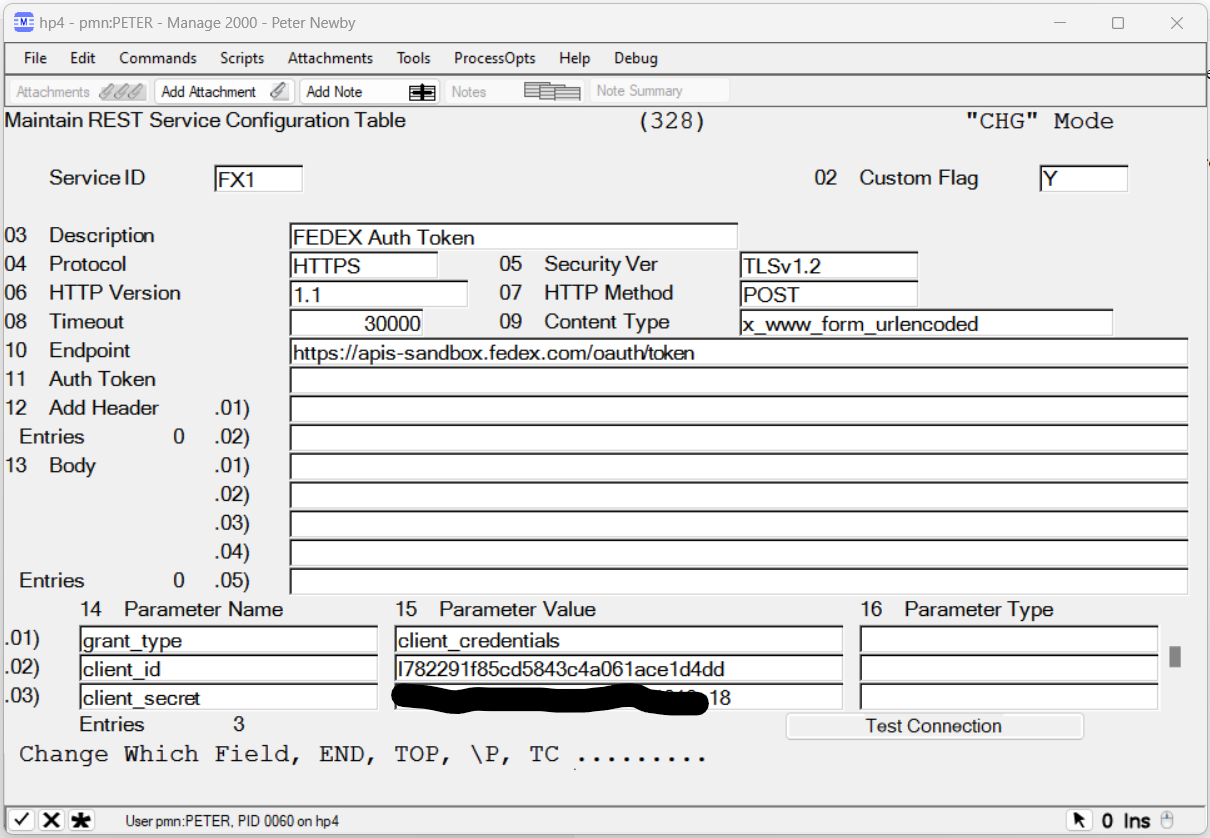
REST services provided by 3PL partners generally require a two-step process to use their service.  First a call must be made with secret credentials to obtain an authorization token.  Then the auth token is submitted with subsequent requests.

In Manage 2000 REST.SERVICES we can create one REST.SERVICES record to obtain the auth token and then reference it in another REST.SERVICES record:


GetAuthToken accepts JPATH expression parameters to identify the token and the expiration span. It then caches the token for the expiration span and uses the cached version until it expires before going back to the REST service to get a fresh token.

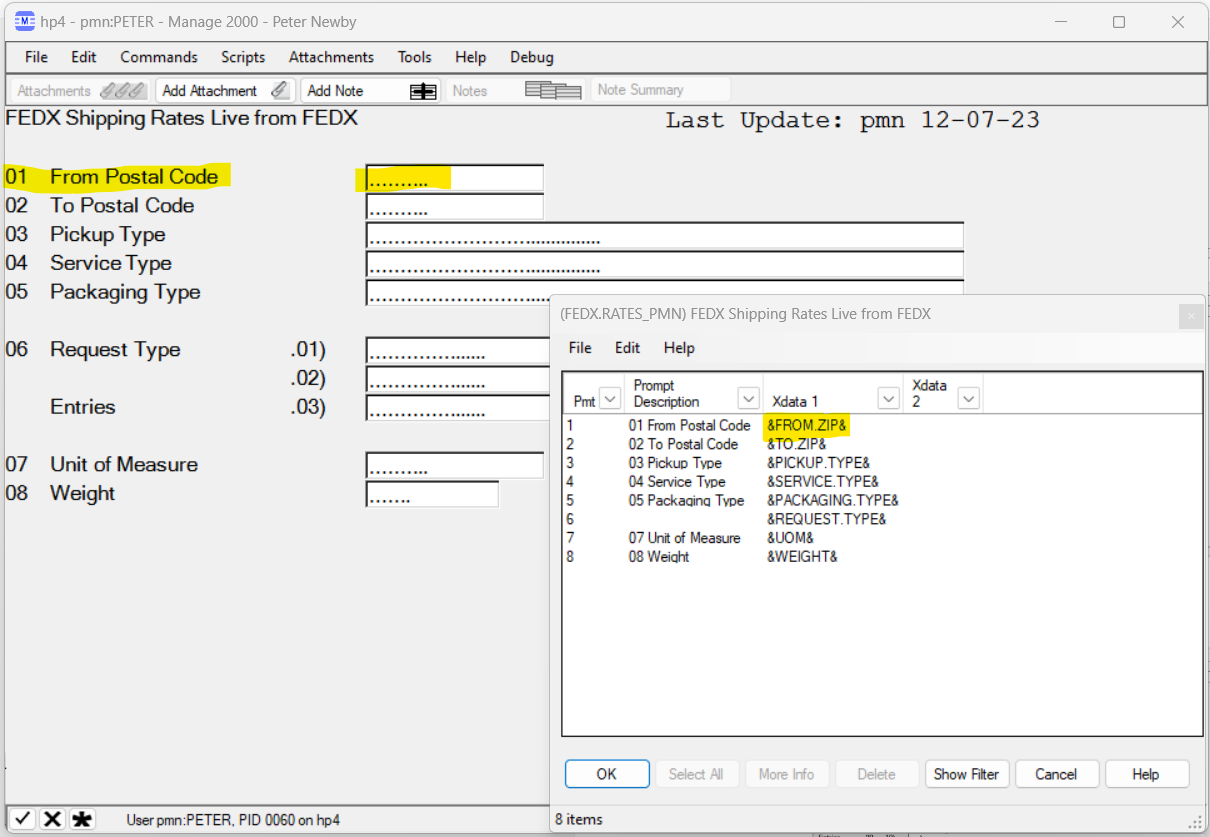
Services like the FEDEX Rates service accept a great many parameters.  These can be specified in the REST.SERVICES record:

A SCREEN.BUILD screen built with matching X_DATA_1 names makes it easy to map the inputs into the RS.COM area for calling the 3PL REST API for information.


The program needs to:

  • Call SUB.MT500 to run the screen
  • Overlay the variables from the screen to the REST common
  • Call REST.SERVICE
  • Parse the result with JPATH
  • Present the results to user, perhaps in the PWS Viewer using SUB.TEXT.OUTPUT.
And the result is a Manage 2000 look and feel function that gets live information from the 3PL REST service:


Friday, May 6, 2022

Bearer Token Authorizations and JPATH Expressions

 Yeah, apples and oranges.  And I am not going to relate the two either.  They are just the flotsam and jetsam floating about in my mind from recent development.

Bearer token authorization comes out of the OAuth 2.0 standard, but has taken on a life of its own and become a commonly used authorization mechanism for REST services.

In the Rocket UniData UniBasic Extensions Version 8.2.2 you can find details on the Authorization setting required in setRequestHeader.  There is a whole intro page about OAuth 2.0 and U2.  

Short version:

setRequestHeader(HTTPRequest.Handle,"Authorization", "Bearer ":BEARER.TOKEN)

setRequestHeader(HTTPRequest.Handle,"Authorization", "DIRECT ":HMAC.TOKEN)

And these have to be done after the Request object is created.  There is no option in setHTTPDefault to specify the authorization type ahead of time. 

So in the REST.SERVICES table you just need to start the Auth Token prompt with "Bearer " or "DIRECT " and then the token, and REST.SERVICE will setRequestHeader and your REST.SERVICE request will be off to the races.


JSONPath or JPATH is for JSON what XPATH is for XML; a standard for declaratively specifying pieces of a JSON string to be returned.  I stumbled into the need for such a thing while working on the REST provider for NEWS.ARTICLES.  If you want to provide the capability to an article author to layout an HTML div and specify replacements from a REST service then you need some standard declarative expression to say "put THAT piece from the REST service results HERE!". And it would be nice to make the replacement expressions familiar and consistent with some larger standard.


The REST.NEWS news provider subroutine simply calls out to JPATH to extract out the pertinent data.

 *
2110* Replace dictionary references with values
 *     
     VAR.CNT = COUNT(LINE, "&")/2
     FOR VAR.IDX = 1 TO VAR.CNT
        VAR.IDX = VAR.IDX ;* Audits!
        VAR.NAME = FIELD(LINE, "&", 2, 1)
        TARGET.NAME = VAR.NAME
        TARGET.VALUE =  JPATH(udoRESTData, TARGET.NAME )


JPATH is not yet a W3C standard.  There is an IETF working group developing a standards-track JSONPath specification based on work by Stefan Goessnerwhich.  So while not set in stone there is general consensus on what a JPATH expression ought to look like and how it ought to function.

There are no JPATH features in the Rocket UDO functionality currently. However, the primitives are there for building a JPATH function.  And that is what I have started. It is available as a patch to Manage 2000 8.1 sp5.  And I would lead with "not complete yet".  But it provides the basic functionality which allows expressions in NEWS.ARTICLES like "&$.Customers[1].OutputEmailAddresses.SaleseQuoteEmail&" and since "$" is optional and array slice filter defaults we can write more concisely &Customers.OutputEmailAddresses.SalesQuoteEmail&.  

Why "not complete yet"?  Well it will do basic array slicing expressions, but a lot of work remains to implement all the possible filter expression and array slices within array slices and so forth.  


Wednesday, December 1, 2021

Application Specific Development of REST Provider Service Based Features

Adding information displays for users in Manage 2000 from REST providers is all well and good, but how can we use the Manage 2000 REST.SERVICES connections to do other more interesting and specific things?

What if the RESTful service lets us POST information back to the provider system?  

What if we want to develop integrations with FEDEX and UPS RESTful service APIs which supply not only tracking services, but Rates, Time in Transit, Dangerous Goods, Global Trade Documents and more?

Back in March I wrote about manually coding REST HTTP Post method calls in UniBasic. But it is not necessary to drop down to this level. REST.MSO and REST.NEWS rely on a new Tools subroutine named  REST.SERVICE to carry out the actual conversation with the REST provider system. 

Application code can declare the parameters for the REST exchange and then delegate the implementation to REST.SERVICE:

     $INCLUDE COM.RS FROM COPY.TOOLS.BP
     $INCLUDE TM_328 FROM TOOLS.LAYOUTS
     ...
     READ TM_328.REC FROM TM, '328*':SERVICE.ID
     ...
     RS.Endpoint               = TM_328.Endpoint
     RS.Protocol               = TM_328.Protocol
     RS.Security_Version       = TM_328.Security_Ver
     RS.HTTP_Version           = TM_328.Http_Version
     RS.Auth_Token             = TM_328.Auth_Token
     RS.Method                 = TM_328.Method
     RS.Content_Type           = TM_328.Content_Type
     RS.Parameter_Names        = TM_328.Parameter_Names
     RS.Parameter_Values       = TM_328.Param_Values
     RS.Parameter_Types        = TM_328.Param_Types
     RS.Body                   = TM_328.Body
     RS.Timeout                = TM_328.Timeout
 *
     CALL REST.SERVICE
     IF RS.Status # "" THEN CALL SCREEN.MSG("RS.Status - ":RS.Status<1,1>:" ] ":RS.Status<1,2>:";VT;#M260618")
     IF RS.Headers # "" THEN CALL SCREEN.MSG("RS.Headers - ":RS.Headers:";VT;#M260619")
     IF RS.Data # "" THEN
        SWAP @AM WITH @VM IN RS.Data        
        RS.Data = CONVERT(FILTER.CHARS, "", RS.Data)
        CALL SCREEN.MSG("RS.Data - ":RS.Data:";VT;#M260620")
     END 
     IF RS.Error # "" THEN  CALL SCREEN.MSG("RS.Error - ":RS.Error:";VT;#M260621")
     RETURN

Parameters may be loaded from the REST.SERVICES table as in this example or created on the fly, or some combination of the two. You might, for instance, want to post a bunch of FORM variables based on a work order or sales order into some RESTful provider endpoint defined in REST.SERVICES, and perhaps receive back some confirmation number or message.

REST services may accept inputs on the querystring or as part of the URL route path when using an HTTP GET method, or the service may accept inputs as form variables or as JSON or XML strings in the HTML Body element when using an HTTP POST method.  The REST.SERVICE subroutine supports all of these approaches to REST parameter passing.

Parameters are placed in the appropriate property in a named common block, then your program executes CALL REST.SERVICE, and then interrogates the result values which are also stored as properties in the common block. If the call is successful then RS.Data will contain the resulting JSON string.  All of the UniBasic Extensions' HTTP plumbing is taken care of by REST.SERVICE.

As always tools subroutine documentation is available from HELP:


     HELP REST.SERVICE
Monday, November 1, 2021

Templated Rendering of REST Provider's JSON Responses in Manage 2000

REST.MSO CustomFormatter subroutines are great for Unibasic programmers who don't mind familiarizing themselves with UDO JSON parsing and building text and HTML displays.

But what can you do without getting into programming?

There is another REST JSON formatter named REST.NEWS. Its purpose is to support writing NEWS.ARTICLES with content from REST providers.  It works similarly to the MCD_DATA.NEWS AR/SO dashboard code behind subroutine in that it lets you layout a template in the news article body with &var& type replacement variables. 


Use the new News Source REST in place of CUSTOM to save yourself some typing.

REST.NEWS will run the REST service specified and then look for expressions in the body like &propertyname& and replace them with the corresponding value from the web service JSON response. It will also check for expressions matching variables sent to the web service like CITY in this example.

So we can hit the same REST provider as our previous MSO and see the results laid out nicely, all without doing any actual programming:


There is an important distinction between MSOs and NEWS.ARTICLES in their scope.

At release 8.1 sp5 MSOs can be configured to be available in any PWS or web function throughout Manage 2000. 

The scope of news articles is a little different:

In terms of Manage 2000 functions, you only see them in NewsReader and the News panels of the 16 or so web functions in the ROIPortals directory. 

However, news articles are NOT limited to viewing in Manage 2000 functions. Manage 2000 news feeds can be viewed from any RSS client. This includes Outlook, Sharepoint, Lotus, the built-in IE newsreader, browser add-ons like Sage for FireFox and SlickRSS for Chrome, standalone readers like RSSOwl, and others.

There is also an interesting reciprocity between the two: MSOs can be used as the source for NEWS.ARTICLES, and since Newsreader is a Manage 2000 function an MSO can wrapper a display of articles in Newsreader.

In this sense the news article scope is actually wider than the MSO scope.  One could even use the auto-start feature of MSOs to fire off a Newsreader display based upon the user entering any particular PWS function or prompt.


Friday, October 1, 2021

Custom Formatter Subroutines for Rendering RESTful Service JSON Results as Text or HTML

 There is an intriguing property in MSO.BUILD on the REST.MSO parameter screen named CustomFormatter:


When this property is blank the rendering of the JSON results from the REST endpoint is handled by a subroutine named FORMAT.JSON which, at release 8.1sp5, you will find in SUB.MFG.RPT.BP.

FORMAT.JSON does a blind format, not knowing anything about the JSON string it is formatting. It just goes through the string displaying property names and property values somewhat like a property inspector in an IDE might do.  You can use the IncludeFilter or the ExcludeFilter to eliminate unwanted properties.  But you do not have any control over the text or html rendering.


By writing your own custom formatter subroutine you get complete control over the rendering process.

In this example I have copied FORMAT.JSON to FORMAT.JSON.101 and modified it to be smarter about the JSON string that REST.SERVICES 101 returns.

I know that REST.SERVICES 101 returns a top level object with 4 properties, 3 of which are simple values and a 4th property named 'forecast' is of type array.  Forecast is, in fact, an array of objects each with 3 simple properties about a future day.  I can store the forecast properties instead of outputting them down the page, and then when the current conditions rendering is complete and the forecast properties have been parsed,  I can output the daily forecast properties across the page with a new row for each day.


REST.MSO pulls JSON data from any RESTful provider endpoint defined in REST.SERVICES. CustomFormatter subroutines let you present this data to users in a more readable format than the autoformatter.


Sunday, September 12, 2021

Manage 2000 REST Consumer API

My latest development adventure has been expanding on text messaging REST services to create a generalized API for Manage 2000 to act as a REST API consumer.

To this end 8.1 sp5 will have a new function named REST.SERVICES which allows naming and configuring access to  REST providers.


The REST.MSO subroutine provides MSO access to REST.SERVICES endpoints.


These services can then be used in MSO.BUILD to display information from REST API provider endpoints in any Manage 2000 function.


This MSO can now be called up in PWS from the CUSTOMERS function:


Or, alternatively, from the CustomerPortal web function:

Perhaps you have an internal system that can be configured to supply a REST provider.  Let's say an MES system which lets you publish real time work order activity. You could display that in the work order status portal by configuring a REST.SERVICES item to access the provider and then publish internally as an MSO or news article.


One can envision REST API providers and consumers becoming a critical architecture for accelerating information up and down the supply chain: 

"... APIs can make certain that carriers, shippers and 3PLs have access to the same real-time data through the entire lifecycle of a shipment, providing true visibility across the supply chain...One of the greatest benefits of using API technology in a 3PL business is that APIs are capable of transmitting data back and forth across the supply chain in milliseconds, making real-time supply chain management a reality."

- Rempel, Eric | REDWOOD LOGISTICS. "Supply Chain Integration: How API-Led Connectivity Is Transforming the Logistics Industry" 3PL Magazine, 7 Jan 2019  


Whatever the source, REST.SERVICES, MSO.BUILD, and NEWS.ARTICLES allow you to build a loosely coupled integration of information from disparate sources into displays within Manage 2000.

Related topics coming soon: 

  • Custom formatter subroutines for rendering JSON responses
  • NEWS.ARTICLES templated support for REST providers
  • Tools subroutine REST.SERVICE for application specific development of REST provider service based features


Friday, September 8, 2017

Using Excel as a Client Front End to Manage 2000

This is a bit of a follow-up to a previous post I wrote  about VSTO and Manage 2000  ERPBusinessObjectService. Visual Studio Tools for Office (VSTO) provides a development framework for coding behaviors into classes of Excel spreadsheets.  You can deploy them with one-click installs and users can save them as templates for creating smart spreadsheets.

Connecting VSTO code with Manage 2000 can be very easy with the ERPBusinessObjectService. A little bit of code in C# or VB.Net can read and post datasets of Manage 2000 business objects. However you may run into a lot of plumbing work moving values from business object dataset tables to the spreadsheet cells and back.  Excel ListObjects can greatly simplify this coding chore. ListObjects define mappings and databind values between columns in the worksheet and row data of columns in the business object data tables:


With this little bit of code you can synchronize the spreadsheet column cell values with a corresponding table in the business object dataset, and use the webservice to read the dataset from or post the dataset back to Manage 2000, turning Excel into a client UI for Manage 2000.

Wednesday, February 5, 2014

Programming Manage 2000 Access Into Excel

I was looking for a way to demonstrate Manage 2000 Data Access Components and web services outside of Manage 2000 web functions. I found VSTO, that is Visual Studio Tools for Office.

VSTO provides templates for creating Office projects like Excel WorkBooks and custom Ribbon Tabs.

You get to write .Net code to add behavior to the Excel workbook. It starts getting interesting to me when you add a web service reference to /MT/ERPBusinessObjectService/ERPBusinessObjectService.asmx.

With this combination you can create Manage 2000 awareness in Excel workbooks. This might take the form of item validation:


Or maybe Cross Referencing:


Or even reading and writing business objects:


You do have to be mindful of release levels.  Visual Studio 2008 cannot work on Office 2010 projects. Visual Studio 2012 has trouble with ASP.NET 4.5 assemblies unless you download the latest AddIn that makes it compatible with both Office 2010 and Office 2013.


Wednesday, October 26, 2011

Out Of the Box Experience (OOBE Newbie New)

Well the development cutoff of Manage 2000 7.3 sp3 is done. I have upgraded our build system and development web server to sp4 where 7.3 future development will happen, and created the views for patching sp3. Now I wait and wait and wait while Release Control readies installs for the field and customer sites slowly rollout new service pack upgrades or come on board from older major releases.
One of the areas I have been trying to enrich is the How To documentation on various web setup processes. I hope this combined with more appropriate Sales Rep and Customer menus and default role preferences will make setting up external access to Manage 2000 less daunting, and thereby give more Manage 2000 sites ROI justification for upgrading to the newest Manage 2000 release.
Imagine Sales Reps, Service Personnel, Buyers for customers at trade shows pulling out their IPhone, Droid, or IPad and interacting directly with your Manage 2000 site.