Friday, April 2, 2021

Events, Conditions, Actions and Text Message Notifications

Text Messaging is the real-time mobile communication method of choice for most people. It is more effective for brief high priority communications and alerts than email notifications.

Now that Manage 2000 8.1 sp5's SUB.TEXT.OUTPUT utility understands text messaging and works with carrier email-to-text-message conversion gateways and third party texting services like Twilio and Nexmo, ECA Notifications can be directed to any contact's cell phone as a text message, providing an extremely flexible system for instantly alerting individuals inside or outside the company, wherever they are, to real-time ERP system events.

To enable control of this feature at a contact level the TextMsg and TextMsgSubj methods have been added to ECA Default Method and ECA Event Override Method prompts in CONTACTS.


With ECA 105 Notification delivery overridden from the default 'Normal' to 'TextMsg'


I can have a short ECA notification sent to my phone. Or I can use TextMsgSubj and just send the ECA subject line as a text message to my phone. I could even use TextMsgSubj in combination with Normal and receive the Subject as a text message and the detail as an email.


Just enter a new quote or whatever the triggering transaction is 


and the notification is delivered right to my hip pocket!


Thursday, March 11, 2021

REST service programming using the UniBasic Extensions

 Previously I posted about the simple case of executing an HTTP GET against a URL with querystring parameters and then catching and parsing the JSON return from a REST service.  However recently I needed to dig a little deeper into UniBasic based REST service programming. My goal was to interact with Text Messaging services from Manage 2000 UniBasic code.

Nexmo and Twilio, at least, provide extensive examples for interfacing with their service from various environments, but not Multi-Value. In each case they provide handy toolkit wrappers that hide all the actual service details and expose the interface as some sort of object with methods and properties, sometimes coded as a JSON request string.

Unfortunately to implement an interface from within UniData I needed to understand some of the things that their nice little wrappers were hiding. One could imagine the JSON request string posting to the service URL and returning another JSON request string. That is, in fact, NOT what happens.

These services accept HTTP POST requests with form variables and then return JSON responses. So simply creating a GET request with a querystring, like my previous post, will not get the job done. Neither will changing the GET to POST and assuming the querystring variables will be magically transformed into form variables in the fashion of the jQuery AJAX command.

Now the UniBasic Extensions submitRequest command does includes a spot for post data:

 * submitRequest(request_handle, time_out, post_data, response_headers, response_data, http_status)

And one is tempted to try to put some type of querystring name=value expression into post_data, but I  could not get that to work. If these sites did accept JSON post data, then it would obviously fit into this argument.

What does work for x_www_form_urlencoded requests is adding in form variables to an HTTP POST request using addRequestParameter:

Ret = addRequestParameter(HANDLE, NAME, VALUE, "text/plain")

Using addRequestParameter works for both GET querystring handling and POST form variable handling so you get the nice symmetry that jQuery AJAX command exhibits.

This has the added benefit of encoding the text you are stuffing into parameters so you don't inadvertently corrupt the request.

The UniBasic Extensions HTTP POST pattern involves:

  1. preparing the context for the HTTP Request using a number of setHTTP... commands
  2. creating the request
  3. adding the form variables with addRequestParameter
  4. submitting the request

So a whole Request transaction might go something like:

 * Prepare HTTPS Request

     SECURITY.VERSION = "TLSv1.1"
     HTTP.METHOD = "POST"
     QS = ""
     CONTEXT = ""
     HTTP.REQUEST.HANDLE = ""
     HTTP.RESPONSE.HEADERS = ""
* Set HTTP version
    Ret = setHTTPDefault("VERSION", "1.1")
 * Add basic authentication credentials
     Ret = setHTTPDefault("AUTHENTICATE", AUTH.TOKEN)
 * Add content-type header
     HTTP.HEADERS = "content-type":@VM:"x-www-form-urlencoded"
     HTTP.HEADERS<2> = "user-agent":@VM:"UniData 6.0" 
     Ret = setHTTPDefault("HEADERS", HTTP.HEADERS) 
 * Create a security context.
     Ret = createSecurityContext(CONTEXT,SECURITY.VERSION)
 * Set the authentication to 'generous' while testing, otherwise UniData will require a certificate
     Ret = addAuthenticationRule(CONTEXT ,'2', 'VerificationStrength' , 'generous')
* Create Request
     Ret = createSecureRequest(URL:"?":QS,HTTP.METHOD,HTTP.REQUEST.HANDLE, CONTEXT)
 * Add POST DATA using addRequestParameter
     PARAM.CNT = DCOUNT(PARAM.NAMES,@AM)
     FOR PARAM.IDX = 1 TO PARAM.CNT
        Ret = addRequestParameter(HTTP.REQUEST.HANDLE, PARAM.NAMES<PARAM.IDX>, PARAM.VALUES<PARAM.IDX>, "text/plain")
        IF Ret <> 0 THEN 
           HTTP.RESPONSE.ERROR = "Error in addRequestParameter ":PARAM.NAMES<PARAM.IDX>:" ":Ret 
           RETURN
        END        
     NEXT     
* Submit Request
    Ret = submitRequest(HTTP.REQUEST.HANDLE,'','',HTTP.RESPONSE.HEADERS,HTTP.RESPONSE.DATA,HTTP.RESPONSE.STATUS)
 
Of course you want to check 'Ret' after each operation and expose error messages for trouble shooting.

This pattern will allow you to POST requests out of UniBasic to REST service endpoints and receive their responses. You may want to look into the UDO (U2 Dynamic Objects) commands for parsing the returned JSON.

All of this 'plumbing' code has been wrapped up in a new Tools subroutine named REST.SERVICE. More on that later.

Monday, February 22, 2021

Text Messaging from Manage 2000?

Recently, while thinking about system administrator notifications, I was chagrined to realize that SUB.TEXT.OUTPUT did NOT have a Text Message method. So I started to do a little research into Text Messaging and some more about using Unibasic Extensions to interact with REST services.

Now, there are a couple of different approaches to launching text messages programmatically:

1. Send an email to the phoneNbr@carrierGateway where the carrierGateway is a destination which converts emails to text messages for that particular carrier.

2. Send REST requests to third party services like Twilio and Nexmo which by-pass the carrier gateway. 

So if it is no bother to 'know' what carrier the phone number you are text messaging belongs to then option 1 is fine.  If on the other hand you want to text message phones which may change carriers at anytime without letting you know then it might be worthwhile to go with option 2.

To begin with I added the PHONE.CARRIERS table to 8.1 sp5 which can hold the gateway suffix for each carrier.  This can be used directly in an application to build the email destination and then the EMAIL method can be used to 'email' a text message to a phone. There is a new prompt in CONTACTS to hold the carrier.

I also added a property for Carrier to the EMAIL method. So, alternatively you can call SUB.TEXT.OUTPUT with Method=Email, To=phoneNbr and Carrier=carrierCode to send 'text messages' via carrier gateways.

Option 2 is complicated by the fact that each Text Messaging service provider uses a different interface. Yes, they are all REST, but some use Basic Authentication tokens while others pass credentials in the form variables.  They each use their own nomenclature for various variables in the request.

So I have attempted to make a pluggable interface with a new table named TEXTING.SERVICES. This table lets you configure the URL, Basic Authentication token, and map form variables from literals or properties of SUB.TEXT.OUTPUT.  We'll see how flexible it turns out to be.


At any rate, there is a new method for SUB.TEXT.OUTPUT in 8.1 sp5 named TEXTMSG which requires a property 'Service' to select the interface table from TEXTING.SERVICES. 


Next level up will be how to incorporate Text Messaging as a destination in the ECA system!

(More details of REST service programming using the UniBasic Extensions next time.)

Thursday, January 16, 2020

Manage 2000 8.1 service pack 4 - sneak peek

Next week will mark the anniversary of the service pack 3 development cutoff.  April will be release clean-up and preparation, and May should (read "July will", consult Joanne Eckenrode for an explanation of old custom code programmers estimates) bring the next service pack of Manage 2000 8.1.

Development continues dropping crumbs of new feature content into the product with this service pack.  There are a variety of tidbits which may have some appeal:

If you are a hardcore MRP geek you may be interested in the new order policy W with its awareness of minimums and maximums in addition to order multiples.

If you are bringing in orders through sales quotes you may get excited that CONVERT.SQ.TO.ORDER now supports ECA use. So you can configure notifications in ECA.BUILD.

If your purchasing database is bursting at the seams you may find some relief in RTV.ENTRY large purchasing files optimization.

If you have gotten addicted to 8.1 attachments you might like the attachment support added to SCHEDULER.

If you have wifi throughout your warehouses you may be interested in the new UnplannedMove web function or the improvements to PICountEntry.

If you are an electronics manufacturer or other heavy user of reference designators you may be excited to see them appear in the web ShowPs function.

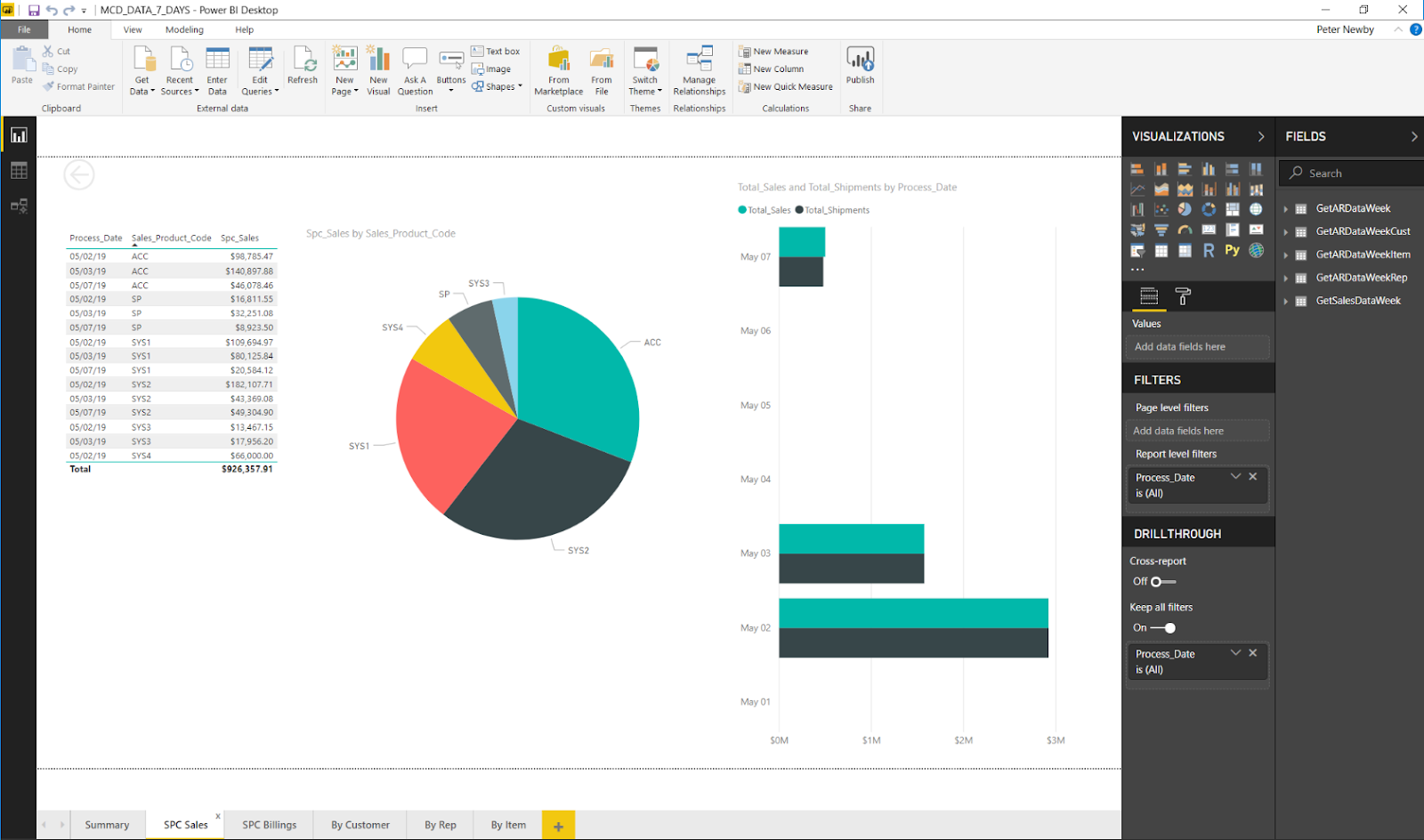
If you are a fan of Power BI but not so much of ODBC you can probably get excited about JSON.PACKAGE.MAINT and the new REST endpoint in JSONServices for GetData.

If your interests lie with work orders there are a number of new reports you may find helpful:

  • SLB.WOS – Shows last closed work order planned and actual labor times and overall average of all closed work orders on file, including number of work orders that went into that average
  • ORDERS.ON.MRP.HOLD – Show a report of all sales orders with the MRP hold flag set
  • PRO.NBR.LOOKUP – Used to find a sales order using a PRO or tracking number from FedEx
  • UNPLANNED.OUTPLANT – Shows work orders with outplant costs, but no standard outplant costs
  • PLANNED.LOAD – Show un-released work order load by department
  • RELEASE.LOAD – Show remaining work order load by Work Center or ALL
  • UPDATE.REV.BY.DRAWING – Update Rev information for all parts with a specific drawing number

If you are just the person who is supposed to keep all this stuff working you may find some help in:
  • ATTACH.MASS.UPDATE - import attachments from Excel
  • AUDIT.DRAWING - identify parts with or without drawings attached
  • MONITOR.PHANTOMS - notifies you when phantoms start, stop or abort
  • ANALYSE.FILE.SYSTEM - use with REFRESH.PARAMS
  • REFRESH.PARAMS - refresh development database without resetting software configuration
  • DATA.CHECK - check files for unprintable characters
  • DEBUG.CONTROL topics: built in debug instrumentation that may be turned on/off
    • BTI.PHANTOM...
    • CallRPCSub - Client Server traffic
    • GetItemsAsJSON - Query DB as JSON
    • MONITOR.PHANTOMS - Monitor phantoms for status change
    • MsoAccess - MSO Security Checking
    • RenderMso - Rendering MSO as HTML
    • SubExecService - Client Subroutine Calls

Tuesday, May 7, 2019

Power Query Access to Manage 2000 Data

Power Query is a common import tool used by both Power BI and Excel 2016+.

From either Power BI or Excel, Get Data dialogs allow you to import data from many different sources.  Among the options is Web. Get Data Web automatically detects JSON formatted results from REST endpoints and starts a Power Query editor session.

From the Power Query editor session a click on the Convert To Table button starts building the M language script which will transform the JSON data package into tables suitable for driving Power BI or Excel.  From there clicking on column expand icons and selecting columns continues to build the transform script.

To see the full script select the Advanced Editor.

This script will automatically be applied anytime the data is refreshed from the source.

Data relations and formats can be refined in Power BI Desktop.

Report visualization can then be assembled by simple drag and drop selection.

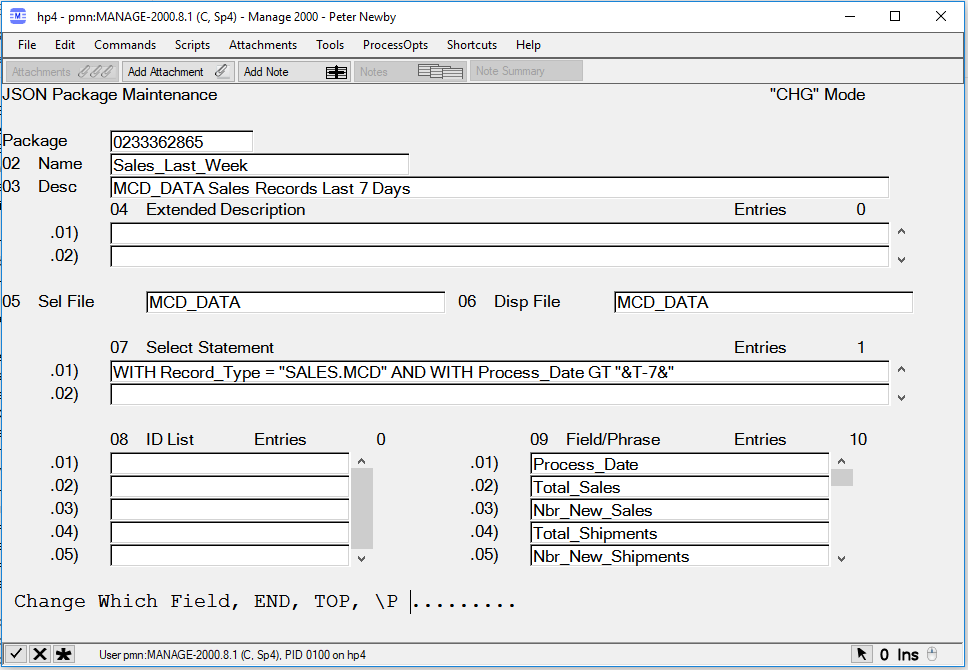
In order to plug Power Query directly into Manage 2000 a new JSON Service named GetData and a new PWS function named JSON.PACKAGE.MAINT have been added to release 8.1. JSON.PACKAGE.MAINT defines named selections of data. The specification for the selection is in the form a UniQuery SELECT statement with &var& replacement variables using the MSO replacement engine.  So relative time frames can be defined like 'Process_Date GE "&T-7&"'.

The JSON packages can be picked up at the /MT/JSONServices endpoint using the GetData service.

So if you are looking for a way to directly plug Manage 2000 data into Power BI or Excel check out the new JSON packages. (dev patch 40126 for 8.1 sp2 and 8.1 sp3)

Monday, April 22, 2019

Embedding Power BI Reports in Manage 2000 News Feeds


Power BI provides shareable visualizations mashed up from multiple data sources.  The data might come from Excel or SQL or ODBC.  For instance Manage 2000 data might be synced through Novo Motion Outbound to SQL server. From there Power BI might refresh reports and dashboards.

Users can consume the report through the Power BI interface.  But it is also very easy to embed Power BI reports in Manage 2000 news articles for display in the Manage 2000 function NewsReader or other RSS feed readers.

From the Power BI Service browser interface:
Select a report
Select File
Select Embed


Copy the iframe content
Paste it into a STATIC article Summary (HTML) prompt

(Recent updates to Power BI have made this a little more round about;
 After copying the iframe snippet into the Summary (HTML) prompt -
   copy the link to the app.powerbi.com website from the Secure embed code dialog to the clipboard
   use the Edit button on the right to bring the Summary (HTML) text up in the editor
   select the string inside the quotes on the right side of the "src" attribute
   paste in the app.powerbi.com url string
   save the contents back to the Summary (HTML) prompt - 8/19/2019)

(Even more recent updates corrected this hiccup.)

Copy the link to the app.powerbi.com website
Paste it into the Drill Back Document prompt
(Clicking on the news article link will send the user to the drill back URL, in this case the report in the Power BI Service. If related detail such as the original Manage 2000 data is available from another URL use that instead.)

Attach the article to a news feed and view from the Newsreader function:


Selecting a row in the airport table refocuses the map to display that specific information. The interactive features of the report remain active when viewed in a Manage 2000 newsfeed.


Monday, January 21, 2019

Manage 2000 8.1 service pack 3 - sneak peek

Development cutoff is fast approaching for service pack 3 of Manage 2000 8.1. We will be cleaning up the service pack material throughout February in preparation for an early March release.

Once again a number of projects are being released along with bug fixes in this development rich service pack.  Here are my top ten favorite new features:

  1. Collapsible Panel Navigation in over 40 web functions provides better use of screen territory and improved mobile experience.
  2. MSO support in web functions provides improved web function tailoring capabilities. MSO displays and web functions may be configured to be available without customizing using the same MSO techniques used in PWS workflow configuration.
  3. Local ‘Portal’ menus are now scoped to browser tab. This allows multiple browser tabs to display different portals or the same portal with different keys without the local menus interfering with each other.
  4. ProductConfigurator supports alternate front-end screens from CTO.ENTRY. This allows ProductConfigurator to use a simplified version of the screens used in CTO.ENTRY.  Sales Reps may then do preliminary configurations in ProductConfigurator and then back end configuration specialists can reconfigure the generated item in CTO.ENTRY.
  5. Summary Notes Option added to attachment notes menu on web pages.  This feature matches the PWS notes summary display available in PWS.
  6. Global Menu: Home and Logoff buttons are easily accessible no matter how menus are configured.
  7. WEB.SETTINGS.INQ - Displays the web preference hierarchy settings for one or more contacts, so if your web settings hierarchy has grown into a ball of spaghetti you can get it sorted out.
  8. Customer Administrator role allows delegation of add, change, or deactivation of other contacts. CMADM role users may use UserPreference | ContactMaint to maintain other users from their company.
  9. Visual Studio 2017 compatibility updates to website vbproj files.
  10. Visual Studio Wizard Updates.
    1. Collapsible Panel generation in BTO Inquiry and BTO Posting wizards.
    2. BTO Posting wizard support for templated columns with roiTextBox controls bound to metadata for improved data entry features.

So keep an eye open for an upcoming official announcement and after you load up this new service pack find out more about these and other new features in the FEATURE.SUMMARY document.