This is a bit of a follow-up to a previous post I wrote about VSTO and Manage 2000 ERPBusinessObjectService. Visual Studio Tools for Office (VSTO) provides a development framework for coding behaviors into classes of Excel spreadsheets. You can deploy them with one-click installs and users can save them as templates for creating smart spreadsheets.
Connecting VSTO code with Manage 2000 can be very easy with the ERPBusinessObjectService. A little bit of code in C# or VB.Net can read and post datasets of Manage 2000 business objects. However you may run into a lot of plumbing work moving values from business object dataset tables to the spreadsheet cells and back. Excel ListObjects can greatly simplify this coding chore. ListObjects define mappings and databind values between columns in the worksheet and row data of columns in the business object data tables:
With this little bit of code you can synchronize the spreadsheet column cell values with a corresponding table in the business object dataset, and use the webservice to read the dataset from or post the dataset back to Manage 2000, turning Excel into a client UI for Manage 2000.
Friday, September 8, 2017
Friday, February 10, 2017
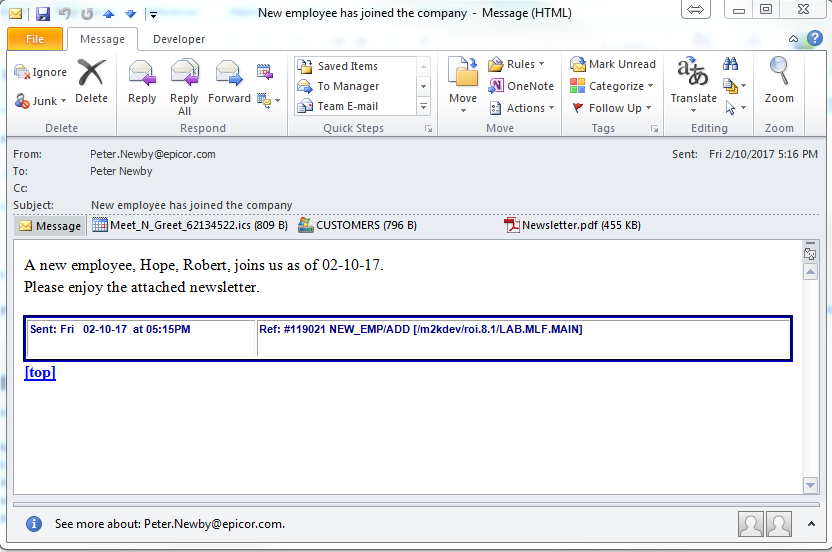
Event, Condition, Actions with Attachments and Calendar Events
ECAs have become a part of daily life at many Manage 2000 sites.
The Event/Condition/Action workflow tool is one of the tools within Manage 2000 which simplifies tailoring to your business.
You can configure Manage 2000 to monitor ERP events, apply conditions, and automatically respond with an action. One possible action is to email pertinent information to the people involved. A powerful scripting engine provides control over the email document content.
With Manage 2000 release 8.1 you can now easily attach items from UniData files, and files from UNIX or Windows level directories.
You can also script a request to add in ICalendar attachments that the recipient can import into their calendar.
The Event/Condition/Action workflow tool is one of the tools within Manage 2000 which simplifies tailoring to your business.
You can configure Manage 2000 to monitor ERP events, apply conditions, and automatically respond with an action. One possible action is to email pertinent information to the people involved. A powerful scripting engine provides control over the email document content.
With Manage 2000 release 8.1 you can now easily attach items from UniData files, and files from UNIX or Windows level directories.
You can also script a request to add in ICalendar attachments that the recipient can import into their calendar.
The new scripting options follow the established ECA scripting norms supporting keyword and ECA variable replacements. Attachments are added like any other options using /ATTACH.ITEM udtfilename itemid or /ATTACH.FILE osfilename. Calendar events are added using the new /CALL subroutine CREATE.CALENDAR.EVENT which includes properties for many of the ICalendar options defined in the RFC 5545 Internet standard.
Wednesday, December 14, 2016
Manage 2000 Release 8.1 GA
Manage 2000
release 8.1 is now officially available for ordering and shipment.
Allan started shipping out copies Dec 09, 2016
Doug and I performed live on WebEx earlier in the week. Check at the EpicWeb site to stream down our mellifluous voices as we banter about and demo some of the cool new features built in to the 8.1 release:
Allan started shipping out copies Dec 09, 2016
Doug and I performed live on WebEx earlier in the week. Check at the EpicWeb site to stream down our mellifluous voices as we banter about and demo some of the cool new features built in to the 8.1 release:
- Integrated PDF Output
- Geographic Mapping
- Photo Support
- Web Attachment and Export Changes
- On-site Newsreader
- Infrastructure Updates
- Many Application Enhancements
Get excited!
Upgrade!
Monday, October 31, 2016
The Value of Coming Together
The 2016 NovoRoiSystem’s User Group Meeting was another
great success drawing 47 attendees from 29 companies. Customers left with lots
of things to think about, and so did those of us on the Manage 2000 development
team.
By the time I got back into the office I had a list of 17 new ideas to
consider for future Manage 2000 development.
One of them came directly out of customer questions about the new
mapping capabilities in release 8.1; “Hey what about truck scheduling
maps?”
The timing couldn’t have been
better. So the GA release will include a new Manage 2000 web mapping function
for the TSCH module: TruckRoute
This
new web function displays maps of truck scheduling routes as defined in
ROUTE.MASTER.MAINT. Each route stop is marked with a numbered pushpin.
Clicking on a marker brings up
an information window with the Route Nbr, customer or facility name, phone, and
address.
Each stop except the last displays a link for Directions to next stop. Clicking on the Directions to next stop link will provide driving turn by turn directions and draw the route on the map.
Thank you NovoRoiSystems for creating the event that draws us all together and allows our ideas to mix and germinate and blossom into creative new software and solutions.
Wednesday, October 12, 2016
NUGM 2016
It has been a great conference here in Minneapolis this week;
informative sessions
great meals,
, and ghost stories (or not) around the fire pit in the brisk autumn air.
It really has felt like the best one yet, with warm smiles and hand shakes and embraces reminding each other of the journey we have been on together through the decades.
For Joanne and Anne the examples I used in the sessions are waiting for you in the Archiver Packages section on the right.
Monday, March 28, 2016
Manage 2000 8.1 Crystallizing
As Manage 2000 evolves and adapts to the changing world around it there are moments when you can watch the snow flakes form. One place the formation of these snow flakes becomes visible is the moment we change a string name for some relationship into a validated entry.
For instance since the 7.1 release the WEB.CONSTANTS screen has had a simple unvalidated, mostly unedited string entry indicating where the web server can be found.
Starting in Manage 2000 8.1 this entry will be validated to the WEB.SITES table, which in-turn will validate the actual IP Address, or Domain Name to the WEB.SERVER.DOMAINS table.
This will formalize the relationship between the Manage 2000 Unidata computer system and one or more Manage 2000 web server computer systems and those web server's IIS applications.
Creating this formal snow flake means we will be able to validate and cross reference in WEB.CONSTANTS, and SYS.USERS, and CNT.SYSTEM.REFS, and CONTACTS.
It also means we will be able to create a VIRTUAL.DIRECTORIES table with validation and cross referencing to define how one might reach a specific UNC document store through a virtual directory.
And what may not be obvious about these snow flakes is that they can clump together to produce a rich attachment configuration snowball supporting many different attachment UNC document stores that can be accessed by virtual directory path and made available from any browser, say from the Attachments menu on Manage 2000 Portal pages.
And how better to fill up these UNC document stores than automatically generating PDF documents out Manage 2000 8.1 MASTER.AGENT tasks running print processing to a PDF queue. :-)
For instance since the 7.1 release the WEB.CONSTANTS screen has had a simple unvalidated, mostly unedited string entry indicating where the web server can be found.
Starting in Manage 2000 8.1 this entry will be validated to the WEB.SITES table, which in-turn will validate the actual IP Address, or Domain Name to the WEB.SERVER.DOMAINS table.
This will formalize the relationship between the Manage 2000 Unidata computer system and one or more Manage 2000 web server computer systems and those web server's IIS applications.
Creating this formal snow flake means we will be able to validate and cross reference in WEB.CONSTANTS, and SYS.USERS, and CNT.SYSTEM.REFS, and CONTACTS.
It also means we will be able to create a VIRTUAL.DIRECTORIES table with validation and cross referencing to define how one might reach a specific UNC document store through a virtual directory.
And what may not be obvious about these snow flakes is that they can clump together to produce a rich attachment configuration snowball supporting many different attachment UNC document stores that can be accessed by virtual directory path and made available from any browser, say from the Attachments menu on Manage 2000 Portal pages.
And how better to fill up these UNC document stores than automatically generating PDF documents out Manage 2000 8.1 MASTER.AGENT tasks running print processing to a PDF queue. :-)
Monday, January 4, 2016
Adding roiTextbox cross referencing and validations inside GridView inside UpdatePanel
GridView provides a nice web standard interface for scrolled set entry. However the large overhead of full page postbacks in Manage 2000 web functions creates a poor user experience. To mitigate this you can place the GridView inside an UpdatePanel. Everything goes along great with bound columns in GridView. But trouble sets in when you try to get nice data entry validation and cross referencing by converting columns to templated columns and using the roiTextbox for editing mode.
The problem has to do with how the UpdatePanel blends the partial postback updates into the browser DOM. HTML input controls get created for all of the roiTextbox controls, but UpdatePanel does not understand about the javascript event wiring that creates all the nice data entry features of the roiTextbox.
Fortunately you can ask the PageRequestManager to call your own routine when it is finished handling the partial postback request.

Then inside your function you can add the wiring for the 4 event handlers that roiMetaData emits for each roiTextbox.

You can get a little more elegant by making a list of textboxes to wire up. Just remember the jQuery expressions in M2k web functions are $j and the events need to be registered through prototype $.observe. So you get a subtle mix of jquery and prototype calls.
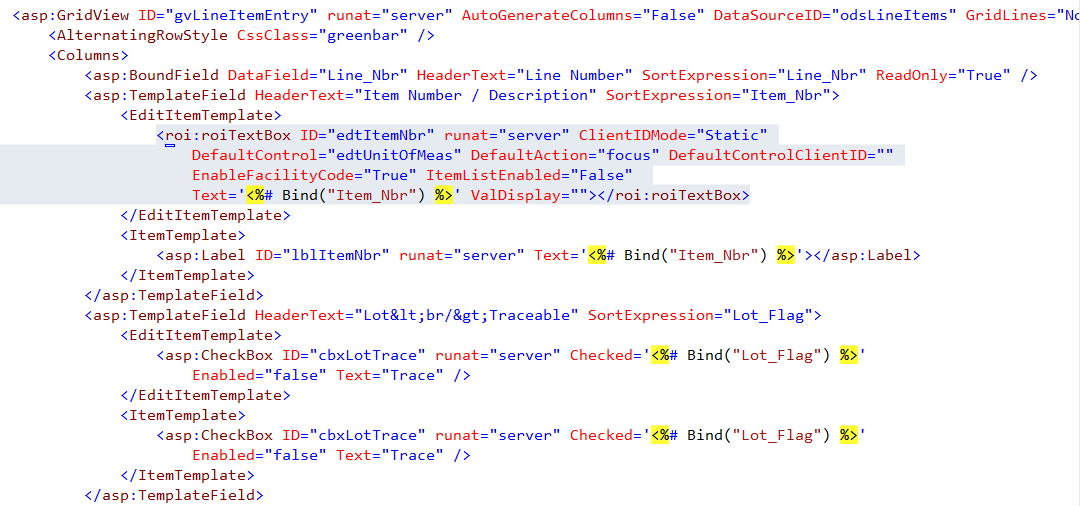
In order to make this work you need to fix the id assignment of the roiTextbox controls in the EditTemplate markup by setting the ClientIDMode attribute to "Static".

Since only one line is in edit mode at any given time there is not a conflict between the id assignments on multiple rows, like there is in the ItemTemplate.
There is one more hurdle to leveraging roiEditBox metadata based behaviors in GridViews inside of UpdatePanels. Controls generated to implement the nice behaviors like roiCrossReference expect to find their target webcontrol on each postback and clientside in javascript land. When none of the GridView lines are in edit mode then the roiTextboxes do not get created and the MetaDataControlExtender or an roiCrossReference control or ancestor logic in roiPopUp runs into the ditch.
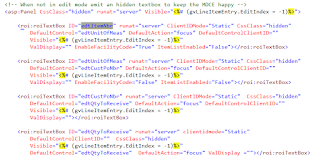
To solve this final obstacle create a panel that is hidden and that is only visible when none of the gridview lines are in edit mode. Then put a duplicate of each input roiTextbox on the panel so that it magically appears in a hidden panel when it does not appear in an editing template.
The problem has to do with how the UpdatePanel blends the partial postback updates into the browser DOM. HTML input controls get created for all of the roiTextbox controls, but UpdatePanel does not understand about the javascript event wiring that creates all the nice data entry features of the roiTextbox.
Fortunately you can ask the PageRequestManager to call your own routine when it is finished handling the partial postback request.
Then inside your function you can add the wiring for the 4 event handlers that roiMetaData emits for each roiTextbox.
You can get a little more elegant by making a list of textboxes to wire up. Just remember the jQuery expressions in M2k web functions are $j and the events need to be registered through prototype $.observe. So you get a subtle mix of jquery and prototype calls.
In order to make this work you need to fix the id assignment of the roiTextbox controls in the EditTemplate markup by setting the ClientIDMode attribute to "Static".
Since only one line is in edit mode at any given time there is not a conflict between the id assignments on multiple rows, like there is in the ItemTemplate.
There is one more hurdle to leveraging roiEditBox metadata based behaviors in GridViews inside of UpdatePanels. Controls generated to implement the nice behaviors like roiCrossReference expect to find their target webcontrol on each postback and clientside in javascript land. When none of the GridView lines are in edit mode then the roiTextboxes do not get created and the MetaDataControlExtender or an roiCrossReference control or ancestor logic in roiPopUp runs into the ditch.
To solve this final obstacle create a panel that is hidden and that is only visible when none of the gridview lines are in edit mode. Then put a duplicate of each input roiTextbox on the panel so that it magically appears in a hidden panel when it does not appear in an editing template.
Subscribe to:
Posts (Atom)