Wednesday, October 12, 2016

NUGM 2016

It has been a great conference here in Minneapolis this week;
 informative sessions

great meals, 


, and ghost stories (or not) around the fire pit in the brisk autumn air.


It really has felt like the best one yet, with warm smiles and hand shakes and embraces reminding each other of the journey we have been on together through the decades.

For Joanne and Anne the examples I used in the sessions are waiting for you in the Archiver Packages section on the right.


Monday, March 28, 2016

Manage 2000 8.1 Crystallizing

As Manage 2000 evolves and adapts to the changing world around it there are moments when you can watch the snow flakes form.  One place the formation of these snow flakes becomes visible is the moment we change a string name for some relationship into a validated entry.

For instance since the 7.1 release the WEB.CONSTANTS screen has had a simple unvalidated, mostly unedited string entry indicating where the web server can be found.


Starting in Manage 2000 8.1 this entry will be validated to the WEB.SITES table, which in-turn will validate the actual IP Address, or Domain Name to the WEB.SERVER.DOMAINS table.


This will formalize the relationship between the Manage 2000 Unidata computer system and one or more Manage 2000 web server computer systems and those web server's IIS applications.

Creating this formal snow flake means we will be able to validate and cross reference in WEB.CONSTANTS, and SYS.USERS, and CNT.SYSTEM.REFS, and CONTACTS.


It also means we will be able to create a VIRTUAL.DIRECTORIES table with validation and cross referencing to define how one might reach a specific UNC document store through a virtual directory.


And what may not be obvious about these snow flakes is that they can clump together to produce a rich attachment configuration snowball supporting many different attachment UNC document stores that can be accessed by virtual directory path and made available from any browser, say from the Attachments menu on Manage 2000 Portal pages.

And how better to fill up these UNC document stores than automatically generating PDF documents out Manage 2000 8.1 MASTER.AGENT tasks running print processing to a PDF queue. :-)

Monday, January 4, 2016

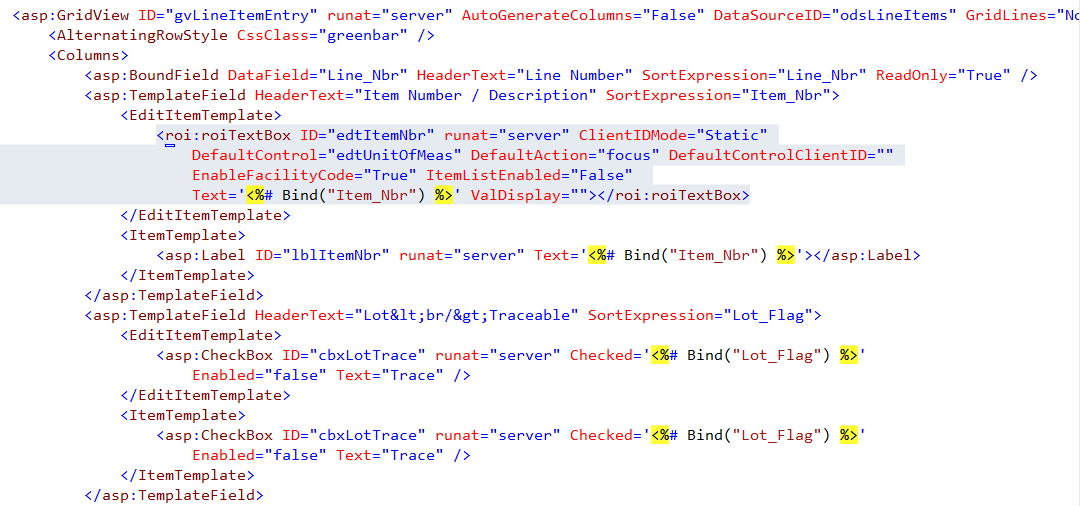
Adding roiTextbox cross referencing and validations inside GridView inside UpdatePanel

GridView provides a nice web standard interface for scrolled set entry.  However the large overhead of full page postbacks in Manage 2000 web functions creates a poor user experience. To mitigate this you can place the GridView inside an UpdatePanel. Everything goes along great with bound columns in GridView.  But trouble sets in when you try to get nice data entry validation and cross referencing by converting columns to templated columns and using the roiTextbox for editing mode.

The problem has to do with how the UpdatePanel blends the partial postback updates into the browser DOM.  HTML input controls get created for all of the roiTextbox controls, but UpdatePanel does not understand about the javascript event wiring that creates all the nice data entry features of the roiTextbox.

Fortunately you can ask the PageRequestManager to call your own routine when it is finished handling the partial postback request.



Then inside your function you can add the wiring for the 4 event handlers that roiMetaData emits for each roiTextbox.


You can get a little more elegant by making a list of textboxes to wire up.  Just remember the jQuery expressions in M2k web functions are $j and the events need to be registered through prototype $.observe.  So you get a subtle mix of jquery and prototype calls.


In order to make this work you need to fix the id assignment of the roiTextbox controls in the EditTemplate markup by setting the ClientIDMode attribute to "Static".


Since only one line is in edit mode at any given time there is not a conflict between the id assignments on multiple rows, like there is in the ItemTemplate.

There is one more hurdle to leveraging roiEditBox metadata based behaviors in GridViews inside of UpdatePanels.  Controls generated to implement the nice behaviors like roiCrossReference expect to find their target webcontrol on each postback and clientside in javascript land.  When none of the GridView lines are in edit mode then the roiTextboxes do not get created and the MetaDataControlExtender or an roiCrossReference control or ancestor logic in roiPopUp runs into the ditch.

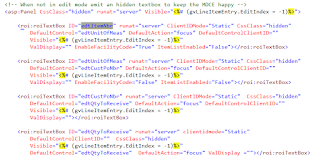
To solve this final obstacle create a panel that is hidden and that is only visible when none of the gridview lines are in edit mode.  Then put a duplicate of each input roiTextbox on the panel so that it magically appears in a hidden panel when it does not appear in an editing template.
Thursday, May 28, 2015

Binding Entries Back From GridView to Dataset

The Manage 2000 DAC architecture relies on strongly typed datasets to manage the movement of business object data between UniData and ASP.NET webcontrols.  The table adapters generated for the datasets handle the binding of data from dataset to the webcontrols very nicely.  There are not, however, any generated methods for Update, Change or Delete operations.

It is possible without an awful lot of code to handle the gridview row events and utilizing the strongly typed dataset methods move the data back into the dataset from the UI.

Here is the SoWebShipments page converted to use GridView controls in place of UltraWebGrid controls:


To move the data back into the dataset we just need to handle the RowUpdating event to move the data and then handle the RowUpdated event to tell the grid the we handled the problem with the missing Update Method on our table adapter. In order to support deleting rows we do the same exercise in the RowDeleted and RowDeleting events handlers.


Monday, April 6, 2015

"And the beat goes on. And the beat goes on."

Yes Ma, I'm still here tinkerin with M2k.

One of the major tasks we are undertaking in developing the next release is to go through all the web pages that have grids on them and do a proper house cleaning.  Its like when you buy new appliances for the kitchen, you're gonna want scrub a little bit behind where the fridge and stove have been settled for the last decade or two. And you are probably going to find things that you wish you hadn't.  But a thorough cleaning every 10 or 20 years brings you closer to God.

So I have been becoming one with the Microsoft GridView component. To begin with I thought it was simple and a bit clumsy with the whole Templated Column approach for links and whatnot.  And there are times when the object model gets annoying as you try to get after some behavior programmatically.  But I have found it to be remarkably pliable.

One of the astonishing things I found was the ability to databind in the aspx file to a group of children of the current row.  Manage 2000 has always used strongly typed datasets in order to get nice design time support in Visual Studio.  But this also means that strongly typed datarows know how to get their children.

The unfortunate part is some rather scary looking casting in order to access the strongly typed datasets properties and methods.  And also the ever annoying IsxxxNull checks that are a must for optional fields.

But the amazing part is adding a templated column in the aspx and having a child set of sub-values or sub-sub-values unfurl before the user:


So the Planned Components are being bound directly in the aspx file from databinding references:

DataSource="<%# DirectCast(DirectCast(Container.DataItem, System.Data.DataRowView).Row, ROISystems.Components.dstItemOrderListing.MFGORDERRES_Order_DetailRow).GetMFGORDERRES_Order_ComponentsRows %>"

Tuesday, September 2, 2014

What I Did On My Summer Vacation

Release 8.0 is taking root in the field and the development group is starting to look forward toward 8.1.  In the next couple of weeks Allan will be setting up the Unidata accounts for 8.1 development and I will setup the build machine and devweb machine for the ASP.NET side of 8.1.

I have already started on the work of replacing Infragistics controls in the Portals with combinations of standard Microsoft controls and jQuery and jQuery Mobile clientside effects in my lab environment. The "System.Web.DataVisualization.Charting.Chart" class introduced as an add-on download in 2008 is now a standard part of Visual Studio 2012.  It is based on the Dundas chart control and provides a very nice alternative to the Infragistics UltraWebChart which Infragistics eliminated from their ASP.NET suite in 2012.

The UltraWebGrid which Infragistics also dropped will be replaced with standard Microsoft GridView and DetailView controls. It takes a bit more work but hiearchical GridView/DetailView compositions can effectively replace what Manage 2000 was doing with the UltraWebGrid.

It also took a little trial and error to find a nice replacement for the IG Update Panels; one that would work nicely in both desktop and touch enhanced tablet or phone mode.  But now that jQuery is part of the Manage 2000 javascript foundation a simple slow jQuery toggle on the content container div provides a pleasant collapse/expansion in both modes.  There will still be a little more work to combine in a partial postback or async JSON update where speed and backround paging are desired.

So I feel a little bit like a race horse chomping at the bit in the 8.1 starting blocks.

Also on the dockit for next month is the Novo User Group Meeting October 5 - 10, 2014 here in Minneapolis. I am putting together sessions on integration of Manage 2000 with Microsoft Office products, the evolving Manage 2000 javascript foundations, and touch enhancement mark-up (how our web functions are using jQuery Mobile).  Hope to see you there.

Wednesday, March 26, 2014

Getting Ready For Insights 2014

Once again I am gathering a few technical stories and tweaking "official" powerpoint templates and testing out demonstration bits of Manage 2000 web technology to take to Las Vegas for the EPICOR Insights user group meeting.

It's a bit earlier this year starting April 27 and running through the 30th.  And we have graduated from Caesar's to Mandalay Bay.

I will give my annual talk about Manage 2000 Web Technology, where we have gotten to with the 8.0 release of Manage 2000 and some of my thoughts looking forward to development thrusts we may pursue for the 8.1 release.

I am also doing a session on Programming Manage 2000 Access Into EXCEL 2010.  My last blog post was based on research for this session.

Other sessions of mine will explore the BTO Framework, roiToolServices, and some of the new REST javascript services running in 7.3 and 8.0.

Hope to see some of you there.